R while loop (original) (raw)
Last Updated : 12 Jul, 2025
While loop in R programming language is used when the exact number of iterations of a loop is not known beforehand. It executes the same code again and again until a stop condition is met. While loop checks for the condition to be true or false n+1 times rather than n times. This is because the while loop checks for the condition before entering the body of the loop.
R- While loop Syntax:
while (test_expression) { statement update_expression }
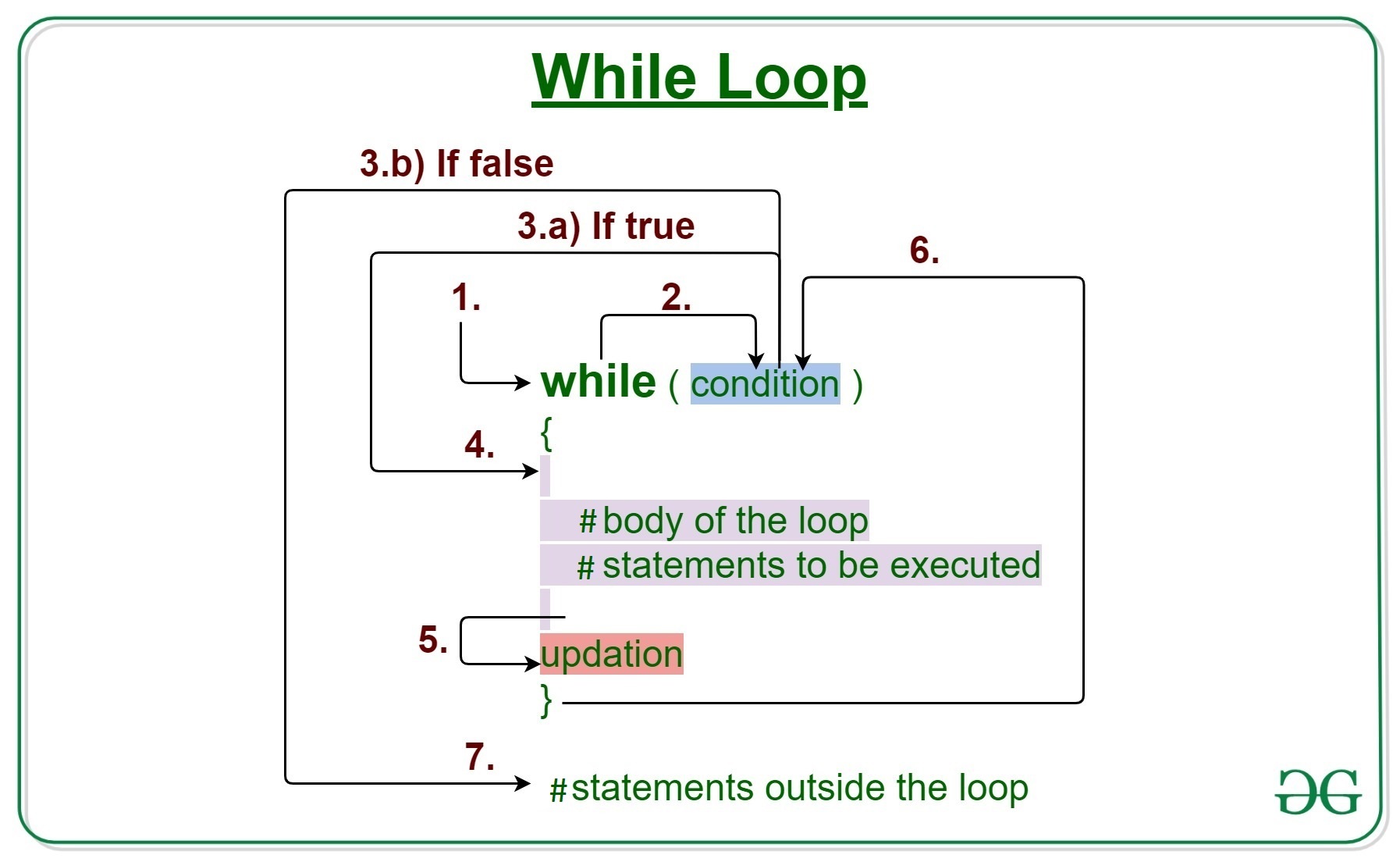
How does a While loop execute?
- Control falls into the while loop.
- The flow jumps to Condition
- Condition is tested.
- If the Condition yields true, the flow goes into the Body.
- If the Condition yields false, the flow goes outside the loop
- The statements inside the body of the loop get executed.
- Updation takes place.
- Control flows back to Step 2.
- The while loop has ended and the flow has gone outside.
Important Points about while loop in R language:
- It seems to be that while the loop will run forever but it is not true, condition is provided to stop it.
- When the condition is tested and the result is false then the loop is terminated.
- And when the tested result is True, then the loop will continue its execution.
R - while loop Flowchart:
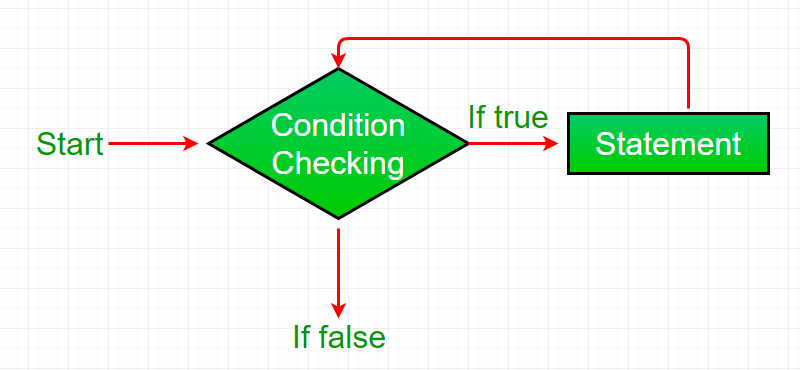
R - while loop
While Loop in R Programming Examples
Example 1:
R `
R program to illustrate while loop
result <- c("Hello World") i <- 1
test expression
while (i < 6) {
print(result)
update expression
i = i + 1 }
`
Output:
[1] "Hello World" [1] "Hello World" [1] "Hello World" [1] "Hello World" [1] "Hello World"
Example 2:
R `
R program to illustrate while loop
result <- 1 i <- 1
test expression
while (i < 6) {
print(result)
update expression
i = i + 1 result = result + 1 }
`
Output:
[1] 1 [1] 2 [1] 3 [1] 4 [1] 5
R - while loop break
Here we will use the break statement in the R programming language. The break statement in R is used to bring the control out of the loop when some external condition is triggered.
R `
R program to illustrate while loop
result <- c("Hello World") i <- 1
test expression
while (i < 6) {
print(result)

if( i == 3){
    break}
# update expression
i = i + 1
}
`
Output:
[1] "Hello World" [1] "Hello World" [1] "Hello World"
R - while loop next
R `
Set an initial value for a variable
x <- 1
Loop while x is less than 10
while (x < 10) { if (x == 3) { # Skip iteration when x is 3 x <- x + 1 next } print(paste("The current value of x is:", x)) x <- x + 1 }
Print a message after the loop has finished
print("The loop has ended.")
`
Output
[1] "The current value of x is: 1" [1] "The current value of x is: 2" [1] "The current value of x is: 4" [1] "The current value of x is: 5" [1] "The current value of x is: 6" [1] "The current value of x is: 7" [1] "The current value of x is: 8" [1] "The current value of x is: 9"
In this instance, x's initial value is set to 1 at the beginning. Then, as long as x is less than 10, we continue iterating using a while-loop. We use an if statement inside the loop to see if x equals 3. If so, the loop's current iteration is skipped in favor of the following one using the next statement. If not, we use the x - x + 1 expression to increment x by 1 and output a message stating the current value of x.
The next line instructs R to move on to the next iteration of the loop and skip the current one. based on a condition, over a subset of the loop's iterations without ever leaving the loop.
R While Loop with If .. Else
R `
x <- 1
while (x <= 10) { if (x %% 2 == 0) { print(paste(x, "is even")) } else { print(paste(x, "is odd")) } x <- x + 1 }
`
Output
[1] "1 is odd" [1] "2 is even" [1] "3 is odd" [1] "4 is even" [1] "5 is odd" [1] "6 is even" [1] "7 is odd" [1] "8 is even" [1] "9 is odd" [1] "10 is even"
In this illustration, we initialize a variable x to 1, and then we iterate through the integers 1 through 10 using a while loop. We utilize an if-else statement inside the loop to determine whether x is even or odd. We publish a message stating that x is even if it is. We print a message noting that x is unusual if it is. Then, until x is more than 10, we increase x by 1 and loop till x is greater than 10.