tidyr Package in R Programming (original) (raw)
Last Updated : 15 Jul, 2025
Packages in the R language are a collection of R functions, compiled code, and sample data. They are stored under a directory called “library” in the R environment. By default, R installs a set of packages during installation. One of the most important packages in R is the tidyr package. The sole purpose of the tidyr package is to simplify the process of creating tidy data. Tidy data describes a standard way of storing data that is used wherever possible throughout the tidyverse. If you once make sure that your data is tidy, you’ll spend less time punching with the tools and more time working on your analysis.
Installation
To use a package in R programming one must have to install the package first. This task can be done using the command install.packages(“packagename”). To install the whole tidyverse package type this:
install.packages("tidyverse")
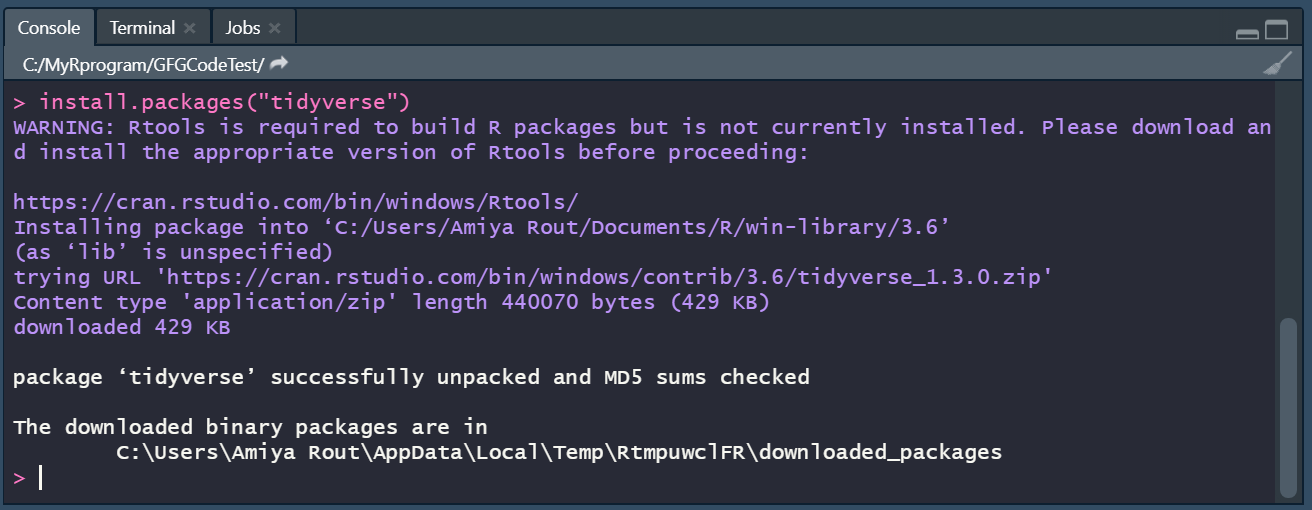
Alternatively, to install just tidyr package type this:
install.packages("tidyr")
To install the development version from GitHub type this:
install.packages("devtools")
devtools::install_github("tidyverse/tidyr")
Important Verb Functions in tidyr Package
The Dataset:
Before going to the important verb function let's prepare the data set first. Define a dataset tidy_dataframe that contains data about the frequency of people in a particular group.
R `
load the tidyr package
library(tidyr)
n = 10
creating a data frame
tidy_dataframe = data.frame( S.No = c(1:n), Group.1 = c(23, 345, 76, 212, 88, 199, 72, 35, 90, 265), Group.2 = c(117, 89, 66, 334, 90, 101, 178, 233, 45, 200), Group.3 = c(29, 101, 239, 289, 176, 320, 89, 109, 199, 56))
print the elements of the data frame
tidy_dataframe
`
Output:
S.No Group.1 Group.2 Group.31 1 23 117 29 2 2 345 89 101 3 3 76 66 239 4 4 212 334 289 5 5 88 90 176 6 6 199 101 320 7 7 72 178 89 8 8 35 233 109 9 9 90 45 199 10 10 265 200 56
tidyr package provides various important functions that can be used for Data Cleaning. Those are:
- gather() function: It takes multiple columns and gathers them into key-value pairs. Basically it makes “wide” data longer. The gather() function will take multiple columns and collapse them into key-value pairs, duplicating all other columns as needed.
Syntax:
gather(data, key = "key", value = "value", ..., na.rm = FALSE, convert = FALSE, factor_key = FALSE)
| Parameter | Description |
|---|---|
| data | the data frame. |
| key, value | the names of new key and value columns, as strings or as symbols. |
| ....... | the selection of columns. If left empty, all variables are selected. You can supply bare variable names, select all variables between x and z with x:z, exclude y with -y. |
| na.rm | if set TRUE, it will remove rows from output where the value column is NA. |
| convert | is set TRUE, it will automatically run type.convert() on the key column. This is useful if the column types are actually numeric, integer, or logical. |
| factor_key | if FALSE, the default, the key values will be stored as a character vector. If TRUE, will be stored as a factor, which preserves the original ordering of the columns. |
Example:
Now for a better understanding, we will make our data long with gather() function.
R `
using gather() function on tidy_dataframe
long <- tidy_dataframe %>% gather(Group, Frequency, Group.1:Group.3)
print the data frame in a long format
long
`
Output:
S.No Group Frequency1 1 Group.1 23 2 2 Group.1 345 3 3 Group.1 76 4 4 Group.1 212 5 5 Group.1 88 6 6 Group.1 199 7 7 Group.1 72 8 8 Group.1 35 9 9 Group.1 90 10 10 Group.1 265 11 1 Group.2 117 12 2 Group.2 89 13 3 Group.2 66 14 4 Group.2 334 15 5 Group.2 90 16 6 Group.2 101 17 7 Group.2 178 18 8 Group.2 233 19 9 Group.2 45 20 10 Group.2 200 21 1 Group.3 29 22 2 Group.3 101 23 3 Group.3 239 24 4 Group.3 289 25 5 Group.3 176 26 6 Group.3 320 27 7 Group.3 89 28 8 Group.3 109 29 9 Group.3 199 30 10 Group.3 56
- separate() function: It converts longer data to a wider format. The separate() function turns a single character column into multiple columns.
Syntax:
separate(data, col, into, sep = " ", remove = TRUE, convert = FALSE)
| Parameter | Description |
|---|---|
| data | A data frame. |
| col | Column name or position. |
| into | Names of new variables to create as character vector. Use NA to omit the variable in the output. |
| sep | The separator between the columns. |
| remove | If set TRUE, it will remove input column from the output data frame. |
| convert | If TRUE, will run type.convert() with as.is = TRUE on new columns. |
Example:
We can say that the long datasets created using gather() is appropriate for use, but we can break down Group variable even further using separate().
R `
import tidyr package
library(tidyr) long <- tidy_dataframe %>% gather(Group, Frequency, Group.1:Group.3)
use separate() function to make data wider
separate_data <- long %>% separate(Group, c("Allotment", "Number"))
print the wider format
separate_data
`
Output:
S.No Allotment Number Frequency 1 1 Group 1 23 2 2 Group 1 345 3 3 Group 1 76 4 4 Group 1 212 5 5 Group 1 88 6 6 Group 1 199 7 7 Group 1 72 8 8 Group 1 35 9 9 Group 1 90 10 10 Group 1 265 11 1 Group 2 117 12 2 Group 2 89 13 3 Group 2 66 14 4 Group 2 334 15 5 Group 2 90 16 6 Group 2 101 17 7 Group 2 178 18 8 Group 2 233 19 9 Group 2 45 20 10 Group 2 200 21 1 Group 3 29 22 2 Group 3 101 23 3 Group 3 239 24 4 Group 3 289 25 5 Group 3 176 26 6 Group 3 320 27 7 Group 3 89 28 8 Group 3 109 29 9 Group 3 199 30 10 Group 3 56
- unite() function: It merges two columns into one column. The unite() function is a convenience function to paste together multiple variable values into one. In essence, it combines two variables of a single observation into one variable.
Syntax:
unite(data, col, ..., sep = "_", remove = TRUE)
| Parameter | Description |
|---|---|
| data | A data frame. |
| col | The name of the new column. |
| .... | A selection of desired columns. If empty, all variables are selected. |
| sep | A separator to use between values. |
| remove | If TRUE, remove input columns from output data frame. |
Example:
Unite is the compliment of separate. To undo separate(), we can use unite(), which merges two variables into one. Here we will merge two columns Group and Number with a separator ".".
R `
import tidyr package
library(tidyr)
long <- tidy_dataframe %>% gather(Group, Frequency, Group.1:Group.3)
use separate() function to make data wider
separate_data <- long %>% separate(Group, c("Allotment", "Number"))
use unite() function to glue
Allotment and Number columns
unite_data <- separate_data %>% unite(Group, Allotment, Number, sep = ".")
print the new data frame
unite_data
`
Output:
S.No Group Frequency 1 1 Group.1 23 2 2 Group.1 345 3 3 Group.1 76 4 4 Group.1 212 5 5 Group.1 88 6 6 Group.1 199 7 7 Group.1 72 8 8 Group.1 35 9 9 Group.1 90 10 10 Group.1 265 11 1 Group.2 117 12 2 Group.2 89 13 3 Group.2 66 14 4 Group.2 334 15 5 Group.2 90 16 6 Group.2 101 17 7 Group.2 178 18 8 Group.2 233 19 9 Group.2 45 20 10 Group.2 200 21 1 Group.3 29 22 2 Group.3 101 23 3 Group.3 239 24 4 Group.3 289 25 5 Group.3 176 26 6 Group.3 320 27 7 Group.3 89 28 8 Group.3 109 29 9 Group.3 199 30 10 Group.3 56
- spread() function: It helps in reshaping a longer format to a wider format. The spread() function spreads a key-value pair across multiple columns.
Syntax:
spread(data, key, value, fill = NA, convert = FALSE)
| Parameter | Description |
|---|---|
| data | A data frame. |
| key | Column names or positions. |
| value | Column names or positions. |
| fill | If set, missing values will be replaced with this value. |
| convert | If TRUE, type.convert() with asis = TRUE will be run on each of the new columns. |
Example:
We can transform the data from long back to wide with the spread() function.
R `
import tidyr package
library(tidyr)
long <- tidy_dataframe %>% gather(Group, Frequency, Group.1:Group.3)
use separate() function to make data wider
separate_data <- long %>% separate(Group, c("Allotment", "Number"))
use unite() function to glue
Allotment and Number columns
unite_data <- separate_data %>% unite(Group, Allotment, Number, sep = ".")
use unite() function to make data wider
back_to_wide <- unite_data %>% spread(Group, Frequency)
print the new data frame
back_to_wide
`
Output:
S.No Group.1 Group.2 Group.3 1 1 23 117 29 2 2 345 89 101 3 3 76 66 239 4 4 212 334 289 5 5 88 90 176 6 6 199 101 320 7 7 72 178 89 8 8 35 233 109 9 9 90 45 199 10 10 265 200 56
- nest() function: It creates a list of data frames containing all the nested variables. Nesting is implicitly a summarizing operation. This is useful in conjunction with other summaries that work with whole datasets, most notably models.
Syntax: nest(data, ..., .key = "data")
| Parameter | Description |
|---|---|
| data | A data frame. |
| .... | A selection of columns. If empty, all variables are selected. |
| .key | The name of the new column, as a string or symbol. |
Example: Let's try to nest Group.2 column from the tidy_dataframe we created in the data set.
R `
import tidyr package
library(tidyr)
df <- tidy_dataframe
nest column Group.1 in
tidy_dataframe using nest()
df %>% nest(data = c(Group.1))
`
Output:
A tibble: 10 x 4
S.No Group.1 Group.3 data
1 1 23 29 <tibble [1 x 1]>
2 2 345 101 <tibble [1 x 1]>
3 3 76 239 <tibble [1 x 1]>
4 4 212 289 <tibble [1 x 1]>
5 5 88 176 <tibble [1 x 1]>
6 6 199 320 <tibble [1 x 1]>
7 7 72 89 <tibble [1 x 1]>
8 8 35 109 <tibble [1 x 1]>
9 9 90 199 <tibble [1 x 1]>
10 10 265 56 <tibble [1 x 1]>
- unnest() function: It basically reverses the nest operation. It makes each element of the list its own row. It can handle list columns that contain atomic vectors, lists, or data frames (but not a mixture of the different types).
Syntax:
unnest(data, ..., .drop = NA, .id = NULL, .sep = NULL, .preserve = NULL)
| Parameter | Description |
|---|---|
| data | A data frame |
| .... | Specification of columns to unnest. If omitted, defaults to all list-columns. |
| .drop | Should additional list columns be dropped? By default, it will drop them if unnesting the specified columns requires the rows to be duplicated. |
| .id | Data frame identifier. |
| .sep | If non-NULL, the names of unnested data frame columns will combine the name of the original list-col with the names from nested data frame, separated by .sep. |
| .preserve | List-columns to preserve in the output. These will be duplicated in the same way as atomic vectors. |
Example:
We will try to nest and unnest Species column in the iris dataframe in the tidyr package.
R `
import the tidyr package
library(tidyr)
df <- iris names(iris)
nesting the species column in
the df data frame using nest()
head(df %>% nest(data = c(Species))) # Output (i)
unnesting the species column
in the df data frame using unnest()
head(df %>% unnest(Species,.drop = NA, .preserve = NULL)) # Output (ii)
`
Output (i):
A tibble: 6 x 5
Sepal.Length Sepal.Width Petal.Length Petal.Width data
1 5.1 3.5 1.4 0.2 <tibble [1 x 1]>
2 4.9 3 1.4 0.2 <tibble [1 x 1]>
3 4.7 3.2 1.3 0.2 <tibble [1 x 1]>
4 4.6 3.1 1.5 0.2 <tibble [1 x 1]>
5 5 3.6 1.4 0.2 <tibble [1 x 1]>
6 5.4 3.9 1.7 0.4 <tibble [1 x 1]>
Output (ii):
A tibble: 6 x 5
Sepal.Length Sepal.Width Petal.Length Petal.Width Species
1 5.1 3.5 1.4 0.2 setosa
2 4.9 3 1.4 0.2 setosa
3 4.7 3.2 1.3 0.2 setosa
4 4.6 3.1 1.5 0.2 setosa
5 5 3.6 1.4 0.2 setosa
6 5.4 3.9 1.7 0.4 setosa
- fill() function: Used to fill in the missing values in selected columns using the previous entry. This is useful in the common output format where values are not repeated, they're recorded each time they change. Missing values are replaced in atomic vectors; NULL is replaced in the list.
Syntax:
fill(data, ..., .direction = c("down", "up"))
| Parameter | Description |
|---|---|
| data | A data frame. |
| .... | A selection of columns. If empty, nothing happens. |
| direction | Direction in which to fill missing values. Currently, either "down" (the default) or "up" |
Example:
R `
import the tidyr package
df <- data.frame(Month = 1:6, Year = c(2000, rep(NA, 5)))
print the df data frame
df # Output (i)
use fill() to fill missing values in
Year column in df data frame
df %>% fill(Year) # Output (ii)
`
Output (i):
Month Year 1 1 2000 2 2 NA 3 3 NA 4 4 NA 5 5 NA 6 6 NA
Output (ii):
Month Year 1 1 2000 2 2 2000 3 3 2000 4 4 2000 5 5 2000 6 6 2000
- full_seq() function: It basically fills the missing values in a vector which should have been observed but weren't. The vector should be numeric.
Syntax: full_seq(x, period, tol = 1e-06)
| Parameter | Description |
|---|---|
| x | A numeric vector. |
| period | Gap between each observation. |
| tol | Numerical tolerance for checking periodicity. |
Example:
R `
import the tidyr package
library(tidyr)
creating a numeric vector
num_vec <- c(1, 7, 9, 14, 19, 20)
use full_seq() to fill missing
values in num_vec
full_seq(num_vector, 1)
`
Output:
[1] 1 2 3 4 5 6 7 8 9 10 11 12 13 14 15 16 17 18 19 20
- drop_na() function: This function drops rows containing missing values.
Syntax: drop_na(data, ...)
| Parameter | Description |
|---|---|
| data | A data frame. |
| .... | A selection of columns. If empty, all variables are selected. |
Example:
R `
import tidyr package
library(tidyr)
create a tibble df with missing values
df <- tibble(S.No = c(1:10), Name = c('John', 'Smith', 'Peter', 'Luke', 'King', rep(NA, 5)))
print df tibble
df # Output (i)
use drop_na() to drop columns
in df with missing values
df %>% drop_na(Name) # Output (ii)
`
Output (i):
A tibble: 10 x 2
S.No Name 1 1 John 2 2 Smith 3 3 Peter 4 4 Luke 5 5 King 6 6 7 7 8 8 9 9 10 10
Output (ii):
A tibble: 5 x 2
S.No Name 1 1 John 2 2 Smith 3 3 Peter 4 4 Luke 5 5 King
- replace_na() function: Itreplaces missing values.
Syntax: replace_na(data, replace, ...)
| Parameter | Description |
|---|---|
| data | A data frame. |
| replace | If data is a data frame, returns a data frame. If data is a vector, returns a vector of class determined by the union of data and replace. |
Example:
R `
import tidyr package
library(tidyr)
df <- data.frame(S.No = c(1:10), Name = c('John', 'Smith', 'Peter', 'Luke', 'King', rep(NA, 5)))
df # Output (i)
use replace_na() to replace missing values or na
df %>% replace_na(list(Name = 'Henry')) # Output (ii)
`
Output (i):
A tibble: 10 x 2
S.No Name 1 1 John 2 2 Smith 3 3 Peter 4 4 Luke 5 5 King 6 6 7 7 8 8 9 9 10 10
Output (ii):
S.No Name1 1 John 2 2 Smith 3 3 Peter 4 4 Luke 5 5 King 6 6 Henry 7 7 Henry 8 8 Henry 9 9 Henry 10 10 Henry