Building a Task Reminder App with Next.js (original) (raw)
Last Updated : 23 Jul, 2025
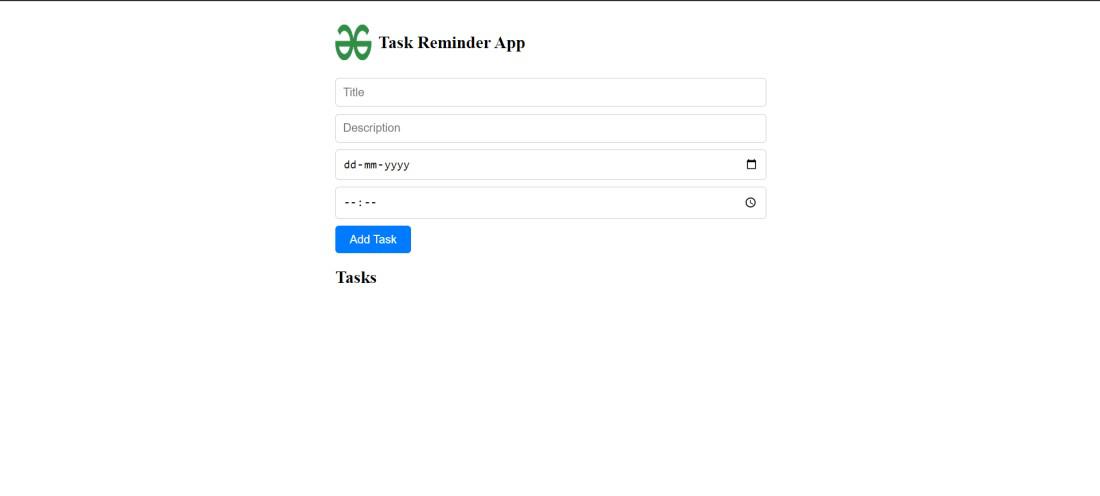
In this article, we’ll walk through the step-by-step process of **creating a basic task reminder app with Next.JS. This application will provide users with a user-friendly interface for adding the title of the task, its description, and its due date & time. The user will also be notified through a pop-up 1 minute before the task scheduled time.
**Output Preview: Let us have a look at how the final output will look like.
Prerequisites:
Approach to Create Task Reminder App with Next.js:
- Set up a new Nextjs project with create-next-app. Initialize a Git repository. Define the project structure.
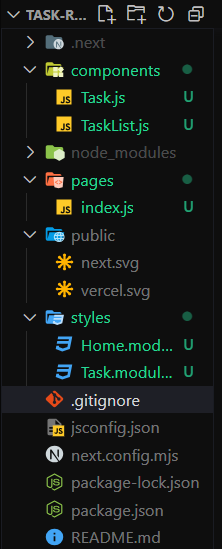
- Within the “text-reminder-app” folder, create the following files and directories:
- Create a **pages/index.js file for the homepage where users can add tasks.
- Create a **components/Task.js file for displaying individual tasks.
- Create a **components/TaskList.js file for displaying the list of tasks.
- Create a **styles/Home.module.css file, it contains the CSS styles for the components.
- Inside the “text-reminder-app” folder, run the command **npm install react react-dom next to install the project dependencies.
Steps to Create Task Reminder App with Next.js:
**Step 1: Create a directory for the project.
mkdir text-reminder-app
cd text-reminder-app
**Step 2: Initialized the Nextjs app and installing the required packages
npx create-next-app .
**Step 3: Install the necessary package for your project using the following command.
npm install react react-dom next
Project Structure:
The dependencies in **package.json file will look like:
"dependencies": {
"react": "^18",
"react-dom": "^18",
"next": "14.1.3"
}
**Example: Create the required files and write the following code.
CSS `
/* Home.module.css */
.container { max-width: 600px; margin: 0 auto; padding: 20px; }
.header { display: flex; align-items: center; margin-bottom: 20px; }
.logo { width: 50px; height: 50px; margin-right: 10px; }
.title { font-size: 24px; display: flex; /* justify-content: center; */ align-items: center;
}
.input { width: calc(100% - 20px); margin-bottom: 10px; padding: 10px; font-size: 16px; border: 1px solid #ccc; border-radius: 5px; }
.button { padding: 10px 20px; font-size: 16px; background-color: #007bff; color: #fff; border: none; border-radius: 5px; cursor: pointer; }
.task { margin-bottom: 10px; padding: 10px; border: 1px solid #ccc; border-radius: 5px; }
.task-title { font-size: 18px; margin-bottom: 5px; }
.task-description { font-size: 14px; color: #555; }
.task-due { font-size: 14px; color: #777; }
` JavaScript ``
// index.js
import React, { useState, useEffect } from 'react'; import TaskList from '../components/TaskList'; import styles from '../styles/Home.module.css';
export default function Home() { const [tasks, setTasks] = useState([]); const [title, setTitle] = useState(''); const [description, setDescription] = useState(''); const [dueDate, setDueDate] = useState(''); const [dueTime, setDueTime] = useState(''); const [completedTasks, setCompletedTasks] = useState(new Set());
const addTask = () => { if (!title || !description || !dueDate || !dueTime) return;
const dueDateTime = new Date(`${dueDate}T${dueTime}:00`);

setTasks([...tasks, { id: tasks.length, title, description, dueDateTime }]);
setTitle('');
setDescription('');
setDueDate('');
setDueTime('');
};
useEffect(() => {
const reminders = tasks.map(task => {
const timeDiff = task.dueDateTime - Date.now();
if (timeDiff > 0 && !completedTasks.has(task.id)) {
return setTimeout(() => {
alert(Reminder: ${task.title} is due in 1 minute.);
setCompletedTasks(prevCompletedTasks => new Set(prevCompletedTasks).add(task.id));
}, timeDiff - 60000);
}
return null;
});
return () => {
  reminders.forEach(reminder => {
    if (reminder) clearTimeout(reminder);
  });
};
}, [tasks, completedTasks]);
const removeTask = (index) => { const newTasks = tasks.filter(task => task.id !== index); setTasks(newTasks); };
return (
.png)
Task Reminder App
<input type="text" className={styles.input} placeholder="Title" value={title} onChange={(e) => setTitle(e.target.value)} /> <input type="text" className={styles.input} placeholder="Description" value={description} onChange={(e) => setDescription(e.target.value)} /> <input type="date" className={styles.input} value={dueDate} onChange={(e) => setDueDate(e.target.value)} /> <input type="time" className={styles.input} value={dueTime} onChange={(e) => setDueTime(e.target.value)} /> Add Task <TaskList tasks={tasks.sort((a, b) => a.dueDateTime - b.dueDateTime)} removeTask={removeTask} />`` JavaScript `
// Task.js
import React from 'react'; import styles from '../styles/Home.module.css';
const Task = ({ task }) => { const { title, description, dueDateTime } = task;
return (
{title}
{description}
Due Date: {dueDateTime.toLocaleString()}
export default Task;
JavaScript
// TaskList.js
import React from 'react'; import Task from './Task';
const TaskList = ({ tasks }) => { return (
Tasks
{tasks.map((task, index) => ( ))}export default TaskList;
`
Start your application using the following command.
npm run dev
**Output:
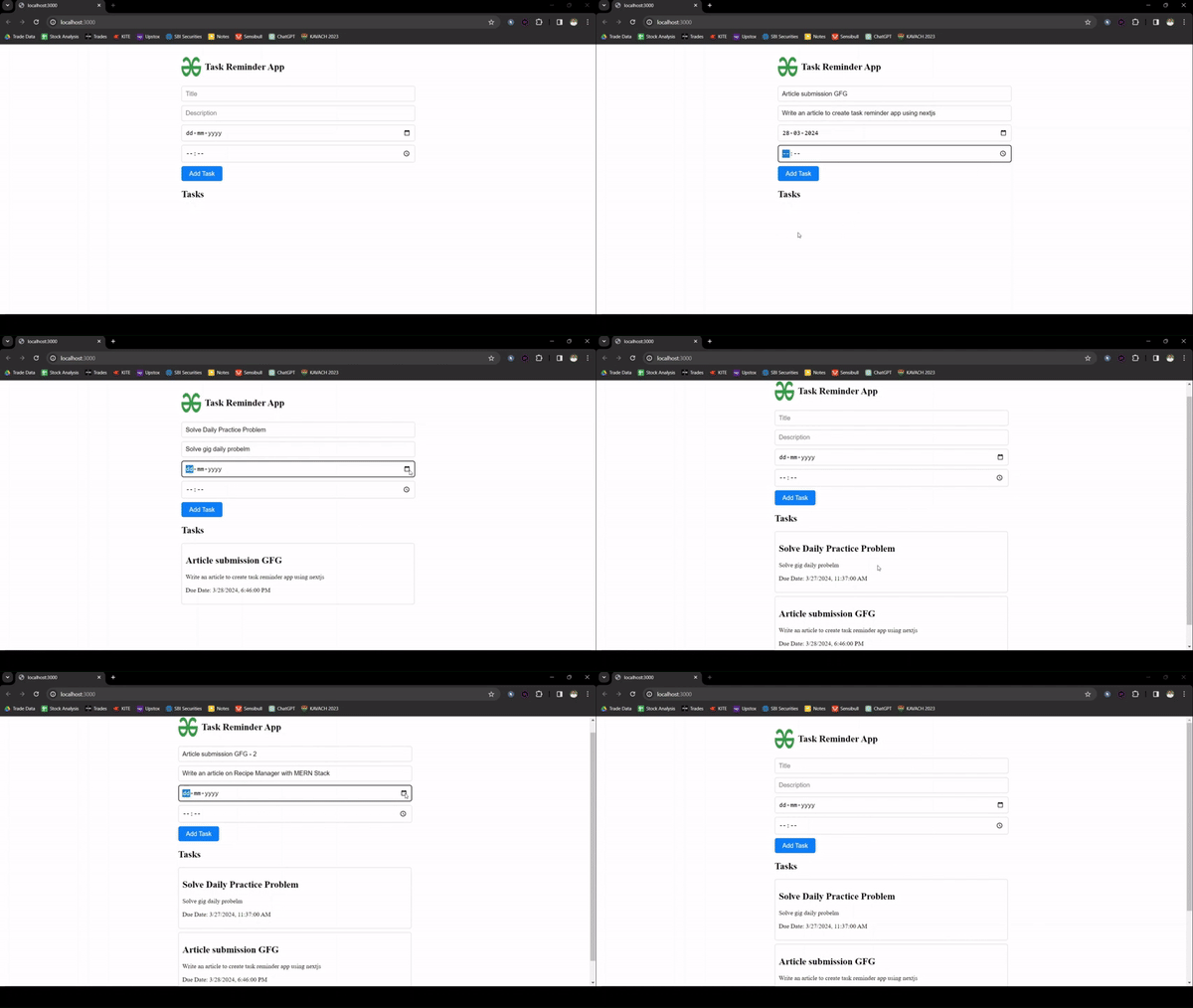
Final Output Preview