Create a Coin Flipping App using ReactJS (original) (raw)
Last Updated : 23 Jul, 2025
In this article, we will build a coin flipping application. In which the user can flip a coin and get a random result from head or tails. We create three components 'App' and 'FlipCoin' and 'Coin'. The app component renders a single FlipCoin component only. FlipCoin component contains all the behind the logic. It has a default prop coin that is an array that contains two images head and tail (sides of a coin). It is a stateful component. The handler function also keeps track of how many times the flip button is clicked and how many times the head face generated randomly and updates its value to the respective state.
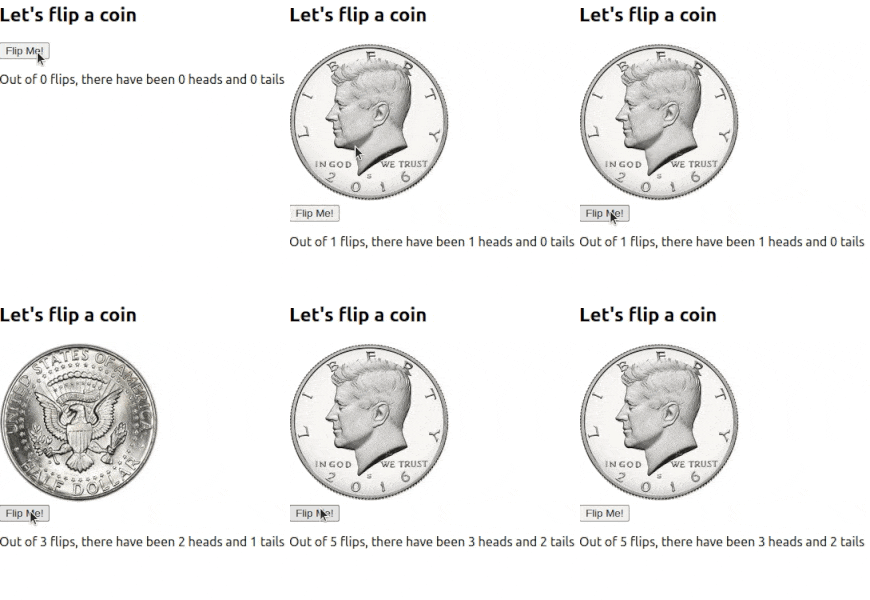
**Let us have a look at how the final application will look like:

Coin Flipping App using ReactJS
**Prerequisites:
**Steps to create application:
**Step 1: Create the project file using command
npm create vite@latest flip --template react
**Step 2: Navigate to the folder using the command
cd flip
**Step 3: Create the folder components and inside the folder create two files FlipCoin.js and Coin.js
**After following the above steps the project structure will look like:
**Project Structure
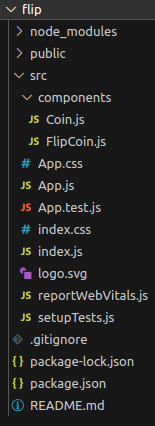
**The dependencies in package.json will look like:
**package.json:
{
"dependencies": {
"react": "^18.2.0",
"react-dom": "^18.2.0",
"react-scripts": "5.0.1",
"vite": "^4.0.0"
},
"devDependencies": {
"vite": "^4.0.0"
}
}
**Example:
- **App.js: App component renders single FlipCoin component only
- **FlipCoin.js: It contains all the behind logic. It is a stateful component. The states are currFace, totalFlips, and heads.It is responsible for Setting event handler, updating all the states according to the user interaction render Coin component.
- **Coin.js: Responsible to show a side of a coin according to the currFace state of FlipCoin component. FlipCoin component communicates with the Coin component through the props system JavaScript `
// App.js
import React from 'react'; import FlipCoin from './components/FlipCoin'
const App=()=> { return (
export default App;
JavaScript
// FlipCoin.js
import React, { Component } from 'react' import Coin from './Coin'
class FlipCoin extends Component { static defaultProps = { coins: [ // Sides of the coin { side: 'head', imgSrc: 'https://media.geeksforgeeks.org/wp-content/uploads/20200916123059/SHalfDollarObverse2016head-300x300.jpg' }, { side: 'tail', imgSrc: 'https://media.geeksforgeeks.org/wp-content/uploads/20200916123125/tails-200x200.jpg' } ] }


constructor(props) {
    super(props)
    // Responsible to render current updated coin face
    this.state = {
        // Track total number of flips
        currFace: null,
        totalFlips: 0,
        heads: 0
    }
    // Binding context of this keyword
    this.handleClick = this.handleClick.bind(this)
}

// Function takes array of different faces of a coin
//  and return a random chosen single face
choice(arr) {
    const randomIdx = Math.floor(Math.random() * arr.length)
    return arr[randomIdx]
}

// Function responsible to update the states
// according to users interactions
flipCoin() {
    const newFace = this.choice(this.props.coins)
    this.setState(curState => {
        const heads = curState.heads +
            (newFace.side === 'head' ? 1 : 0)
        return {
            currFace: newFace,
            totalFlips: curState.totalFlips + 1,
            heads: heads
        }
    })
}
handleClick() {
    this.flipCoin()
}
render() {
    const { currFace, totalFlips, heads } = this.state
    return (
        <div>
            <h2>Let's flip a coin</h2>
            {/* If current face exist then show current face */}
            {currFace && <Coin info={currFace} />}
            {/* Button to flip the coin  */}
            <button onClick={this.handleClick}>Flip Me!</button>
            <p>
                Out of {totalFlips} flips, there have been {heads} heads
                and {totalFlips - heads} tails
            </p>
        </div>
    )
}
}
export default FlipCoin
JavaScript
// Coin.js
import React, { Component } from 'react'
class Coin extends Component { render() { return (
export default Coin
`
**Steps to run the applicaton:
**Step 1: Type the following command in terminal
npm run dev
**Step 2: Open web browser and type the following URL
**Output :