Create ToDo App using ReactJS (original) (raw)
Last Updated : 8 Aug, 2025
This to-do list allows users to add new tasks and delete them by clicking the corresponding button. The logic is handled by a click event handler whenever the user clicks on a task it gets deleted from the list.
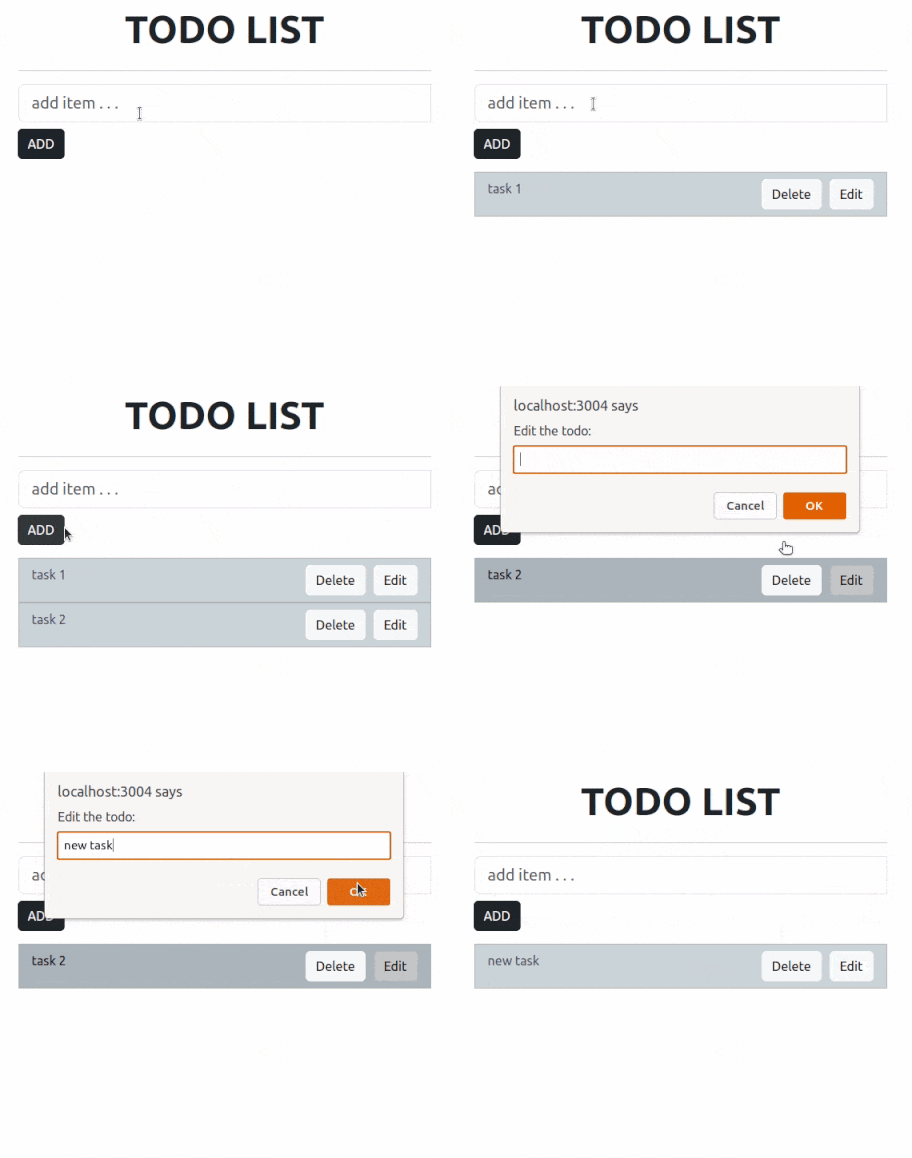
**Lets have a quick look at what the final application will look like:

ToDo App using ReactJS
**Steps to create the Application:
- Vite is a modern build tool that is faster and more lightweight than Create React App (CRA).
npm create vite@latest todo-react -- --template react
- Now, goto the folder
cd todo-react
- Install the bootstrap and react-bootstrap module
npm install bootstrap
npm install react-bootstrap
After following the above steps the Folder structure will look like:
**Folder Structure:

The dependencies in **package.json file will look like:
"dependencies": {
"bootstrap": "^5.3.0",
"react": "^18.2.0",
"react-bootstrap": "^2.7.4",
"react-dom": "^18.2.0"
},
"devDependencies": {
"@vitejs/plugin-react": "^4.0.0",
"vite": "^4.5.0"
}
**Example: Write the below code in App.js file in the src directory
javascript `
// App.js File import React, { Component } from "react"; import "bootstrap/dist/css/bootstrap.css"; import Container from "react-bootstrap/Container"; import Row from "react-bootstrap/Row"; import Col from "react-bootstrap/Col"; import Button from "react-bootstrap/Button"; import InputGroup from "react-bootstrap/InputGroup"; import FormControl from "react-bootstrap/FormControl"; import ListGroup from "react-bootstrap/ListGroup";
class App extends Component { constructor(props) { super(props);
    // Setting up state
    this.state = {
        userInput: "",
        list: [],
    };
}

// Set a user input value
updateInput(value) {
    this.setState({
        userInput: value,
    });
}

// Add item if user input in not empty
addItem() {
    if (this.state.userInput !== "") {
        const userInput = {
            // Add a random id which is used to delete
            id: Math.random(),

            // Add a user value to list
            value: this.state.userInput,
        };

        // Update list
        const list = [...this.state.list];
        list.push(userInput);

        // reset state
        this.setState({
            list,
            userInput: "",
        });
    }
}

// Function to delete item from list use id to delete
deleteItem(key) {
    const list = [...this.state.list];

    // Filter values and leave value which we need to delete
    const updateList = list.filter((item) => item.id !== key);

    // Update list in state
    this.setState({
        list: updateList,
    });
}

editItem = (index) => {
  const todos = [...this.state.list];
  const editedTodo = prompt('Edit the todo:');
  if (editedTodo !== null && editedTodo.trim() !== '') {
    let updatedTodos = [...todos]
    updatedTodos[index].value= editedTodo
    this.setState({
      list: updatedTodos,
  });
  }
}

render() {
    return (
        <Container>
            <Row
                style={{
                    display: "flex",
                    justifyContent: "center",
                    alignItems: "center",
                    fontSize: "3rem",
                    fontWeight: "bolder",
                }}
            >
                TODO LIST
            </Row>

            <hr />
            <Row>
                <Col md={{ span: 5, offset: 4 }}>
                    <InputGroup className="mb-3">
                        <FormControl
                            placeholder="add item . . . "
                            size="lg"
                            value={this.state.userInput}
                            onChange={(item) =>
                                this.updateInput(item.target.value)
                            }
                            aria-label="add something"
                            aria-describedby="basic-addon2"
                        />
                        <InputGroup>
                            <Button
                                variant="dark"
                                className="mt-2"
                                onClick={() => this.addItem()}
                            >
                                ADD
                            </Button>
                        </InputGroup>
                    </InputGroup>
                </Col>
            </Row>
            <Row>
                <Col md={{ span: 5, offset: 4 }}>
                    <ListGroup>
                        {/* map over and print items */}
                        {this.state.list.map((item, index) => {
                            return (
                              <div key = {index} >
                                <ListGroup.Item
                                    variant="dark"
                                    action
                                    style={{display:"flex",
                                            justifyContent:'space-between'
                                  }}
                                >
                                    {item.value}
                                    <span>
                                    <Button style={{marginRight:"10px"}}
                                    variant = "light"
                                    onClick={() => this.deleteItem(item.id)}>
                                      Delete
                                    </Button>
                                    <Button variant = "light"
                                    onClick={() => this.editItem(index)}>
                                      Edit
                                    </Button>
                                    </span>
                                </ListGroup.Item>
                              </div>
                            );
                        })}
                    </ListGroup>
                </Col>
            </Row>
        </Container>
    );
}
}
export default App;
`
**Steps to run the Application:
- Type the following command in the terminal:
npm run dev
- Type the following URL in the browser:
**Output: