generateImageMetadata Next.js (original) (raw)
Last Updated : 15 Jul, 2024
Next.js is a powerful React framework that helps developers build fast, user-friendly web applications. One of the advanced features it offers is**generateImageMetadata**, which helps in generating and optimizing metadata for images in your Next.js applications. This feature is important for improving SEO and ensuring your images load quickly and efficiently.
Syntax
The generateImageMetadata function is typically used within the Next.js configuration or in a custom server setup.
import { generateImageMetadata } from 'next/image-metadata';
const metadata = generateImageMetadata(imagePath, options);
Parameters
imagePath(string): The path to the image file for which metadata is to be generated.options(object): An optional object to customize the metadata generation. This can include various parameters such as width, height, quality, and more.
Options Object
width(number): Desired width of the image.height(number): Desired height of the image.quality(number): Image quality (0-100).
Returns
The generateImageMetadata function returns an object containing the following properties:
src(string): The URL of the image.width(number): The width of the image.height(number): The height of the image.alt(string): The alt text for the image.
Uses of generateImageMetadata
- **SEO Optimization: Proper image metadata improves SEO by providing search engines with relevant information.
- **Performance: Optimized images load faster, enhancing user experience.
- **Accessibility: Alt text and other metadata improve accessibility for users relying on screen readers.
Steps to Create the Project
Step 1. Create Next.js Project
Use Create Next App to establish a new Next.js project named my-image-project.
npx create-next-app my-image-project
Note : Select **Page Router instead of App Router ( by defualt )
Step 2. Navigate to the Project Directory
cd my-image-project
Project Structure
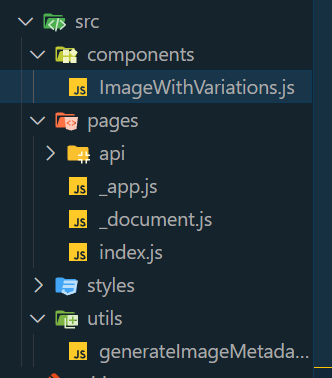
project struture used page router
Dependencies
dependencies :
{
"react": "^18",
"react-dom": "^18",
"next": "14.2.4"
}
**Example: Illustration to design a generateImageMetadata App with Next.
- create **ImageWithVariations.js file in src/components folder
- create **generateImageMetadata.js filein src/utils folder
- Update **index.js file JavaScript `
// utils/generateImageMetadata.js export const generateImageMetadata = () => { return [ { id: 1, alt: "Small example image", size: "small", width: 100, height: 100 }, { id: 2, alt: "Medium example image", size: "medium", width: 200, height: 200 }, { id: 3, alt: "Large example image", size: "large", width: 300, height: 300 } ]; };
JavaScript
// components/ImageWithVariations.js import React from 'react';
const ImageWithVariations = ({ metadata }) => { return (
 ))}
))}
export default ImageWithVariations;
JavaScript
// pages/index.js import React from 'react'; import { generateImageMetadata } from '../utils/generateImageMetadata'; import ImageWithVariations from '../components/ImageWithVariations';
const HomePage = () => { const metadata = generateImageMetadata();
return (
Image Variations
export default HomePage;
`
**Step to Run Application: Run the application using the following command from the root directory of the project
npm run dev
**Output: Your project will be shown in the URL http://localhost:3000/

image varies size due to different metadata