Mortgage Calculator using React (original) (raw)
Last Updated : 23 Jul, 2025
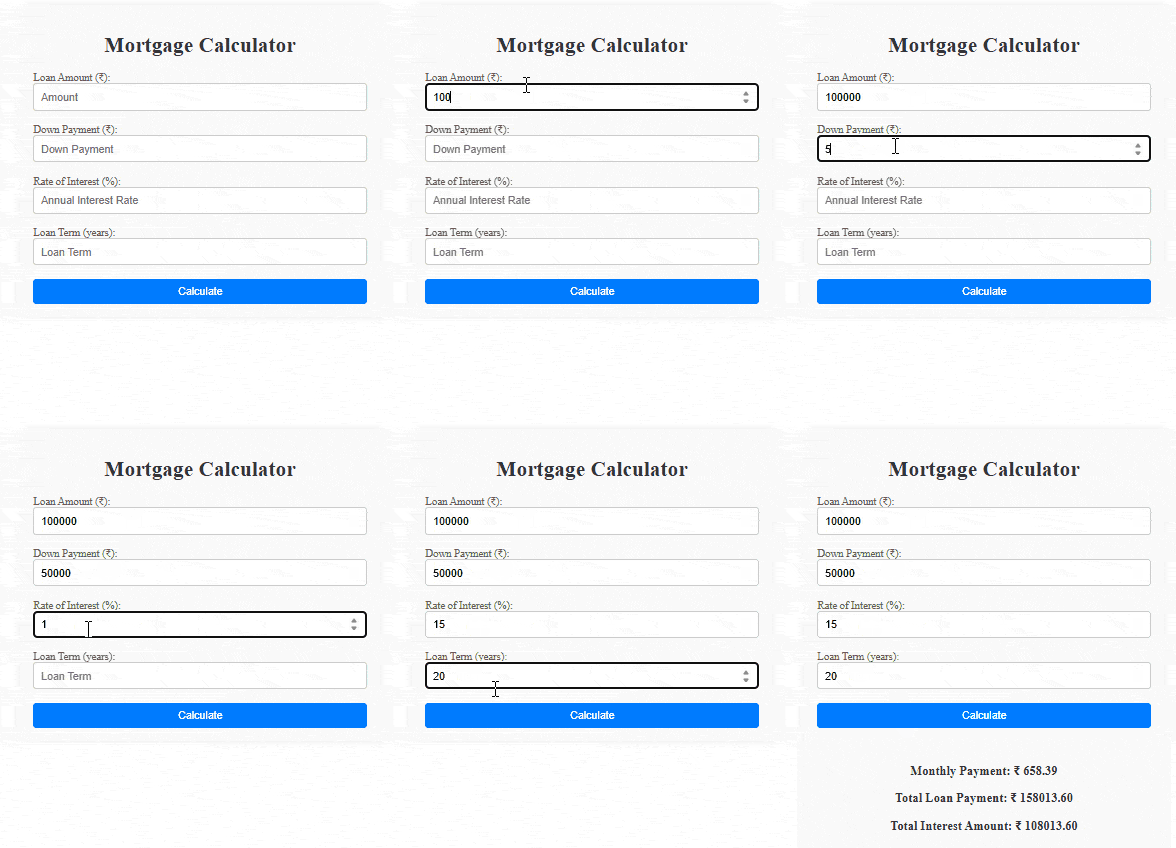
In this article, we will create a **Mortgage Calculator using React, allowing users to estimate their monthly mortgage payments based on the loan amount, annual rate of interest, and loan term in years. The application provides instant feedback, displaying the calculated monthly payment, total payable amount, and total interest.
The application uses React's **useState hook to manage state variables for the principal amount, annual interest rate, loan term, monthly payment, total payable amount, total interest, and error handling. Users are prompted to input the necessary information, with real-time validation to ensure accurate calculations.
Preview:
.png)
Pre-requisites:
- ReactJS
- UseState
- CSS
- JSX
- [Components in React](https://Class Components in React)
Project Structure:
.png)
Steps to Create the Project:
**Step 1: Set up React project using the command
npm create vite@latest <> --template react
**Step 2: Navigate to the project folder using
cd <>
**Step 3: Install necessary dependencies
npm install
**Step 4: Create **MortgageCalculator.js component along with its CSS file.
Approach
- First use React's 'useState' hook for managing component state, handling variables like loan amount, interest rate, and error messages.
- The `calculateMonthlyPayment` function solves mortgage details based on user input, ensuring valid values before performing calculations.
- Features input fields for loan details and a button triggering the calculation, with results displayed if the input is valid.
- Connects input fields to state variables using `value` and `onChange`, ensuring real-time updates, and triggers calculations on the "Calculate" button click.
- App component includes MortgageCalculator, rendering a simple layout with a header and the mortgage calculator below, with imported CSS for styling.
**Example: In this example we will see the implementation of above approach. add the below code in respective files.
CSS `
/* MortgageCalculator.css */ .container { max-width: 500px; margin: 0 auto; padding: 20px; background-color: #f9f9f9; border-radius: 10px; box-shadow: 0 0 10px rgba(0, 0, 0, 0.1); }
h1 { text-align: center; color: #333; }
.main-cont { display: flex; flex-direction: column; gap: 15px; }
.label { display: flex; flex-direction: column; gap: 5px; }
.label label { font-size: 16px; color: #555; margin-bottom: 5px; }
.label input { padding: 10px; border: 1px solid #ccc; border-radius: 5px; font-size: 16px; width: 100%; box-sizing: border-box; }
.label button { padding: 10px; background-color: #007bff; color: white; border: none; border-radius: 5px; font-size: 16px; cursor: pointer; width: 100%; }
.label button:hover { background-color: #0056b3; }
.res { text-align: center; margin-top: 20px; color: #333; }
JavaScript
// App.js import React from 'react'; import './App.css'; import MortgageCalculator from './MortgageCalculator';
function App() { return (
export default App;
JavaScript
import React, { useState } from 'react'; import './MortgageCalculator.css';
const MortgageCalculator = () => { const [amount, setAmount] = useState(''); const [interestRate, setInterestRate] = useState(''); const [loanTerm, setLoanTerm] = useState(''); const [downPayment, setDownPayment] = useState(''); const [monthlyPayment, setMonthlyPayment] = useState(null); const [totalPayable, setTotalPayable] = useState(null); const [totalInterest, setTotalInterest] = useState(null); const [error, setError] = useState('');
const calculateMonthlyPayment = () => { if (!amount || !interestRate || !loanTerm) { setError('Please fill in all fields.'); alert('Please fill all the fields !!!'); setMonthlyPayment(''); return; }
const loanAmount = parseFloat(amount) - (downPayment ? parseFloat(downPayment) : 0);
const r = parseFloat(interestRate) / 100 / 12;
const n = parseFloat(loanTerm) * 12;

const numerator = loanAmount * r * Math.pow(1 + r, n);
const denominator = Math.pow(1 + r, n) - 1;
const monthlyPayment = (numerator / denominator).toFixed(2);

setMonthlyPayment(monthlyPayment);
const totalPayable = (monthlyPayment * n).toFixed(2);
setTotalPayable(totalPayable);
const totalInterest = (totalPayable - loanAmount).toFixed(2);
setTotalInterest(totalInterest);
setError('');
};
return (
Mortgage Calculator
{error}
} {monthlyPayment && (Monthly Payment: ₹ {monthlyPayment}
Total Loan Payment: ₹ {totalPayable}
Total Interest Amount: ₹ {totalInterest}
export default MortgageCalculator;
`
**Steps to run the application:
Step 1: Type the following command in terminal
npm run dev
Step 2: Open web-browser and type the following URL
**Output: