Next.js Folder Structure (original) (raw)
Last Updated : 9 Mar, 2026
Next.js Folder Structure organizes files and directories in a way that helps manage pages, components, APIs, and assets efficiently. It follows a convention-based approach where the folder names determine routing and application behavior.
- **app/ or pages/ : Contains route-based pages; each file automatically becomes a route in the application.
- **components/ : Stores reusable UI components used across multiple pages.
- **public/ : Holds static assets like images, fonts, and icons accessible directly via URL.
- **styles/ : Includes global CSS, module CSS, or styling files for the application.
Enhanced Files and Folders Structure
Below structure helps maintain separation of concerns and improves code readability and collaboration among developers.
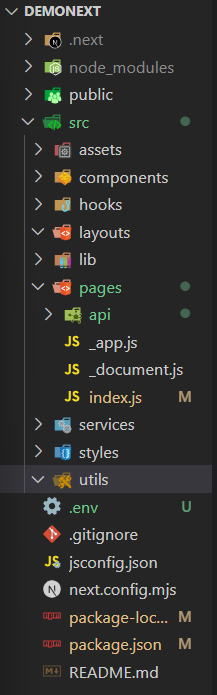
Enhanced folder structure
- **public/ – Stores static assets like images and icons.
- **src/ – Contains the main application source code.
- **assets/ – Holds reusable static files (images, fonts, etc.).
- **components/ – Reusable UI components.
- **hooks/ – Custom React hooks.
- **layouts/ – Common layout components for pages.
- **lib/ – Helper libraries or third-party integrations.
- **pages/ – Next.js routing files and API routes.
- **services/ – API calls and service logic.
- **styles/ – Global styles and CSS modules.
- **utils/ – Utility and helper functions.
Steps to Create Folder Structure
**Step 1: Open the terminal, go to the path where you want to create the project and run the command with the project name to create the project.nd navigate to that folder using following commands.
npx create-next-app demonext
**Step 2: Now after project folder has been created, go inside the folder using the following command.
cd demonext
**Step 3: Install the required dependencies for your project (if any) using the following command.
npm install package_name
**Step 4: Lets create a file with extension .env which will contain the sensitive information and credentials of the project such as API keys.
touch .env
****Step 5 :**check this must present basic dependencies in package.json file
"dependencies": { "react": "^18", "react-dom": "^18", "next": "14.2.2" }
Recommended Project Folder Structure
It helps organize code logically so that projects remain scalable, maintainable, and easy for teams to navigate.
- **Components: Contains reusable UI components used across the application.
- **Layouts: The layouts folder holds shared layout components that define the common page structure, such as headers, footers, and sidebars.
- **Lib: The lib folder contains shared utility functions and helper modules used across the application.
- **Services: The services folder contains modules that handle communication with external services like APIs, databases, and authentication.
- **Utils: This folder contains shared utility functions for common tasks across the application.
- **Assets: The assets folder stores static files like images, fonts, and icons used in the UI.
- **Hooks: The hooks folder contains custom React hooks that encapsulate reusable logic across the application.
Importance of Next.js Project Structure
A well-defined Next.js project structure helps keep the codebase organized, scalable, and easy to maintain throughout the development lifecycle.
- Keeps code organized and easy to navigate.
- Supports team collaboration.
- Simplifies scaling and future enhancements.
- Makes code changes faster and safer.
- Ensures consistency and better code quality.
Optimal Approaches for Next.js Project Structure
Optimal Approaches for Next.js Project Structure focus on organizing files by features and responsibilities to keep the application scalable and easy to maintain.
- Creating a clear project structure in Next.js ensures smooth development.
- Organize files by purpose and place them in appropriate folders.
- Store reusable UI elements in the components folder.
- Follow consistent naming conventions for files and folders.
- A well-structured project improves code readability, maintenance, and development speed.