Random Quote Generator App using ReactJS (original) (raw)
Last Updated : 27 Jul, 2025
In this article, we will create an application that uses an API to generate random quotes. The user will be given a button which on click will fetch a random quote from the API and display it on the screen. Users can generate many quotes by clicking the button again. The button and the quotes are displayed beautifully using CSS styling to create a good user interface.
Let us have a look at how the final application will look like:
.png)
Random Quote Generator App using ReactJS
**Prerequisites
**Approach
We're going to use React on the frontend and we'll make get requests to Advice Slip JSON API. After going through this article, you will have a strong understanding of basic React workflow as well as how to make API requests in React Apps. Learn how to fetch API data with ReactJS.
**Advice Slip JSON API: https://api.adviceslip.com/
**Steps to Create the Application
Step 1: create react app by the following command
npm create vite@latest quote-generator-react --template react
**Step 2: Now, go to the folder
cd quote-generator-react
**Step 3: Install the required dependencies
npm install axios
**Project Structure
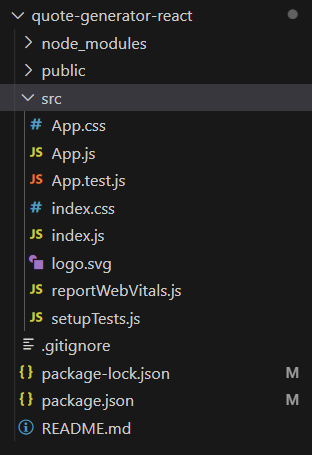
Folder Structure
**The updated dependencies in package.json will look like:
"dependencies": { "@testing-library/jest-dom": "^5.17.0", "@testing-library/react": "^13.4.0", "@testing-library/user-event": "^13.5.0", "axios": "^1.4.0", "react": "^18.2.0", "react-dom": "^18.2.0", "react-scripts": "5.0.1", "web-vitals": "^2.1.4" }
Write the following code in respective files.
- **index.html: This file is used to import font package and change the title
- **App.js: In this, we will create a class-based App component in this app component we are going to have a State
- **App..css: This file contains our styling code for our random quote generator app. HTML `
<!--Fonts-->
<link rel="preconnect" href="https://fonts.gstatic.com/" />
<link href="https://fonts.googleapis.com/css2?family=Spartan:wght@100;200;300; 400;500;600;700;800;900&display=swap" rel="stylesheet" />
<title>Quote Generator</title>CSS
body { display: flex; justify-content: center; align-items: center; height: 100vh; margin: 0; background: linear-gradient(to right, #ece9e6, #ffffff); font-family: 'Segoe UI', Tahoma, Geneva, Verdana, sans-serif; }
.app { text-align: center; }
.card { background: #fff; padding: 40px 20px; border-radius: 15px; box-shadow: 0 4px 8px rgba(0, 0, 0, 0.1); max-width: 400px; margin: 20px; }
.heading { font-size: 28px; color: #333; margin-bottom: 30px; position: relative; padding-bottom: 10px; }
.heading::after { content: ""; position: absolute; width: 50px; height: 3px; background-color: #4caf50; bottom: 0; left: 50%; transform: translateX(-50%); }
.button { background-color: #4caf50; color: white; border: none; padding: 15px 30px; font-size: 18px; border-radius: 25px; cursor: pointer; transition: background-color 0.3s ease; text-transform: uppercase; letter-spacing: 1px; }
.button:hover { background-color: #45a049; }
span { display: block; font-size: 18px; font-weight: bold; margin-top: 20px; }
JavaScript
import React from "react"; import axios from "axios"; import "./App.css";
class App extends React.Component { state = { advice: "" };
componentDidMount() {
    this.fetchAdvice();
}

fetchAdvice = () => {
    axios
        .get("https://api.adviceslip.com/advice")
        .then((response) => {
            const { advice } = response.data.slip;
            this.setState({ advice });
        })
        .catch((error) => {
            console.log(error);
        });
};

render() {
    const { advice } = this.state;

    return (
        <div className="app">
            <div className="card">
                <h1 className="heading">{advice}</h1>
                <button className="button" onClick={this.fetchAdvice}>
                    <span>Give Me Advice</span>
                </button>
            </div>
        </div>
    );
}
}
export default App;
`
Steps to run the application
**Step 1: Type the following command in your command line
npm run dev
**Step 2: Open http://localhost:5173/ URL in the browser. It will display the result.
**Output:

Random Quote Generator App using ReactJS