React Bootstrap Form Text (original) (raw)
Last Updated : 25 Jul, 2024
In this article, we will learn about the concept of React Bootstrap Form Text. **Form.Text in React Bootstrap is the component mainly used for rendering the text in the form. We can display the information, help messages, and other textual contents in the application by using this component. We will see the Syntax, Properties, and practical implementation of React Bootstrap Form Text.
**Syntax:
<Form.Text className="text-muted">
{/* textcontent */}
</Form.Text>
Properties:
- **id: This property is the unique identifier fo the Form.Text component.
- **className: This property is used to define the CSS classes that we can apply to the Form.Text component.
- **bsPrefix: This property mainly overrides the default Bootstrap prefix, which allows the customization of class names.
- ****...props:** This property can be used to pass the props that are not explicitly handled.
**Steps to create React Application And Installing Module:
**Step 1: Create a React application using the following command:
npx create-react-app <-Project-folder-name->
Step 2: After creating your project folder i.e. foldername, move to it using the following command:
cd <-Project-folder-name->
**Step 3: After creating the ReactJS application, Install therequiredmodule using the following command:
npm install react-bootstrap
npm install bootstrap
**Project Structure:

The updated dependencies in package.json file will look like:
"dependencies": {
"bootstrap": "^5.3.2",
"react": "^18.2.0",
"react-bootstrap": "^2.9.0",
"react-dom": "^18.2.0",
"react-scripts": "5.0.1",
"web-vitals": "^2.1.4"
}
**Example: Now write down the following code in the **App.js file. Here, App is our default component where we have written our code.
JavaScript `
import React from "react"; import { Form, Container, Row, Col } from "react-bootstrap"; import "bootstrap/dist/css/bootstrap.css"; const App = () => { return ( <Col md={{ span: 6, offset: 3 }}> <h1 style={{ color: "green", }} > GeeksforGeeks
React Bootstrap Form Text
<Form.Group controlId="username"> <Form.Label>Username</Form.Label> <Form.Control type="text" placeholder="Enter your username" /> <Form.Text id="usernameHelp" className="text-muted" bsPrefix="geeks-form-text" as="span" > Enter Your Name Geek </Form.Text> </Form.Group> <Form.Group controlId="password"> <Form.Label>Password</Form.Label> <Form.Control type="password" placeholder="Enter your password" /> <Form.Text id="passwordHelp" className="text-danger" plaintext > Hey Geek! Your password should be secure and unique. </Form.Text> </Form.Group> <Form.Group controlId="email"> <Form.Label>Email</Form.Label> <Form.Control type="email" placeholder="Enter your email" /> <Form.Text id="emailHelp" className="geeks-form-text" > Hello Geek! We will send important updates to your email. </Form.Text> </Form.Group> ); };export default App;
`
**Step to Run Application: Run the application using the following command from the root directory of the project:
npm run start
**Output: Now open your browser and go to http://localhost:3000/, you will see the following output:
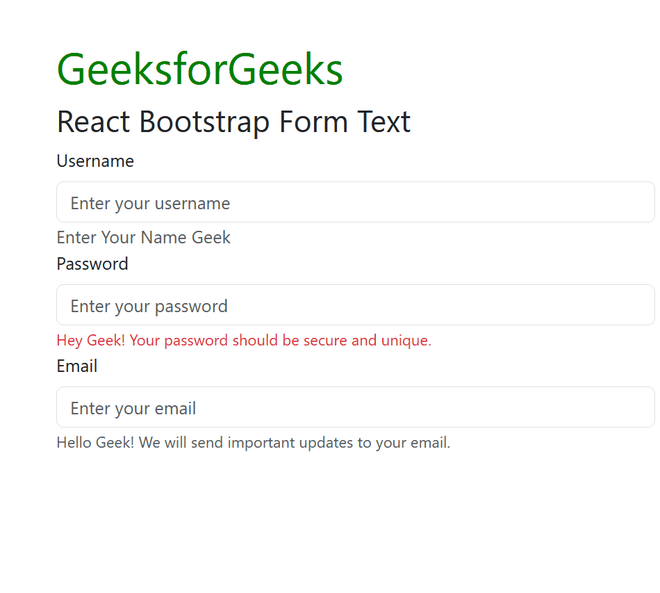
Form.text output