ReactJS Fragments (original) (raw)
Last Updated : 11 Jul, 2025
ReactJS Fragments are a way to group **multiple elements without adding an extra node to the **DOM. It allows you to return **multiple child elements from a component without wrapping them in a parent container like a ****
Why Use React Fragments?
The primary benefit of Fragments is the capability to reduce the elements available in the DOM.
- **Cleaner DOM Structure: It avoids redundant wrapper elements.
- **Better Performance: React fragments reduces extra nodes, improving rendering speed.
- **Avoid Unnecessary Markup: It Prevents unwanted elements.
- **Flexibility in Component Compositioneb: React Fragments returns multiple elements while maintaining React’s single parent requirement.
**Syntax:
<>
Hello, World!
Welcome to the world of React!
</>
- ****
Hello, World!
:** This creates a heading element with the text "Hello, World!". - ****
Welcome to the world of React!
:** This creates a paragraph element with the text "Welcome to the world of React!". - The <> and </> are fragments in React, which allow you to return multiple elements without adding an extra node to the DOM.
How to Use React Fragments
We can use react Fragement in **two ways. we have implemented each one here.
Using Shorthand
This is the simplest and most common way to use fragments in React. The shorthand uses empty tags <> and </> to wrap multiple elements.
JavaScript `
return ( <>
Title
Content
</> );`
Using React.Fragment
Use the React.Fragment component directly. While this is more detailed, it offers extra functionality, such as the ability to assign keys when using Fragments in lists.
JavaScript `
<React.Fragment>
Title
Content
</React.Fragment>;`
Implementing ReactJS Fragments
Here, we have created a simple example that display a list of fruits using ReactJS Fragments.
JavaScript `
import React from "react";
function FruitList() { const fruits = [ { name: "Apple", description: "A sweet red fruit" }, { name: "Banana", description: "A tropical yellow fruit" }, { name: "Cherry", description: "A small, round fruit" }, ];
return (
    <div>
        {fruits.map((fruit, index) => (
            <React.Fragment key={index}>
                <h3>{fruit.name}</h3>
                <p>{fruit.description}</p>
            </React.Fragment>
        ))}
    </div>
);
}
export default FruitList;
`
**Output
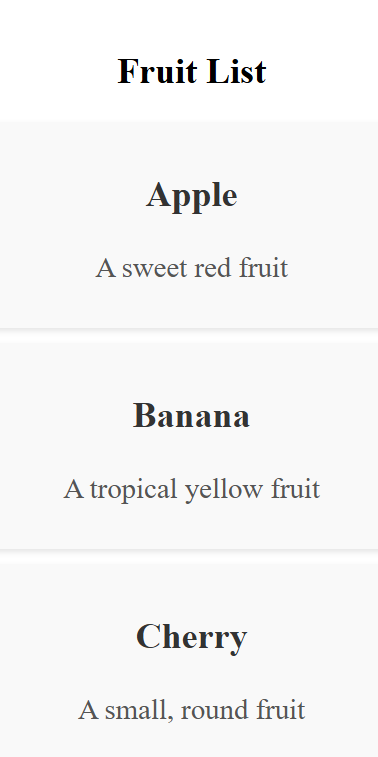
Displaying a List of Fruits
**In this code
- **Using React.Fragment: Instead of wrapping each fruit's name and description in a div, we use React.Fragment to avoid extra wrapper nodes in the DOM.
- **Key Prop: Since we are mapping over a list of items, each React.Fragment requires a key prop to help React identify which elements have changed, added, or removed.
- **Cleaner DOM: Without React Fragments, we would have to wrap each fruit’s h3 and p in a , which would create unnecessary nodes in the DOM.
Difference Between React Fragments and Element
| Feature | React Fragment | Element |
|---|---|---|
| Purpose | Groups elements without adding extra nodes. | Groups elements but adds an extra . |
| DOM Structure | No extra node in the DOM. | Adds an additional div node to the DOM. |
| Semantic Markup | Maintains clean structure. | Can clutter HTML with extra s. |
| Use Case | Ideal for rendering multiple components without extra DOM elements. | Suitable when a wrapper element is needed for styling, layout, etc. |
| Performance | More efficient because it doesn’t add extra DOM nodes. | Less efficient due to the additional wrapper node. |
| Support for key Prop | Can support key when used with lists. | Supports key like any regular element, especially useful in lists. |
| Attributes | Cannot have attributes like className or style. | Can have attributes such as className, id, etc. |
| Nested Components | Works well with child components without creating an unnecessary wrapper. | Can be used to wrap multiple elements, especially when additional styling or events are required. |
| Common Use | Frequently used when rendering lists or when no additional wrapper is needed. | Used for general layout purposes where extra structure or styling is required. |
Advantages of React Fragments
React Fragment replaces the ****
- **Cleaner DOM: Avoids unnecessary wrapper elements, keeping the structure clean and semantic.
- **Improved Performance: No extra DOM nodes, leading to faster page loads, especially in complex apps.
- **Flexibility: Enables nesting multiple elements without extra wrapping tags.
- **Semantic HTML: Maintains a clean structure by eliminating redundant elements.
- **Key Support: Allows key usage in lists, improving React's rendering efficiency.
Limitations of React Fragments
- **No Attributes: React Fragments cannot accept attributes like className, id, or style. If you need to apply styles or identify elements, you still need a wrapper element like a .
- **Cannot Manipulate Directly: Since React Fragments don't create a DOM node, you can't select them using functions like querySelector().
- **Limited to wrapping: Fragments can only support wrapping elements and not additional functionalities like handling events, styling, or layouts offered by a div.
Conclusion
React Fragments **optimize structure, improve performance, and maintain semantic **HTML by eliminating unnecessary wrapper elements. While useful for lists and layouts, they lack attributes and direct **DOM manipulation. Use them wisely for a cleaner, more efficient React app.