Travel Blog Website using React (original) (raw)
Last Updated : 27 Jul, 2025
Creating a Travel Blog Website using ReactJS is a better way to learn how to manage state, passing props and render data dynamically. In this article, we are going to learn how to create a Travel Blog Website using React JS. This website will have a list of places with images and description. The data is passed through the application with the help of JSON file. When you click on the location, it will redirect you to the google maps to see the complete description of that place.
**Preview of final output: Let us have a look at how the final output will look like.
Prerequisites
Approach
- First we will create a data.js file which will store all the data of the travel places like location, images, description etc.
- After that we will create header and footer for the website.
- Now we will create the cards section which will display the travel places.
- We will pass the data stored in the data.js file as props.
- Now we will integrate all the components in the App.js file.
- To style the app we will add the required style in the App.css file.
**Steps to create React Application And Installing Module
**Step 1: Setting up the React Project
npm create vite@latest travelblog --template react
**Step 2: After creating your project folder, move to it using the following command.
cd travelblog
**Step 3: Installing Dependencies
npm install
**Step 4: Create an image folder and store your custom images in the public folder.
**Project Structure
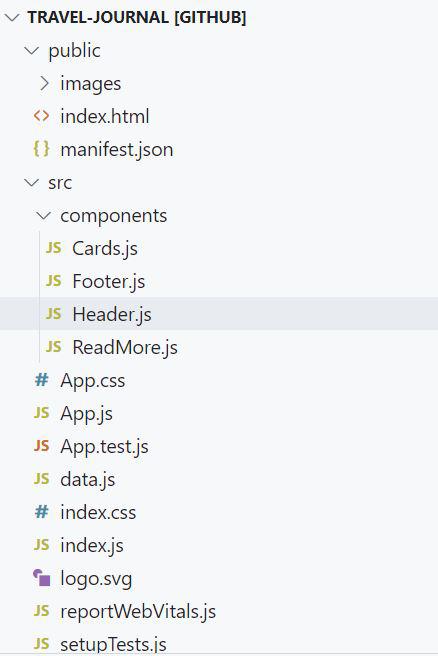
The updated dependencies in **package.json file will look like
"dependencies": {
"react": "^18.2.0",
"react-dom": "^18.2.0",
"vite": "^4.0.0",
"web-vitals": "^2.1.4"
}
CSS `
/* App.css*/
- { box-sizing: border-box; }
body { margin: 0; font-family: 'Outfit', sans-serif;
}
a { color: #d74180; font-size: 16px; }
a:hover{ color: #808080; }
section { padding: 20px; }
p { font-size: 16px; }
h4, p { padding-bottom:5px; margin: 0; }
.title { font-weight: 600; }
.journal-header { background-color: #d74180; height: 130px; justify-content: center; align-items: center; display: flex; padding: 20px 36px; color: white; margin-left: 40px; margin-right: 40px; }
/* .material-symbols-outlined { font-variation-settings: 'wght' 200, 'GRAD' 20, 'opsz' 24, } */
.card-img {
min-width: 300px; border-radius: 9px; margin-bottom: 15px; position: relative; padding-left: 10px; display: block; }
.card-country { font-size: 18px; padding-right: 10px; }
.card-country-title { font-size: 40px; }
.card-date { font-size: 18px; }
.card { /* align-items: center; / / width: 175px; */ display: flex; flex-direction: row; font-size: 12px; flex: 0 0 auto; position: relative; margin-top: 80px; margin-right: 15px; margin-left: 15px;
}
.column-left { flex: 40%; padding-right: 30px; }
.column-right { flex: 40%; }
.journal-footer { justify-content: center; align-items: center; display: flex; background-color: #5a595a; height: 130px;
display: flex; color: white; clear: both; position: relative; bottom: 0; width: 100%; }
.footer-caption { padding-left: 5px; }
/* For mobile phones: / [class="card-"] { width: 100%; flex-direction: column;
}
/* media queries */ @media (max-width: 400px) { .card { background-color: #de3163; } }
JavaScript
//App.js
import Header from './components/Header.js' import Cards from './components/Cards.js' import { data } from './data.js' import Footer from './components/Footer.js' import './App.css'
function App() { const mappedData = data.map((item) => { return ( ) }) return (
export default App;
JavaScript
//Cards.js
import React from 'react';
export default function Cards(props) { return (

{props.item.title}
{props.item.date}
{props.item.description}
Read more.. </div>
)}
JavaScript
//Header.js
import React from "react";
export default function Header() { return (
my travel journal
JavaScript
//Footer.js
import React from 'react';
export default function Footer() { return (
JavaScript
//data.js
export const data = [ { id: 1, date: "May 2018", title: "Panajachel, Lake Atitlán", description: "The busiest and most built-up lakeside town, Panajachel ('Pana') is the gateway to Lago de Atitlán for most travelers.", coverImg: "atitlan.jpeg", country: "GUATEMALA", googleMapLink: "https://www.google.com/maps/place/Lake+Atitl%C3%A1n/@14.6788007,-91.2837663,12z/data=!3m1!4b1!4m6!3m5!1s0x85894ac7c083b493:0xa6e33f7d6b54910!8m2!3d14.6906713!4d-91.2025207!16zL20vMDN3NXpy?entry=ttu", }, { id: 2, date: "December 2019", title: "Secret Beach", description: "Experience the beautiful landscape and meet new friends all while enjoying pristine warm waves of the Atlantic.", coverImg: "belize.jpeg", country: "BELIZE", googleMapLink: "https://www.google.com/maps/search/belize+secret+beach/@18.0171292,-87.9672513,13z/data=!3m1!4b1?entry=ttu", } ]
`
**To run the app run the following command in the terminal
npm run dev
**Output