Synthetic Events in ReactJS (original) (raw)
Last Updated : 18 Aug, 2025
Synthetic events in React are cross-browser wrappers around the browser's original event. Different browsers may have different names for the events. They create a uniform interface that React uses to ensure that events execute consistently across browsers. React normalizes this information to provide a consistent API for handling events regardless of the browser.
**Syntax:
e.preventDefault(); // Stop default browser action
e.stopPropagation(); // Stop event bubbling to parent
**Note: Here 'e’ is a synthetic event, a cross-browser object. It is made with a wrapper around the actual event of the browser.
Some of the attributes are:
- **bubbles: Return true or false indicates event is a bubbling event or not.
- **cancelable: Return true or false indicates if the event can be canceled or not.
- **currentTarget: Indicates the element to which the handler is attached
- **defaultPrevented: Return true or false, indicates whether the event has been canceled by preventDefault().
- **eventPhase: Returns number, indicates the phase
- **isTrusted: Return true when the event is generated by the user and false when by the browser/script
- **type: Returns string, it indicates the type of the event
**Note: Methods like preventDefault() and stopPropagation() are discussed further.
**Steps to create React Application:
**Step 1: Create the react project folder, open the terminal, and write the command npm create-react-app folder name.
npm create-react-app project
**Step 2: After creating your project folder(i.e. project), move to it by using the following command.
cd project
**Project Structure:
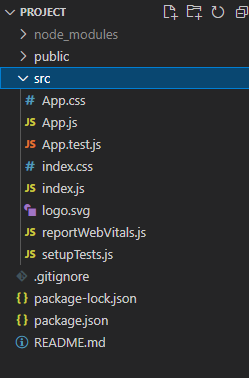
**Example 1: In App.js we are creating a simple button that on click shows all the properties of the event in the console. We will see that all the above-mentioned properties there in the console.
JavaScript `
// App.js function App() { const onClickHandler = (e) => { console.log(e); } return (
export default App;
`
**Output:

**Example 2: Now we will understand about the two void functions: preventDefault(), stopPropagation()
JavaScript `
function App() { const handlepreventDefault = e => { e.preventDefault(); console.log("clicked on preventDefault") } const handlestopPropagation = e => { e.stopPropagation(); console.log("clicked on stopPropagation") }
const insideDiv = (e) => {
    e.stopPropagation();
    console.log("clicked on Div")
}
return (
    <div className="App">
        <form>
            Type anything: <input />
            <button type="submit"
                onClick={handlepreventDefault}>
                preventDefault()
            </button>
            <span onClick={handlestopPropagation}>
                stopPropagation()
                <span onClick={insideDiv}> Inside div</span>
            </span>
            <button type="submit">submit</button>

        </form>
    </div>
);
}
export default App;
JavaScript
// index.js body { margin: 0; font - family: -apple - system, BlinkMacSystemFont, 'Segoe UI', 'Roboto', 'Oxygen', 'Ubuntu', 'Cantarell', 'Fira Sans', 'Droid Sans', 'Helvetica Neue', sans - serif; -webkit - font - smoothing: antialiased; -moz - osx - font - smoothing: grayscale; }
code { font - family: source - code - pro, Menlo, Monaco, Consolas, 'Courier New', monospace; } button, span{ padding: 2px 10px; font - size: 20px; border: 1px solid black; background - color: aliceblue; cursor: pointer; }
`
**Output:
