Routes in ruby on rails (original) (raw)
Last Updated : 5 Aug, 2025
In Ruby on Rails, routes are a crucial component that connect incoming web requests to the appropriate controller actions and views. They act as the bridge between a user’s request and the application's response, determining how URLs are processed and which data is displayed. By defining routes, developers can control how different parts of the application are accessed and interacted with, ensuring a seamless user experience. This introduction will explore the basics of routing in Rails, including how to define and manage routes, and how they play a key role in the overall structure of a Rails application.
**Routes in ruby on rails
In Ruby on Rails, a router is a component that helps manage incoming web requests and directs them to the appropriate controller action. It maps URLs to specific actions within controllers, enabling the application to respond to different routes.
**Purpose of the Routes in Rails
The primary purpose of the router in Ruby on Rails is to manage and route incoming web requests to the appropriate controllers and actions within an application. The router plays a crucial role in handling the HTTP requests and determining which part of the application should respond to a specific one.
Let’s take a simple example your application receives an incoming GET request.
GET articles/10It asks the router to match it to a controller action. If the first matching route is:
get 'articles/:id', to: 'articles#show'Then, the request is processed by show action in the **ArticlesController to which ****{id: ‘10’}** is passed as params.
- **Note: Rails uses snake_case for controller names here, if you have a multiple-word controller like **ArticlesController, you want to use articles#show
**How Routing is done in Ruby on Rails?
Open your rails application in your editor routing is done through the config/routes.rb file, which is located in the root directory of our rails application.
Ruby `
open the file 'config/routes.rb'
Rails.application.routes.draw do root 'articles#index'
get 'articles', to: 'articles#index' get 'articles/new', to: 'articles#new' post 'articles', to: 'articles#create' get 'articles/:id', to: 'articles#show' get 'articles/:id/edit', to: 'articles#edit' patch 'articles/:id', to: 'articles#update' delete 'articles/:id', to: 'articles#destroy' end
`
**HTTP Requests in rails
- **GET:- This request is used to retrieve data from the server. When a user visits a web page, a GET request is sent to the server to retrieve the page’s HTML, CSS, and JavaScript files.
- **POST:- This request is used to submit data(add entity) to the server, such as form data or JSON data. When a user submit a form, a POST request is sent to the server with the form data.
- **PUT:- This request is used to update data on the server. For example, if a user edits their profile information, a PUT request would be sent to the server to update the information.
- **DELETE:- This request is used to delete data from the server. For example, if a user wants to delete a post, a DELETE request would be sent to the server to delete the post.
- **PATCH:- This request is similar to PUT, but it is used to update only a portion of the data on the server. For example, if a user updates their profile picture, a PATCH request would be sent to the server to update only the profile picture.
Lets take an example how HTTP request is work:
When we go to a particular article with a article id, let’s 12 then the request is:
GET articles/12
Corresponding to this request we’ll have a rails route in **config/routes.rb
get 'articles/:id', to: 'articles#show'This route in rails calls the show action in the **ArticlesController and passes the id parameter as an argument
class ArticlesController < ApplicationController
def show
@article = Article.find(params[:id])
end
end
The show action retrieves the article with the corresponding id using the Article. find action and assigns it to an instance variable ****@article**. Now it can be rendered to a view to display the contents of ****@article**. For example, we could create a **show.html.erb template in the **app/views/articles directory that displays the article's title and **content:
<%= @post.title %>
<%= @post.content %>
**Resource Routing
Resource routing allows you to quikly declare all of the common routes for a given resourceful controller. A single call to resource can declare all of the necessary routes for your **index, show, new, edit, create, **update, and **destroy actions. Resourceful routes can be defined in the **config/routes.rb file. For example, the following code defines resource for articles resources.
Rails.application.routes.draw do
resources :articles
end
The above line will provide the following auto-generated routes:
| HTTP Verb | Path | Controller#Action | Used for |
|---|---|---|---|
| GET | /articles | articles#index | Display a list of articles |
| GET | /articles/new | articles#new | Return an HTML form for creating a new article |
| POST | /articles | articles#create | create a new articles |
| GET | /articles/:id | articles#show | Display a specific articles |
| GET | /articles/:id/edit | articles#edit | Return an HTML form for editing an article |
| PATCH/PUT | /articles/:id | articles#update | Update a specific article |
| DELETE | /articles/:id | articles#destory | Delete a specific article |
Define Multiple resources:
resources :article, :book, :comments
This work exactly the same as:
resources :articles
resources :books
resources :comments
**Nested Resources
Nested resources allow us to define a hierarchical relationship between resources in our application. For example, suppose your application includes these models:
class Article < ApplicationRecord
has_many :comments
end
class Comment < ApplicationRecord
belongs_to :article
end
Nested routes allow you to capture this relationship in your routing. In this case, you could include this route declaration:
resources :articles do
resources :comments
end
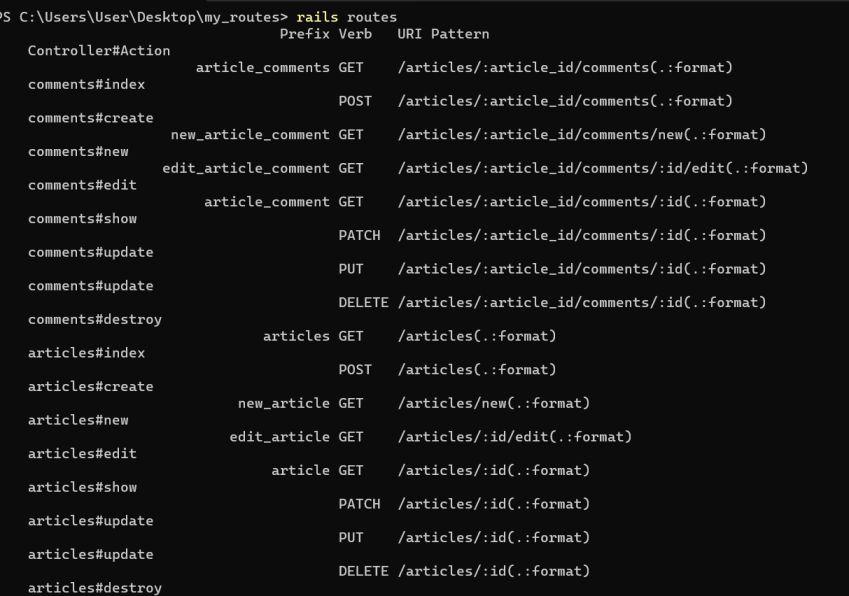
This will generate the following routes:
article_comments GET /articles/:article_id/comments(.:format) comments#index
POST /articles/:article_id/comments(.:format) comments#create
new_article_comment GET /articles/:article_id/comments/new(.:format) comments#new
edit_article_comment GET /articles/:article_id/comments/:id/edit(.:format) comments#edit
article_comment GET /articles/:article_id/comments/:id(.:format) comments#show
PATCH /articles/:article_id/comments/:id(.:format) comments#update
PUT /articles/:article_id/comments/:id(.:format) comments#update
DELETE /articles/:article_id/comments/:id(.:format) comments#destroy
articles GET /articles(.:format) articles#index
POST /articles(.:format) articles#create
new_article GET /articles/new(.:format) articles#new
edit_article GET /articles/:id/edit(.:format) articles#edit
article GET /articles/:id(.:format) articles#show
PATCH /articles/:id(.:format) articles#update
PUT /articles/:id(.:format) articles#update
DELETE /articles/:id(.:format) articles#destroy
To fetch al the routes rails, run the below command in the terminal:
$ rails routes
Conclusion
In conclusion, routes in Ruby on Rails are a fundamental aspect of managing the flow of web requests within an application. They define how incoming requests are mapped to specific controller actions, ensuring that users can access the appropriate resources and functionalities of the app. By leveraging Rails' convention-over-configuration approach, developers can create clear, maintainable routes that enhance both development efficiency and application structure. Understanding and effectively managing routes is essential for building robust and scalable Rails applications.