MATLAB Commands (original) (raw)
Last Updated : 4 Jul, 2021
MATLAB is an interactive multi-programming language and numeric computing environment developed by MathWorks. MATLAB provides the Commands that will be used when the user wants to interact with any application using the command line interface.
Following are the lists of commands used in MATLAB.
Commands for Managing a Session
| Command | Use |
|---|---|
| clc | Clears command window |
| clear | Removes the variables from memory |
| global | Declares variables globally |
| exist | Checks for the existence of a particular file or memory |
| help | Searches for a help topic |
| quit | Stops MATLAB |
| who | Lists current variables in use |
| lookfor | Searches help entries for a keyboard |
Example 1
Matlab `
% MATLAB Code to illustrate % global function setGlobalx(val) global x
`
Output:
x = val;
Example 2
Matlab `
% MATLAB Code to illustrate who x = 2 who
`
Output:
Variables in the current scope: x
Example 3
Matlab `
% MATLAB Code to illustrate % clear clear type x
`
Output:
error: type 'x' is undefined
Commands for Working with the System
| Command | Use |
|---|---|
| cd | Changes current directory |
| date | Displays current date |
| delete | Deletes a file |
| dir | Lists all the files in a directory |
| path | Displays search path |
| pwd | Displays current directory |
| type | Displays content of a file |
| wklread | Reads.wk1 spreadsheet file |
| save | Saves workplace variables in a file |
Example 1
Matlab `
% MATLAB Code to illustrate % pwd pwd
`
Output:
ans = /home/oo
Example 2
Matlab `
% MATLAB Code to illustrate % date c = date
`
Output:
c= '18-jun-2021'
Input and Output Commands
| Command | Use |
|---|---|
| disp | Displays content of an array or a string |
| fscanf | Reads formatted data from a file |
| format | Controls screen-display format |
| fprintf | Performs formatted writes to file or screen |
| input | Displays the prompt and waits for input |
| ; | Suppresses screen printing |
Example 1
Matlab `
% MATLAB Code to illustrate % disp
A = [15 150];
S = 'Hello World.';
disp(A)
disp(S)
`
Output:
15 150
Hello World.
Example 2
Matlab `
% MATLAB Code to illustrate %input age = input('how old are you: '); % At this point, the variable: age, will contain % whatever value the user types
`
Output:
20
Vector, Matrix, and Array Commands
| Command | Use |
|---|---|
| cat | Concatenates the array |
| find | Finds the indices of nonzero elements |
| max | Returns the largest element |
| min | Returns the smallest element |
| prod | Product of each column |
| sort | Sorts each column |
| rank | Computes rank of a matrix |
| eye | Creates an identity matrix |
| inv | Computes the inverse of a matrix |
Example 1
Matlab `
% MATLAB Code to illustrate %cat array1 = [1,2,3] array2 = [4,5,6] cat(1,array1,array2)
`
Output:
ans =

1    2    3
4    5    6
Example 2
Matlab `
% MATLAB Code to illustrate %max max(array1)
`
Output:
ans = 3
Example 3
Matlab `
%MATLAB Code to illustrate %min min(array2)
`
Output:
ans = 4
Matlab `
%MATLAB Code to illustrate %eye eye(2,2)
`
Output:
ans = Diagonal Matrix 1 0 0 1
Plotting Commands:
| Commands | Use |
|---|---|
| axis | Sets axis limit |
| grid | Displays grid lines |
| plot | Generates xy plot |
| title | Puts title at top of the plot |
| close | Closes current plot |
| bar | Creates bar chart |
| Prints the plot / saves the plot | |
| figure | Opens a new figure window |
| Close all | Closes all plots |
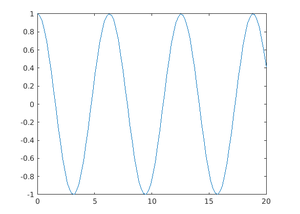
Example1:
Matlab `
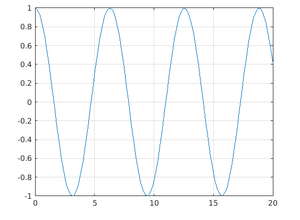
% MATLAB Code to illustrate %plot x = linspace(0,20) y = cos(x) plot(x,y)
`
Output:
Example 2:
Matlab `
%MATLAB Code to illustrate %grid x = linspace(0,20) y = cos(x) plot(x,y) grid on
`
Output: