Project Schedule Tracking Tools in Software Engineering (original) (raw)
Last Updated : 27 Apr, 2026
Project scheduling tools play a key role in planning and managing project timelines effectively. They help organize tasks, track progress, and provide visual schedules with automatic updates and reports for better decision-making. Its features are:
- Helps in planning and scheduling tasks to ensure timely completion.
- Ensures efficient allocation and management of resources.
- Improves team communication through built-in collaboration features.
- Provides an easy-to-use interface for better project handling.
Benefits
- Clearly defines tasks and organizes project activities.
- Helps manage time and resources to keep the project on track.
- Assists in estimating and controlling project costs.
- Improves team productivity through better planning and task distribution.
- Increases overall efficiency and speed of project execution.
Selection Criteria for Project Scheduling Tools
- Should be able to handle multiple projects simultaneously.
- It must be easy to use with a simple and user-friendly interface.
- Should be cost-effective and fit within the project budget.
- Must provide strong security features to protect project data.
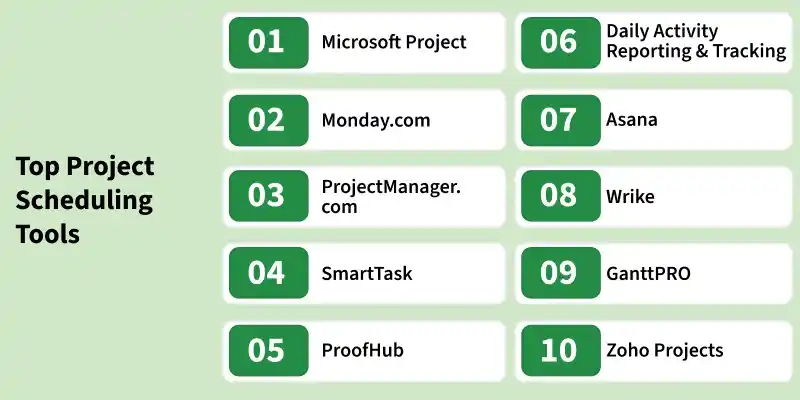
A variety of project scheduling tools are available to help teams plan, track, and manage project timelines efficiently.
1. Microsoft Project
Developed by Microsoft, this tool is widely used for project planning and scheduling activities. Microsoft Project is simple to use and can generate a variety of reports and templates based on industry standards. It also presents data in the form of charts and diagrams, supports cloud services, and allows users to share data remotely. Its features are:
- Creating the project
- Assigning resources to tasks
- Tracking project progress
- Managing project cost
- Project analysis
- Automatic and manual scheduling
2. Monday.com
Suitable for startups, freelancers, and small businesses, this platform helps in scheduling and managing projects effectively. Monday.com provides reporting features, allows file sharing, and enables teams to collaborate and track progress in one place. Its features are:
- Customizable templates
- Task scheduling and automation
- File sharing and collaboration
- Workload management
- Progress tracking
3. ProjectManager.com
Known for its simplicity, this application helps in planning and scheduling projects with ease. ProjectManager.com is cost-effective and supports productivity tracking, making it suitable for different types of projects. Its features are:
- Gantt chart scheduling
- Easy updates
- Detailed project planning
- Budget-friendly
- Integration with tools like Office 365 and Slack
**4. SmartTask
This all-in-one platform helps manage projects with features like automation, tracking, and reporting. SmartTask includes task management, time tracking, CRM, and collaboration tools, making project handling more efficient. Its features are:
- Auto scheduling
- Notifications and reminders
- Team collaboration
- Project analysis
- CRM functionality
6. ProofHub
Managing projects with large teams becomes easier using this tool, as it helps organize tasks, deadlines, and communication. ProofHub provides an intuitive interface to manage tasks, create milestones, and track progress effectively. Its features are:
- Task and meeting organization
- Progress tracking
- Team collaboration
- Gantt charts and multiple views
- Time tracking
7. Daily Activity Reporting and Tracking (DART)
Designed for monitoring project activities, this tool helps track changes made by users and maintain records efficiently. DART (Daily Activity Reporting Tool) is used by many organizations to monitor project progress, collect data, and provide updates to stakeholders regarding performance. Its features are:
- Defines tasks and dependencies
- Sends email summaries of updates
- Tracks changes in project plans
- Supports project analysis
- Manages project budget
7. Asana
Used for managing tasks, clients, and workflows, this platform provides a simple interface for tracking project progress. Asana allows teams to collaborate, manage documents, and monitor ongoing work efficiently. Its features are:
- Centralized task and document management
- Cloud-based platform
- Project tracking and reporting
- Workflow organization
- Team collaboration
8. Wrike
This tool provides a powerful environment for task management and scheduling, helping teams plan and execute projects efficiently. Wrike offers real-time collaboration, dynamic timelines, and advanced tracking features. Its features are:
- Real-time progress tracking
- File sharing and collaboration
- Scalable task management
- Gantt charts and timelines
- Communication tools
9. GanttPRO
Focused on visual project planning, this tool uses Gantt charts to manage tasks and timelines effectively. GanttPRO is widely used by teams of different sizes and integrates with popular applications. Its features are:
- Gantt chart-based planning
- Task and deadline management
- Team collaboration
- Ready-to-use templates
- Notifications and file sharing
10. Zoho Projects
This platform helps in organizing and managing complex projects with ease. Zoho Projects provides customization options, supports collaboration, and helps track performance and expenses effectively. Its features are:
- Task management and customization
- Team collaboration
- Budget and expense tracking
- Automated reports and charts
- Integrations and add-ons