Software Evolution (original) (raw)
Last Updated : 24 Apr, 2026
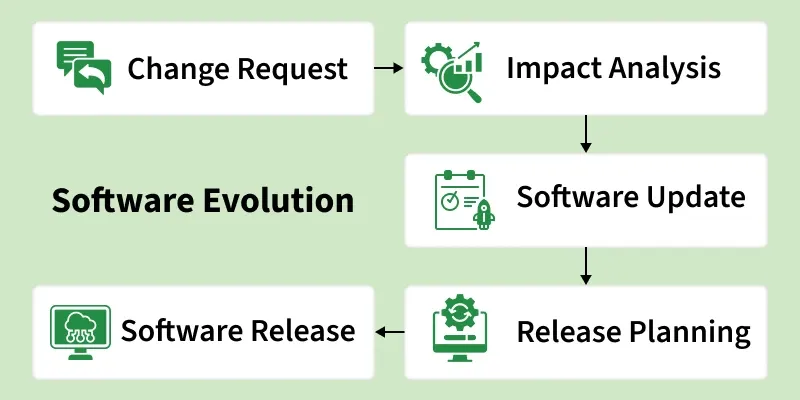
Software Evolution is the process of developing software and continuously updating it over time whether to add new features, improve performance or remove outdated functionalities. This process includes fundamental activities of change analysis, release planning, system implementation and releasing a system to customers.
- The cost and impact of these changes are accessed to see how much the system is affected by the change and how much it might cost to implement the change.
- If the proposed changes are accepted, a new release of the software system is planned.
- During release planning, all the proposed changes (fault repair, adaptation and new functionality) are considered.
- A design is created to define the changes that will be implemented in the next version of the system.
- Change implementation is an iterative process where system updates are designed, implemented, and tested.
Software Evolution
Necessity of Software Evolution
- **Changing requirements: As an organization’s needs change over time, the software must be updated to support new ways of working and improve performance.
- **Environmental changes: When the working environment or technology changes, software must evolve with updated features to stay compatible and useful.
- **Errors and bugs: Older software becomes less efficient and more error-prone, so it needs updates to handle growing workloads and complexity.
- **Security risks: Outdated software is vulnerable to cyberattacks, making regular updates and security patches essential.
- **New features and performance: Software must continuously evolve to add new features, improve speed and meet user expectations.
Types of Software Evolution
There's more than one way for software to evolve this depends on the purpose of the changes required in the software.
1. Corrective Evolution
It involves fixing problems discovered after the software has been released. Despite thorough testing, bugs and errors often surface in real-world use because users interact with software in ways that testers may never anticipate.
Example: An error message pops up on an ATM transaction
2. Adaptive Evolution
The environment surrounding the software keeps evolving with the advent of newer operating systems, hardware and devices. Therefore adaptive evolution refers to upgrading the software so that it remains relevant and compatible with changes, although there is no mal-functioning involved.
For example, the evolution of Windows 11 from Windows 10
3. Perfective Evolution
Perfective evolution is about enhancing software that already works. New features are added and existing ones are improved based on user feedback and changing needs.
Example: A photo editing app adds a background removal tool after users repeatedly request it.
4. Preventive Evolution
Preventive evolution is about maintaining software before problems arise. This includes cleaning up code, updating documentation and optimizing the system to make future maintenance easier and reduce the risk of breakdowns.
Example: A development team rewrites a confusing section
Laws used for Software Evolution
1. Law of Continuing Change
This law states that any software system that represents some real-world reality undergoes continuous change or become progressively less useful in that environment.
2. Law of Increasing Complexity
As an evolving program changes, its structure becomes more complex unless effective efforts are made to avoid this phenomenon.
3. Law of Conservation of Organization Stability
Over the lifetime of a program, the rate of development of that program is approximately constant and independent of the resource devoted to system development.
4. Law of Conservation of Familiarity
This law states that during the active lifetime of the program, changes made in the successive release are almost constant.
Software Evolution vs Software Maintenance
Here we compare software evolution with software maintenance
| Feature | Software Evolution | Software Maintenance |
|---|---|---|
| Core Idea | The process of continuously developing and updating software to meet changing needs | The process of fixing and managing existing software to keep it functioning correctly |
| Goal | Enhance the software and ensure its relevance | Maintain software functionality |
| Purpose | To grow and improve the software over time | To preserve and sustain the current state of the software |
| Nature of Changes | Proactive, changes are planned | Reactive, changes are made in response to problems |
| Cost | Higher due to larger scale changes | Lower as changes are smaller and specific |
| Example | Adding a brand-new payment system to an application | Repairing a faulty login button on an existing application |
| Frequency | Scheduled, occurs at predetermined intervals of development | Continuous, occurs as needed for maintenance |
Advantages
- **Ability to Adapt to Changing Requirements: As requirements change over time, the software can be evolved to fit into new situations to ensure that the software remains relevant.
- **Improved Security: With changing security threats, evolving software allows for regular updating to prevent any breaches to the system.
- **Improves Performance: Software can be continuously optimized to run faster, consume fewer resources, and deliver a smoother experience over time.
- **Ensures Compatibility: Evolving software stays compatible with new technologies, operating systems, standards and regulations, preventing it from becoming outdated.
- **Enhances User Experience: Continuous improvements based on real user feedback make the software more intuitive, user-friendly and enjoyable to use.
- **Extends Software Lifespan: Regular evolution prevents software from becoming obsolete, saving organizations the cost of building entirely new systems from scratch.
Challenges
- **Increasing Cost: As software grows, so does the cost of updating it. Testing, debugging and deploying modifications demands significant time, money and manpower.
- **Sustaining Quality in Updates: Every update carries the risk of affecting other parts of the system. Developers must ensure that fixing one problem doesn't introduce several others.
- **Lack of Documentation: Without proper documentation, future developers struggle to understand how the system works. This makes updates slower, costlier and far riskier than necessary.
- **Security Threats: Updating software can introduce new security vulnerabilities if not handled carefully. Every modification is a potential entry point for new attacks.
- **Compatibility Problems: Updates can break compatibility with linked or third-party systems, triggering a chain of errors that are difficult to trace and resolve.
- **Pressure to Update Quickly: Market competition pushes companies to evolve their software rapidly. However, rushing the process leads to poor quality updates and insufficient testing.