User defined function in MATLAB (original) (raw)
Last Updated : 20 Aug, 2020
Functions let you do a specific task. User defined functions are the functions created by the users according to their needs. This article explains how the user defined function in MATLAB is created.
Syntax : function [a1,...,an] = func(x1,...,xm)func is the function namea1,...,an are outputsx1,...,xm are inputs Function name is required, whereas input and output arguments are optional.
For making a user defined function in MATLAB, go to Home -> New -> Function. The function template appears as-
function [outputArg1,outputArg2] = untitled(inputArg1,inputArg2) % UNTITLED Summary of this function goes here % Detailed explanation goes here outputArg1 = inputArg1; outputArg2 = inputArg2; end
Change the function name and save the file with the changes made. Save the file either in the current folder or in a folder on the MATLAB search path. The name of the function and the file should be same. For example, to create a function for calculating factorial, the code is:
MATLAB `
function f = fact(n) f = 1; i = 1; while i <= n f = f * i; i = i + 1; end end
`
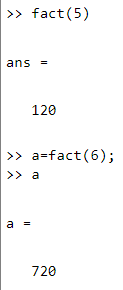
Save it and it can be run from the command window. The value of the fact() function returned, can also be stored in a variable. Code output for different values of n being passed :