Sprint and its importance in Agile Scrum (original) (raw)
Last Updated : 2 Jun, 2026
Sprint is a fixed-length iteration and an agile scrum event, during which a cross-functional scrum team works to complete a set amount of work. Generally, a sprint is time-boxed to a 2 to 4-week duration. Sprint breaks down complex tasks in product or project development into shorter durations with a well-defined sprint goal, and it results in a potentially shippable Product Increment (PI).
**Purpose of Sprint
The purpose of a Sprint is defined as a product increment or to make specific and planned progress against the product goal. Each Sprint purpose or goal is determined during the Sprint planning meeting and agreed upon by the Scrum Team, which includes the Product Manager, Development Team, and Scrum Master.
**Definition of Agile
Agile is a flexible, adaptive, and collaborative project development approach that breaks down projects into short iterations called Sprints of 2 to 4 weeks. Agile has 4 values and 12 principles called the Agile Manifesto. Agile frameworks include Scrum, Kanban, Extreme Programming (XP), Disciplined Agile (DA), Large Scale Scrum (LeSS) and Scaled Agile Framework (SAFe)
**Sprint in Agile
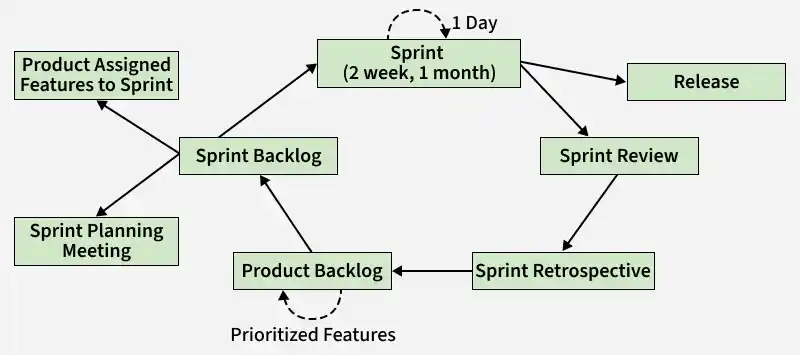
In Agile, a Sprint is a time-boxed iteration of 2 to 4 weeks, during which the scrum team works to complete a set amount of work planned during sprint planning meetings. Sprint is a fundamental component of Scrum, which is one of the popular Agile frameworks.
**Sprints in Agile Scrum
They are used by the entire Scrum team which includes the Development Team, Scrum Master and Product Owner.
- Additionally, the key stakeholders including customers, end users, business representatives and the leadership team of a company, use Sprint.
- The Development Team includes all Software Developers, Quality assurance, Testing teams, Designers and UX Specialists who are involved in the development process of a product or project.
Characteristics of a Sprint
The key characteristics of a Sprint are listed below.
- **Time-Boxed Duration: A sprint has a fixed, time-boxed duration which is determined by the Scrum Team based on the team's capacity and the nature of the project. As a general practice, this duration is consistent throughout a project for predictability.
- **Fixed Sprint Goal: Each Sprint has a well-defined, clear and concise Sprint goal with planned objectives the team aims to achieve.
- **Iterative Process: Sprints are continuous and repetitive with each sprint working on top of what was achieved in the previous sprint.
- **Incremental Development: From each sprint the product is built incrementally, and releases done to product increments.
- **Collaborative Teamwork: Sprints are executed by the Collaborative efforts of all team members including the product owner, scrum master and development team. They work together to plan, execute and review the sprint.
- **Adaptive: Sprint is adaptive and flexible to adjust the scope of the sprint based on customer feedback and markets' changing requirements.
- **Potentially Shippable Product Increment: The primary objective of each sprint is to deliver a well-defined potentially shippable product increment that meets the 'definition of done.
- **Empirical Process Control: Based on the feedback, data and experience of Sprint Review and Sprint Retrospective events, the empirical process is implemented. Empirical process control helps the team to continuously inspect and adapt their work for improvement.
- **Stakeholder Engagement: Sprints engages all stakeholders during the sprint cycle, to engage and receive feedback which promotes transparency and alignment with stakeholders' needs.
Purpose of Sprint in Agile Scrum
Below is the list of items that serve the purpose of a Sprint:
- **Delivers Value: The main goal of each Sprint is to create a potentially shippable product increment and deliver value to customers in a fixed duration. The Sprint goal is achieved by selection of work from the product backlog during sprint planning, with estimation and definition of the done.
- **Achieve short-term goals to: Every Sprint will provide short-term, and concrete discusses goals to which the Scrum team commits and that will enhance focus and accountability.
- **Adaptation to Change: A sprint incorporates the Agile Scrum principle of Adaptation, to adapt to any change in requirements or priorities.
- **Continuous Improvement: During the Sprint Retrospective at the end of every Sprint, the scrum team reflects on their processes, identifies what went well and what needs improvement or correction which leads to continuous improvement.
The outcome of a Sprint
The outcome of a Sprint is measured by the tangible and demonstrable product increment, based on the sprint goal and sprint backlog. Below are the key outcomes of a Sprint:
- **Potentially Shippable Product Increment: The primary outcome of a Sprint is potentially shippable and usable product increment which adds to the product iteration.
- **Demonstrable Progress: Progress of a Sprint is reviewed during Daily Scrum and the Sprint Review at the end of a Sprint, the stakeholders are updated with a Demo of the completed work.
- **Feedback and Validation: Stakeholders should be able to review the tangible progress achieved during the Sprint and provide feedback for improvement, which helps validate the work completed.
- **Reflection and Improvement: The action items derived from the Sprint Retrospective results to action items and improvements for the next Sprint.
- **Revised Product Backlog: New insights and improvement ideas may emerge from Sprint review and this will lead to an updated product backlog with the addition of new items or removing obsolete ones. This leads to revised and reprioritized product backlog items which ensures that the product remains relevant to the evolving needs of the business and users.
The Sprint Lifecycle
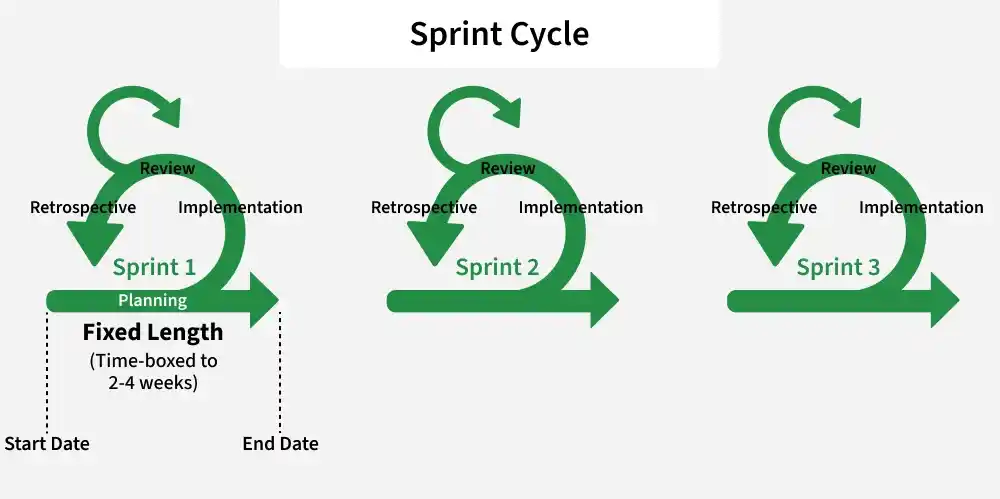
The Sprint Lifecycle in Agile Scrum is a repetitive, time-boxed cycle used for developing and managing software products. It operates on the core Scrum pillars of transparency, inspection, and adaptation, enabling continuous improvement.
Each Sprint is a fixed-duration iteration, typically lasting between one to four weeks, with a clear start and end date. As soon as one Sprint ends with its deliverables, the next Sprint begins immediately. This iterative approach allows teams to deliver working increments of the product frequently and respond flexibly to changes.
The Sprint Lifecycle consists of five key events:
- Sprint Planning
- Daily Scrum
- Sprint Execution
- Sprint Review
- Sprint Retrospective.
Working of Sprint In an Agile Framework
Sprint in agile is characterized by many events and activities. Below are the key items based on how Sprint works in an agile framework:
- **Sprint Planning Meeting: Held at the start of each Sprint. The Scrum Team (Product Owner, Development Team, and Scrum Master) defines the Sprint Goal and selects Product Backlog Items to complete. Timeboxed to 2 hours per week of Sprint duration.
- **Sprint Backlog: Set of Product Backlog Items (PBIs) selected and committed by the team during Sprint Planning. Represents the work to be completed by the end of the Sprint.
- **Definition of Done (DoD): Clear, shared checklist created by the team for each item. Ensures work is fully complete, tested, and meets quality standards before it can be considered "Done".
- **Sprint Execution & Progress Tracking: The Development Team works on Sprint Backlog items daily. Progress is updated every day. A Burndown Chart is commonly used to show remaining work.
- **Daily Standup (Daily Scrum): 15-minute daily meeting where the team answers:
- What did I do yesterday?
- What will I do today?
- Any blockers/impediments?
- **Sprint Review Meeting: Held at the end of the Sprint with stakeholders and customers. The team demonstrates completed work, gathers feedback, and validates if the Sprint Goal was achieved.
- **Sprint Retrospective Meeting: Held after the Sprint Review. The team reflects on what went well, what didn’t, and identifies improvements for the next Sprint.
- **End of Sprint: After Review and Retrospective, the Sprint ends. Actionable improvements are taken into the next Sprint. A new Sprint begins immediately.
Benefits of working in sprints
- **Faster Delivery of Value: Sprints enable faster delivery and shorter time-to-market. This helps scrum teams to deliver potentially shippable product increments at the end of each sprint iteration. This enables deliver value based on quicker response to market changes and customer feedback.
- **Increased focus and motivation: Sprint enables teams to stay focused on the shorter duration goals, which leads to increased motivation and productivity.
- **Higher Quality Deliverables: Sprint helps to identify problems early on, which leads to improved quality delivery.
- **Increased flexibility: Sprint enables teams to adapt to changes in requirements, customer feedback and changing market conditions.
- **Reduced Risk: Sprint consists of small and manageable pieces of work that reduce risks associated with a long monolithic development process. sprint iterations, teams can identify and mitigate risks more effectively.
- **Measurable Progress: The team can track the progress of the sprint and measure planned versus completed sprint backlog items to gauge team velocity. This leads to data-driven decisions to plan future commitments and resource allocation.
- **Increased customer satisfaction: Sprints deliver work increments of product regularly which helps customers to view progress instead of waiting till the end of longer duration developments. This helps to keep customers engaged and satisfied with the progress.
- **Improved communication and collaboration: Sprints foster a collaborative environment for teams to work closely and communicate quickly and effectively to achieve sprint goals.
Essentials to running a successful sprint
Following are the elements and best practices to ensure a successful Sprint in agile scrum:
- **Well-defined sprint goal: Have a clear and well-defined sprint goal for the team to achieve at the end of a sprint.The sprint goal should be specific, measurable, achievable, relevant, and time-bound (SMART).
- **Prioritized Product Backlog: The product owner should maintain a prioritized and ordered list of product backlog items ready to be selected during sprint planning meeting for the next sprint.
- **Effective Sprint Planning: All sprint planning meetings should be organized and time boxed.During the planning meeting the development team collaborates with the Product owner to select the backlog items based on the capacity and team velocity.
- **Collaborative sprint execution: All cross-functional team members should work closely together to complete the selected items.Daily the team should review progress together and identify any road-blocks to be resolved quickly.
- **Be Realistic and Transparent: The team should be realistic in defining the amount of work and not overcommit. The team should be transparent to share information about any changes and progress of the sprint regularly and keep everyone informed.
- **Hold daily standup meetings: The Scrum team should hold daily standup meetings at a specified time to review previous days' work and what the team will be working on that day.During the standup call the team members should also bring up any impediments or progress blockers to be resolved
- **Sprint review meeting: At the end of the sprint, the completed work should be reviewed with the stakeholder and receive the feedback.
- **Definition of Done (DoD): Verify and adhere to the agreed-upon Definition of done at the end of the sprint. This sets the quality and ensures the delivered backlog items are potentially shippable.
- **Hold a retrospective meeting: After the completion and acceptance of the definition of done, of a spirit, the team should meet to reflect on the completed spirit to identify what went well and what needs improvement. This will help the team to continuously improve the process and deliver better results in future sprints.
Steps to Create and Run a Sprint
Creating a Sprint involves a set of well-defined steps and processes. Below is the step-by-step guide to creating a sprint:
- A ready-to-work product backlog list of features and functions for the specific product is the first step before creating a sprint.
- Schedule the Sprint with duration and begin and end dates.
- Sprint Planning meeting is held before the Sprint begins.
- Sprint execution with daily standup meetings to monitor progress.
- Update the status of work completed and in progress.
- Progress is monitored using a burndown chart.
- Sprint review is done after the completion of all backlog items planned for the sprint.
- Verify the Definition of Done.
- Hold the Sprint retrospective meeting.
- End of the current sprint and begin the next sprint.
Jira Example for creating a Sprint:
Jira is a project/product management tool used by teams to add and track the progress of project/product issues, user stories and releases. We will explore the Sprint actions from Jira software.
Below are steps to create a New Sprint, start a Sprint and Complete a Sprint:
**Step 1: To begin log in to the Jira tool.

**Step 2: Select your project from the list of projects available.
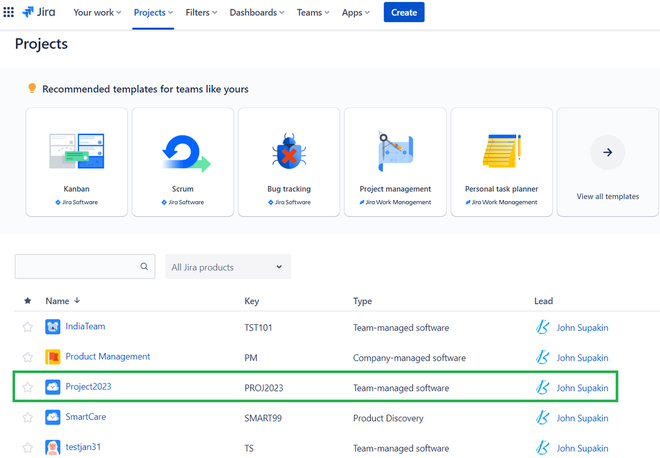
In this demo, I'm selecting the project 'Project2023'.
**Step 3: View product backlog items created in the project selected above.
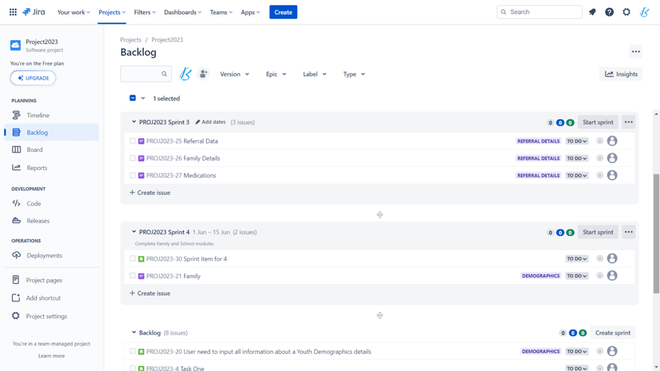
**Step 4: Edit Backlog Item. After creating a backlog item or adding it to a sprint, it can be edited by selecting the particular item. A window will appear to the right of the item selected. You can add or update a description and add or edit other information like assignee, Sprint name, Story point estimated value and the fix version number for issue.

Create New Sprint
Below are the steps for creating a new Sprint from Jira.
**Step 1: Create the New Sprint
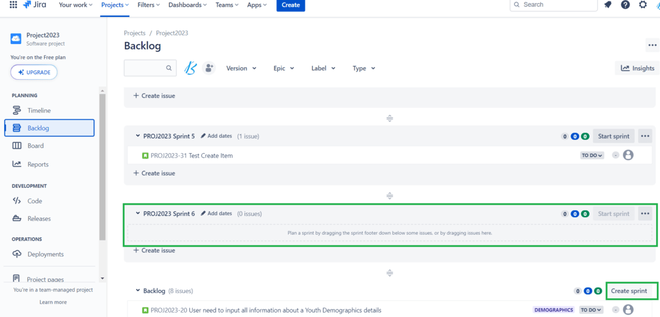
Click the 'Create Sprint' button on atop right of a backlog items list to create a new Sprint.
**Step 2: Add a New Issue to the New Sprint
Once a planned Sprint is created, we can add new tasks or issues can be added to the new Sprint created.
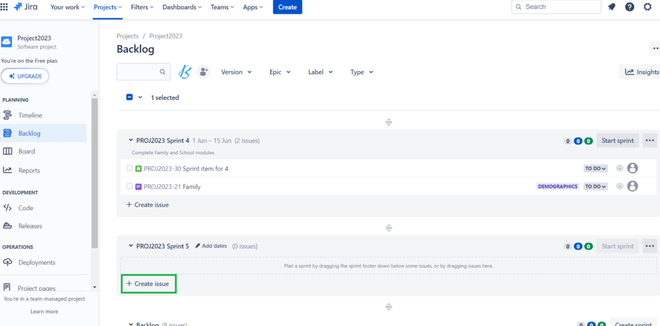
Click the 'Create Issue' button and an editable area appear above the button to add details of the issue.
**Step 3: Drag an Item to the New Sprint from the backlog items. You can add as many items as required and plan for a specific Sprint.

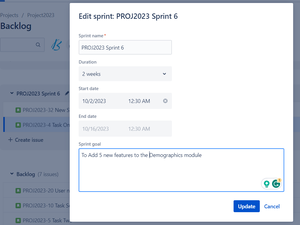
**Step 4: Edit Sprint Dates and add Sprint goal.
Select Add date or click of the 3 dots at the top right end of a sprint and a popup menu displays, select 'Edit the sprint' menu to add or edit dates.
Start a New Sprint
**Step 1: Start a Sprint
After all backlog items are added to a particular Sprint and ready, you can click the 'Start Sprint' button to begin a new Sprint.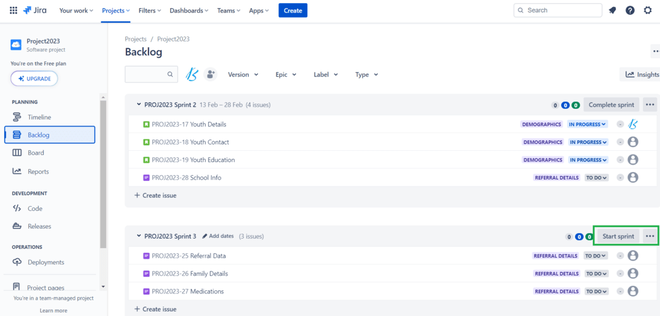
**Step 2: View Sprint Progress
As Sprint progresses and the scrum team works on the issues and tasks from the Sprint, the progress and status of the Sprint items can be viewed from the 'Timeline' tab at the left of the selected project.

**Step 3: Sprint task status
When we need to change the status of a task or issue, it can be changed by selecting the item from the list of items in the Sprint and changing the status to 'In Progress' and 'Done' The 'To Do' status is the default when we create a new task or issue.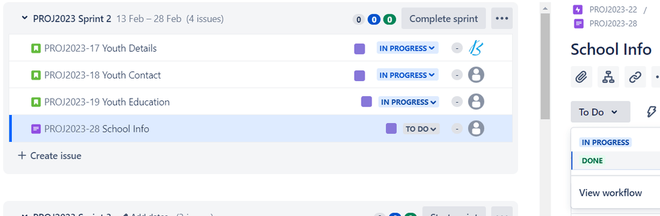
Step 4: Complete a Sprint
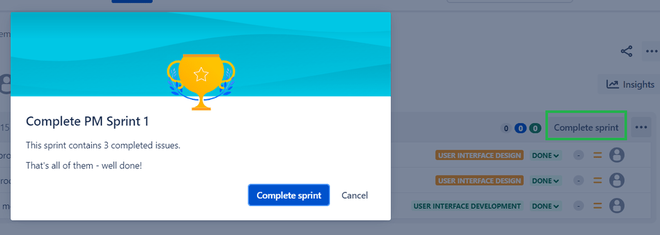
When a Sprint is completed after the specified time and 'Definition of Done' is accepted by all team members after Sprint Review, the 'Sprint' can be set to be completed by clicking the 'Complete Sprint' button.
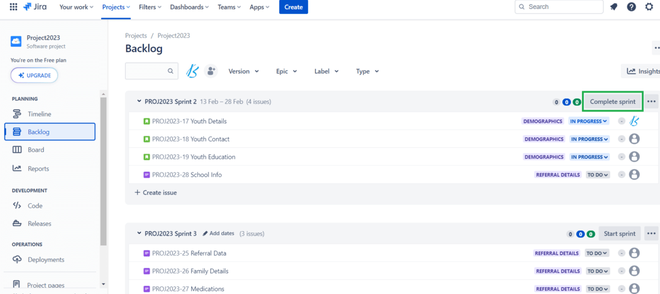
After the 'Complete Sprint' button is clicked below confirmation window appears. Select the helps 'Complete Sprint' button.