Getting started with Scripting in the Postman (original) (raw)
Last Updated : 28 May, 2026
Postman scripting allows you to add JavaScript code to automate API testing, handle dynamic data, and validate responses. It helps make API workflows more efficient and reusable.
- Pre-request scripts run before sending the request to set variables or modify data
- Test scripts run after the response to validate results and perform assertions
- Helps automate tasks like token generation, data extraction, and response checking
Types of Scripts in Postman
Postman scripting is mainly divided into two types based on when they run in the request lifecycle.
- **Pre-request script: Runs before the request is sent and is used to set up data such as headers, tokens, variables, cookies, or dynamic request bodies.
- **Test scripts: Runs before the request is sent and is used to set up data such as headers, tokens, variables, cookies, or dynamic request bodies.
Writing Scripts in Postman
Writing scripts in Postman is simple because it uses JavaScript. Pre-request scripts are written in the Pre-request Script tab, and test scripts are written in the Tests tab.
Variables in Postman Test Scripts
Postman has four types of variables:
- **Environment Variables: Environment variables are used to manage different environments like development, testing, and production. Only one environment is active at a time. They are created in the Environment section and accessed using:
pm.environment.get('variableName') - **Collection variables: Collection variables are available within a specific collection and are independent of environments. They are useful for shared values like base URLs or authentication data. They are defined in the collection variables section and accessed using:
pm.collectionVariables.get('variableName') - **Local variables: Local variables are temporary and exist only during a single request execution. They are used in scripts and do not persist after the request ends. They are set using:
pm.variables.set('variableName', 'value') - **Global Variables: Global variables are accessible across the entire workspace, including all collections, requests, and environments. They are useful for testing and prototyping. They are defined in the Global Variables section and accessed using:
pm.globals.get('variableName')
**Pre request scripts examples: To access the request properties in postman you can pm.request
JavaScript `
// Set a custom header pm.request.headers.upsert({ key: 'Authorization', value: 'Bearer ' });
// Set a query parameter pm.request.url.addQueryParams([ { key: "page", value: "1" } ]);
// Generating fake data for request body let obj = { fname: pm.variables.replaceIn('{{$randomFirstName}}'), lname: pm.variables.replaceIn('{{$randomLastName}}'), country: pm.variables.replaceIn('{{$randomCountry}}') };
pm.request.body.raw = JSON.stringify(obj);
// Setting environment and collection variables pm.environment.set('id', 14234233); pm.collectionVariables.set('uid', 93782937);
// Getting variables (example usage) pm.environment.get('id'); pm.collectionVariables.get('uid');
// Sending a request pm.sendRequest({ url: 'https://api.example.com/some-endpoint', method: 'GET' }, function (err, res) { console.log(res ? res.json() : err); });
`
Test scripts examples
A test scripts can contain multiple pm.test() calls. Each call to pm.test() is for testing one parameter of the response.
**Validate response status code
JavaScript `
// Check if the response status code is 200 (OK) pm.test('Status code is 200', function () { // assertion to check if status code is 200 or not // if assertion is true then test passes else test fails pm.response.to.have.status(200); });
`
**Check response body JSON has a certain field
JavaScript `
// Parse the response JSON const responseBody = pm.response.json();
// Check if a property exists in the response pm.test('Response contains the "username" property', function () { pm.expect(responseBody).to.have.property('username'); });
`
**Response body JSON property value validation
JavaScript `
// Parse the response JSON const responseBody = pm.response.json();
// Check if a property has an expected value pm.test('Username is correct', function () { pm.expect(responseBody.username).to.eql('expected_username'); });
`
**Response time validation
JavaScript `
// Check if the response time is less than 500 ms pm.test('Response time is acceptable', function () { pm.expect(pm.response.responseTime).to.be.below(500); });
`
**Handling Authentication
JavaScript ``
// Obtain an access token from a previous response and set it as a variable const accessToken = pm.response.json().access_token; pm.environment.set('access_token', accessToken);
// Set the access token as an authorization header
pm.request.headers.add({
key: 'Authorization',
value: Bearer ${accessToken}
});
``
There are many snippets available in Postman test scripts. They can be found on the right side of the test script editor.
Postman has built in functionality of generating fake data. You can know more about it here.
A simple test script in Postman
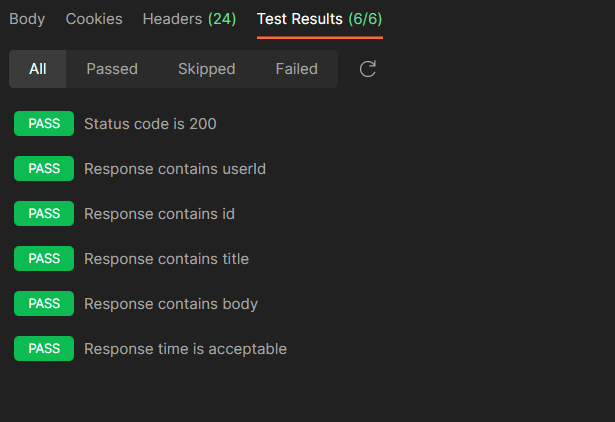
In Postman, you can write test scripts in the Tests tab to validate API responses. Below is a simple example for a GET request that checks status code and response body properties.
**Example: Method - GET
JavaScript `
// Check if the response status code is 200 (OK) pm.test("Status code is 200", function () { pm.response.to.have.status(200); });
// Parse the response JSON const jsonData = pm.response.json();
// Check if the response contains specific properties pm.test("Response contains userId", function () { pm.expect(jsonData.userId).to.exist; });
pm.test("Response contains id", function () { pm.expect(jsonData.id).to.exist; });
pm.test("Response contains title", function () { pm.expect(jsonData.title).to.exist; });
pm.test("Response contains body", function () { pm.expect(jsonData.body).to.exist; });
`
Now hit the send button and look the tests passing successfully in the result bar. At last, our efforts paid off.
Reasons to Use Scripting in Postman
Scripting in Postman enhances API testing and automation by adding dynamic and intelligent behavior to requests and responses.
- **Dynamic Test Data: You can generate dynamic test data such as names, cities, phone numbers, and pin codes while executing scripts. This removes the need for manually creating test data.
- **Response Validation: You can validate API responses by writing test scripts to check status codes, response bodies, and schemas. This helps detect unexpected changes and ensures the API behaves as expected.
- **Automation: You can automate end-to-end API workflows by chaining multiple requests like authentication, data creation, update, and deletion using GET, POST, PUT, and DELETE methods. This is useful for complex testing scenarios.
- **Data Extraction: You can extract values from API responses and store them in variables (environment, collection, or global) for reuse in later requests. This is commonly used for tokens, session IDs, and dynamic data.