Gray Box Testing Software Testing (original) (raw)
Last Updated : 18 May, 2026
Gray Box Testing is a hybrid testing approach that combines the strengths of both Black Box and White Box Testing. It leverages partial knowledge of the internal structure while focusing on the system's functionality and behavior from an external perspective.
- Combines external user behavior testing with partial internal system knowledge.
- Helps in identifying both functional and structural issues effectively.
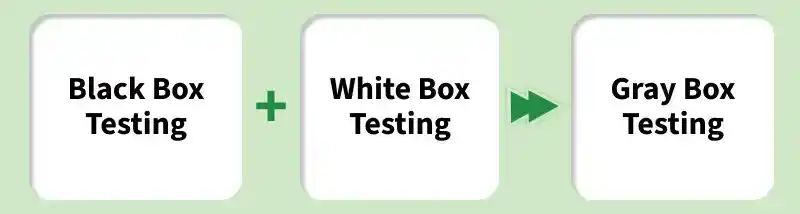
Gray Box Testing
Objectives of Gray Box Testing
- To combine the advantages of both Black Box Testing and White Box Testing.
- To utilize inputs from both developers and testers for better test design.
- To improve overall product quality by identifying defects at different levels.
- To reduce testing effort by focusing on critical areas using a hybrid approach.
- To support efficient defect detection and quicker debugging.
- To validate the system from a user’s perspective while using internal insights.
Purpose and Significance of Gray Box Testing
- **Balances Depth and Efficiency: Combines internal code knowledge with external system behavior, offering a more comprehensive testing approach.
- **Improves Software Security: Helps identify security vulnerabilities by testing both functional and structural aspects.
- **Enhances Integration Testing: Effective for testing how different components or modules of a system interact with each other.
- **Boosts Product Quality: Provides a more thorough evaluation, leading to the detection of both high-level issues and deep-rooted defects.
- **Reduces Testing Time: Optimizes the testing process by focusing on both functional and technical aspects without duplicating efforts.
- **User-Centric Testing: Approaches the system from the user’s perspective while considering the internal logic, ensuring usability and reliability.
Architecture of Grey Box Testing
Before understanding the architecture components, it is important to know that Grey Box Testing combines external behavior testing with partial internal system knowledge to ensure more effective validation.
Partial Internal Knowledge Utilization
In Grey Box Testing, testers have limited access to internal details such as database structure, APIs, and system architecture. This helps identify critical areas, improve test accuracy, and detect hidden defects without full access to the source code.
- Focuses on both functionality and internal behavior
- Helps uncover issues related to data handling and integration
Example: A tester checks a registration form and also verifies whether the data is correctly stored in the database tables and follows the expected schema.
Hybrid Test Design Approach
Test cases are designed using both external requirements (inputs/outputs) and partial internal knowledge. This approach ensures better validation of data flow, integration points, and system behavior compared to pure black box testing.
- Combines black box and white box testing techniques
- Validates both user input and backend processing
**Example: A tester validates a login feature not only by checking valid/invalid inputs but also by understanding how user data is stored in the database.
Targeted Testing Techniques
Grey box testing uses focused techniques like API testing, database testing, State Transition Testing, and regression testing to validate both frontend functionality and backend processes effectively.
- API testing to verify communication between services
- Database testing to ensure data integrity
**Example: A tester performs API testing on a payment system to ensure correct request/response handling and verifies in the database that transaction records are updated accurately.
Workflow of Grey Box Testing
The Grey Box Testing workflow includes the following step by step process:
1. Create Test Case
Writing detailed test cases for a module or application using partial internal knowledge along with external requirements.
- Identify positive, negative, boundary, and exception scenarios by combining functional specifications with limited internal details (API structure, database schema, architecture diagrams)
- Design test cases using hybrid techniques such as Matrix Testing, Orthogonal Array Testing, and State Transition Testing
- Prepare test data, preconditions, expected outputs, and internal checkpoints (logs, database queries, API responses)
2. Review Test Case
Peer or senior review of the created test cases for quality, completeness, and effective use of partial internal knowledge.
- Check coverage of both external functionality and targeted internal areas
- Verify correctness of expected results, test data, edge cases, and internal validation points
- Ensure adherence to testing standards, readability, and proper balance between black-box and white-box elements
- Record comments and update test cases based on feedback
3. Baseline Test Case
Officially approving and freezing the reviewed test cases as the standard version.
- Approve test cases after successful review
- Commit the test cases into version control with “Baseline” tag
- Mark them as official and ready for execution
- Create a test execution plan and assign test cycles
4. Execute Test Case
Running the baselined test cases to validate application behavior using both external inputs and partial internal monitoring.
- Execute test cases manually or through automation tools while observing internal elements (logs, database state, API calls)
- Compare actual output with expected output and record results
- Log defects for any mismatches and track them in defect management tool
- Perform re-testing and regression testing after defects are fixed
5. Defect Reporting & Retesting
Log all defects with proper steps to reproduce, severity, and priority. After fixes, perform retesting and regression testing to ensure no new issues are introduced.
Gray Box Testing Techniques
The following are the key techniques used:
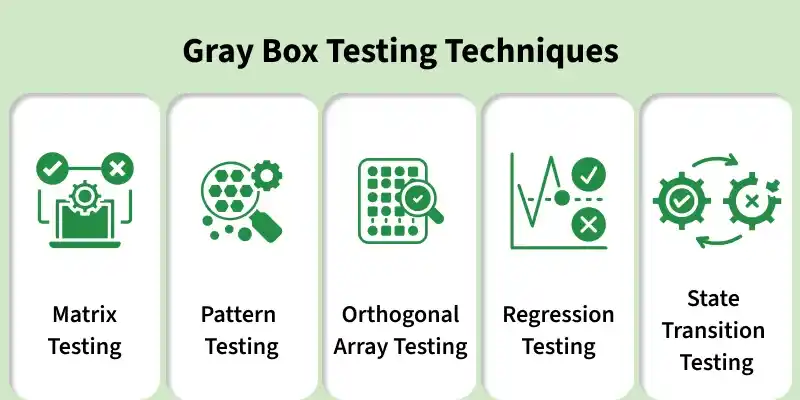
1. Matrix Testing
Matrix testing focuses on identifying and analyzing variables in the application along with their associated technical and business risks.
- Evaluates risk impact of each variable
- Helps prioritize testing areas
- Improves coverage based on usage frequency
2. Pattern Testing
This technique uses historical defect data to identify recurring patterns and root causes.
- Analyzes past defects to prevent repetition
- Helps design proactive test cases
- Improves defect prediction and prevention
3. Orthogonal Array Testing
A structured black-box technique used to test multiple combinations with minimal test cases.
- Reduces number of test cases
- Ensures maximum input combination coverage
- Ideal for complex systems with large datasets
4. Regression Testing
Performed after changes to ensure existing functionality remains unaffected.
- Validates system stability after updates
- Detects unintended side effects
- Ensures defect fixes don’t break other features
5. State transition Testing
Used for systems with different states and transitions between them.
- Verifies correct state changes
- Tests valid and invalid transitions
- Ensures system behaves as expected across states
6. Testing Decision Tables
Organizes complex business rules into a table format to cover multiple input combinations.
- Simplifies complex logic testing
- Ensures all rule combinations are covered
- Improves test clarity and completeness
7. Testing APIs
Focuses on testing system interfaces without full knowledge of internal code.
- Validates input/output handling
- Ensures proper communication between systems
- Tests different data formats and responses
8. Data Flow Testing
Examines how data moves through the system to identify potential issues.
- Tracks data paths and transformations
- Detects data handling errors
- Ensures data integrity and consistency
Process of Gray Box Testing
Gray box testing mixes both black box and white box testing. The tester has partial knowledge of how the system works internally but focuses mainly on its inputs and outputs. Unlike white box testing, you don’t need to design tests based on the code.
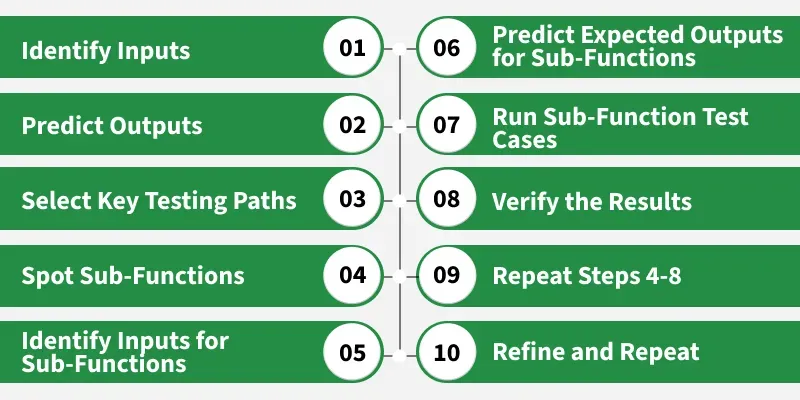
Process of Gray Box Testing
- **Identify Inputs: Determine the required test inputs using both system requirements and partial internal knowledge (like APIs, database, or workflows).
- **Predict Expected Outputs : Define the expected results for each input to verify whether the system behaves correctly.
- **Select Critical Testing Paths: Focus on important system areas such as key features, data flow paths, and integration points.
- **Identify Sub-Functions: Break down the system into smaller modules or components that need individual testing.
- **Define Inputs for Sub-Functions: Determine specific inputs required to test each module effectively.
- **Define Expected Outputs for Sub-Functions : Specify the expected results for each sub-function based on given inputs.
- **Execute Test Cases: Run test cases on sub-functions and overall system using real or simulated inputs.
- **Verify Results: Compare actual outputs with expected results to identify defects.
- **Repeat for Other Modules: Continue testing remaining modules and system paths to ensure full coverage.
- **Refine and Retest: Improve test cases based on defects found and re-test to ensure issues are resolved.
Grey Box Testing Example
Gray box testing combines aspects of white box and black box testing. For example, consider a User Registration System.
ArtOfTesting’s login feature uses gray box testing, ensuring both the UI and backend work correctly. It tests the system’s internal parts (API, database, authentication) along with the user-facing behavior.
- **Step 1. Open Login Page: Navigate to the URL using Selenium.
- **Step 2. Enter Credentials: Input valid username and password.
- **Step 3. Submit Login: Click the login button.
- **Step 4. Verify Login: Check redirection to the correct page.
- **Step 5. Optional Checks: Confirm database entry and API response for the login attempt.
**BaseTestMain.java
Java `
package Test;
import org.openqa.selenium.WebDriver; import org.openqa.selenium.chrome.ChromeDriver; import org.testng.annotations.AfterMethod; import org.testng.annotations.BeforeMethod;
public class BaseTestMain {
protected WebDriver driver;
protected String Url = "https://ecommerce.artoftesting.com/";

// Set up the ChromeDriver
@BeforeMethod
public void setup() {
    // Set the path to your chromedriver executable
    System.setProperty("webdriver.chrome.driver", "C:\\Users\\path of the chromedriver\\drivers\\chromedriver.exe");


    // Initialize the ChromeDriver
    driver = new ChromeDriver();
}

// Close the browser after each test
@AfterMethod
public void teardown() {
    if (driver != null) {
        driver.quit();
    }
}
}
`
**LoginPageText.java
Java `
package ArtOfTesting;
import org.openqa.selenium.By; import org.testng.Assert; import org.testng.annotations.Test;
import Test.BaseTestMain;
public class LoginPageTest extends BaseTestMain{
@Test
public void TestLogin() {
    driver.get(Url);
    driver.findElement(By.name("uname")).clear();
    driver.findElement(By.name("uname")).sendKeys("auth_user");

    Assert.assertEquals(driver.getCurrentUrl(), "https://ecommerce.artoftesting.com/");

    driver.findElement(By.name("pass")).clear();
    driver.findElement(By.name("pass")).sendKeys("auth_password");

    driver.findElement(By.className("Login_btn__pALc8")).click();
    System.out.println("Login Successful");

     // Optional: Backend Verification - Database Check
    // For this step, you could verify the database to ensure the login attempt was logged.
    // Example (pseudo-code for DB verification, not actual code in the test):
    // assertTrue(checkDatabaseForLoginAttempt("auth_user"));

    // Optional: API Verification - Verify API response (you can use Postman or other API testing tools for this)
    // Example (pseudo-code for API verification):
    // assertTrue(verifyLoginApiResponse("auth_user"))

}
}
`
**Output:
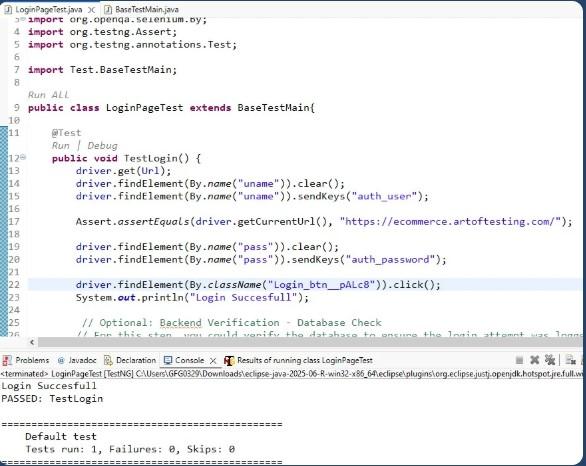
Output of Gray Box Test Example
Gray Box Testing Tools
- **Playwright : Excellent network interception, tracing, API testing, and DOM inspection. Allows partial internal knowledge while testing UI flows. Fast, reliable, and cross-browser.
- **Postman : Widely used for validating APIs with knowledge of endpoints, schemas, and data flows. Supports environment variables, collections, and integration with CI/CD.
- **Burp Suite : Industry standard for Grey Box penetration testing. Allows intercepting traffic, modifying requests, and using partial knowledge of application architecture for deeper vulnerability detection.
- **Selenium 4 : Mature framework with strong support for browser dev tools, network logging, and integration with internal monitoring. Still heavily used in enterprise for hybrid testing.
- **Appium : Mature framework with strong support for browser dev tools, network logging, and integration with internal monitoring. Still heavily used in enterprise for hybrid testing.
Advantages of Gray Box Testing
- **Comprehensive Coverage: Combines external functionality and internal structure for thorough testing.
- **Better Fault Detection: Identifies both functional issues and system vulnerabilities.
- **Efficient Test Design: Optimized test cases based on partial internal knowledge.
- **Improved Security: Effective for finding security flaws and vulnerabilities.
- **Faster than White Box: Takes less time than full white box testing.
- **Ideal for Integration Testing: Perfect for testing interactions between components.