How To Write A Good Bug Report? (original) (raw)
Last Updated : 12 May, 2026
A well-written bug report is essential in software testing because it ensures clear communication between testers and developers. It helps in faster identification, tracking, and resolution of defects, improving overall software quality.
- Improves clarity and reduces misunderstandings between teams.
- Speeds up bug fixing and issue resolution process.
- Enhances product quality and user satisfaction.
Elements of an Effective Bug Report
To create an effective bug report in software testing and development, it should include the following key elements:
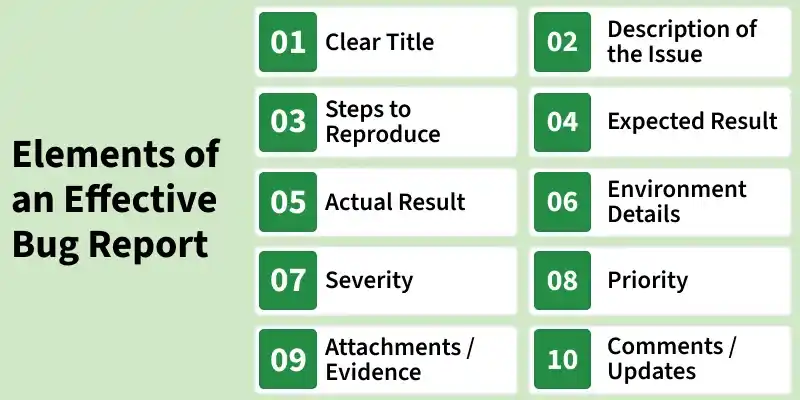
- **Clear Title: A concise and meaningful summary that quickly explains the issue.
- **Description of the Issue: A detailed explanation of the problem, its behavior, and impact on the system.
- **Steps to Reproduce: Exact steps required to consistently recreate the defect.
- **Expected Result: The correct behavior the system should show under normal conditions.
- **Actual Result: The actual behavior observed, highlighting the mismatch with expectations.
- **Environment Details: Information such as OS, browser, device, and software version where the issue occurred.
- **Severity and Priority: Defines the impact of the bug and the urgency of fixing it.
- **Attachments / Evidence: Screenshots, logs, or recordings that help explain the issue clearly.
- **Comments / Updates: Additional notes or clarifications added during investigation or discussion.
Writing an Effective Bug Report
A good bug report in software testing and development includes all necessary details that help teams understand, reproduce, analyze, and fix the issue efficiently. It should be clear, structured, and easy to follow to ensure faster resolution and better communication.
1. Title / Bug ID
A unique and concise identifier that clearly summarizes the issue for easy tracking and reference throughout the development and testing lifecycle.
- Helps quickly identify and categorize defects in tracking systems.
- Provides a short overview for faster understanding of the issue.
- Essential for managing multiple bugs in large projects using tools like Jira.
2. Environment
The environment section contains all technical details of the system where the issue occurred, helping ensure accurate reproduction and analysis.
- Includes OS, browser, device type, software version, and configuration settings.
- May also include network conditions like WiFi, 4G, or Ethernet.
- Helps developers reproduce issues in the exact same setup.
- Improves accuracy in identifying environment-specific defects.
3. Steps to Reproduce a Bug
A structured sequence of actions required to consistently trigger the issue in the system.
- Provides clear and step-by-step instructions for replication.
- Ensures developers can reproduce the bug without ambiguity.
- Helps identify the root cause faster and more accurately.
4. Expected Result
The expected result defines the correct system behavior based on requirements and design specifications.
- Acts as a reference for correct functionality.
- Helps compare actual system behavior against requirements.
- Clearly defines how the system should respond under given conditions.
5. Actual Result
The actual result describes the real behavior of the system when the bug occurs.
- Highlights the difference between expected and real output.
- Helps developers understand the impact of the defect.
- Provides clarity on how the system is malfunctioning.
6. Visual Proof of Bug
Visual evidence such as screenshots, videos, or logs that clearly demonstrate the issue.
- Provides strong support for understanding complex or UI-related bugs.
- Helps developers quickly identify and verify the issue.
- Reduces dependency on assumptions or verbal explanation.
7. Bug Severity and Priority
A classification system that defines the impact of the bug and urgency of resolution to support effective planning and decision-making.
- Helps prioritize bugs based on business and technical impact.
- Ensures critical issues are addressed first.
- Improves resource allocation and release planning.
**Bug Severity Levels
Defines how much impact a bug has on the system’s functionality and overall user experience.
- **Low: Minor issue with no major system impact.
- **Minor: Slight functional or UI issue.
- **Major: Significant functionality affected.
- **Critical: System crash or complete failure.
**Bug Priority Levels
Indicates the urgency of fixing a bug based on business needs and project requirements.
- **Low: Can be fixed later.
- **Medium: Fix in normal development cycle.
- **High: Requires immediate attention due to major impact.
Benefits of a Good Bug Report
A good bug report helps developers quickly understand, reproduce, and fix issues in a software application. Clear and detailed bug reports improve communication between testers and developers, leading to faster issue resolution and better software quality.
- Helps developers identify and fix bugs quickly
- Improves communication between testers and developers
- Reduces debugging and testing time
- Enhances overall software quality and reliability