What is Jira Backlog? (original) (raw)
Last Updated : 15 Sep, 2025
Jira is a popular tool for product management. It has multiple features for product management. Among them, Backlog is one of the most prominent tools used by developers in the software industry to get execution of the project. Backlog is like making a to-do list of the required things, but it is done smartly.
In this article, we will explain Jira Backlog and why it is useful for getting things done in a project.
What is the Jira Backlog
Your backlog is like a to-do list for your team project. In Jira backlog is like an area of storage of work that needs to be done in the Jira Project. It is a place where all the ideas and tasks are stored that need to be done in the future. These tasks may not be an immediate task that needs to be done but are essential for project execution. Backlog also provides the feature of prioritizing task that needs immediate attention.
It is where you can keep track of different tasks in a team:
- What you are working on right now on the project?
- What you are planning to do next in the project?
- Things that are not urgent but you still want to remember to do later to improve the output of the project.
Backlogs look different in Scrum and Kanban projects, and we will explore those differences in the project.
Why is the Jira backlog important?
Using Jira Backlog in project management offers a lot of benefits. Some of the major benefits are written below:
- **Prioritization: In backlog all the feature tasks are listed in one place which it easier to prioritize the work based on importance.
- **Transparency: It gives transparency to the works making it clear to the team what is planned and how needs to be done.
- **Continuous Planning: In Agile Methodology, there requires continuous planning and adaptability. The backlog facilitates the ongoing change in plans.
- **Collaboration: Backlog offers a collaborative feature that helps in communication among the team members and allows a place for clarification and discussion.
- **Risk Management: Maintaining a backlog helps in managing the risks, and in the early planning process helping in removing the risk.
- **Capacity Management: estimating the effort for each task helps to plan the resources and time availability.
- **Customer Focus: Jira Backlog helps in maintaining a customer requirement-based approach and helps in ensuring that the customer value is addressed first.
- **Goal Alignment: Backlog helps to check that the team effort aligns with the project goals.
- **Clear Documentation: The backlog gives clear documentation of the work which helps in preventing further misunderstanding.
- **Data-Driven Decision Providers benefits: Backlog provides data and analysis that can be used for making the best data-driven decision.
Primary Terminologies
- **Jira: Jira is a software or think it as a toolbox for handling projects.
- **Backlog: It is a Do List, where work to be done in future is organized.
- **Issues: These are the tasks on your To-do list, that represent some work.
- **Priority: It helps in deciding which work to be performed in which order.
- **Issue Type: It is like an adjective that you assign for a task like bug, new feature, etc.
- **Sprint: It is a mini project which is done to accomplish the more extensive project.
- **Assignee: For a particular task the right team member is assigned.
- **Description: It is an introduction to an issue, that helps in understanding what needs to be done.
- **Comments: This is like an internal chat where team members can discuss the task and share their ideas.
- **Attachments: It will help in adding images or documents within the task so that other team members can refer to it.
Scrum vs. Kanban backlogs
Scrum and Kanban do not have fixed time and frames that are focused on a continuous flow of work. Tasks are represented by cards and move through the columns as they progress in the workflow with process. The board helps teams to visualize their work, identify bottlenecks, and improve their processes for efficiency in the project.
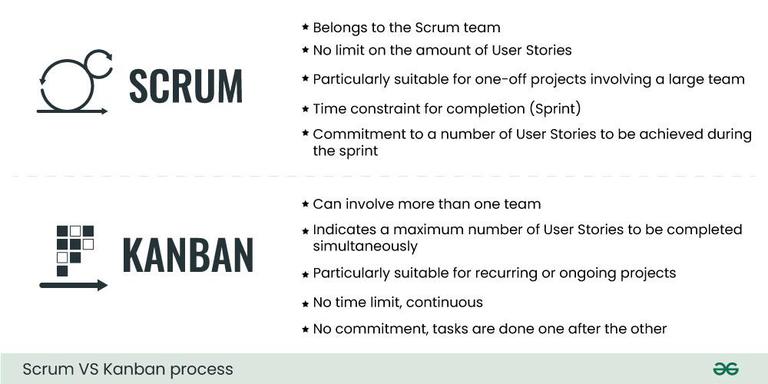
Scrum vs. Kanban backlogs
- **Backlog: A list of current problems waiting to be solved.
- **Issue detail view: A close look at the chosen problem.
Steps to creating your backlog
You need to have a Jira Account either free or paid version.
**Step 1: Log in To Jira
**Step 2: under project Tag, select "**Create Project"

**Step 3: Select "**Scrum" Project Template

**Step 4: Click on "**Use template"

**Step 5: Select "**Team Managed Project" as Company managed to require premium Account.
.jpg)
**Step 6: Give a suitable Project Name "**Website Redesign" and click on next.

**Step 7: Click on "**Backlog" in the left navigation bar.

**Step 8: Click on "**Create issue" to start adding backlog.

**Step 9: Click on "**Create issue" and write the below.
- Design Homepage
- Fix Contact Form Bug
- Update Product Images
- Mobile Responsiveness

**Step 10: You can drag the position of the issue to change the priority of backlog and also, you can click on any issue to edit or add comment on it.

Tips for Managing a Jira Backlog
1. Plan Ahead
- Make your Project Goal well-defined.
- Break your work into smaller manageable tasks.
2. Use Descriptive Issue Titles
- Write clear and informative titles.
- use clear language that every team member can understand.
3. Prioritize Regularly
- Keep a continuous monitoring of the task.
- Ensure the important work is on the top.
4. Keep Issues Small and Specific
- Avoid making complexity on the board.
- Divide tasks into achievable units of work.
5. Add Detailed Descriptions
- Provide appropriate descriptions to remove ambiguity.
- Include correct information, links and context.
6. Collaborate and Communicate
- Encourage team members to participate in regular updates.
- Tag the specific team member if required.
7. Educate Your Team
- Providing training is required.
- To ensure that everyone knows how to use Jira Backlog.
Conclusion
In this step-by-step tutorial, we have covered the fundamentals of Jira Backlogs. Whether you are working on a software project, or any collaborative project Jira Backlog will always help in organizing and efficient working. Remember to adjust the process in Jira Backlog according to your need and you will find the best way of Jira Backlog management.