Setting Up Cucumber (original) (raw)
Last Updated : 11 Aug, 2025
Before setting up the project, it's essential to ensure the foundational components, like Java & Maven/Gradle installation. Make sure you have installed Java & Maven in your System.
Here are the steps to Set up Cucumber:
Step 1. Set Up Maven Project
Open your preferred IDE such as IntelliJ IDEA , Eclipse or NetBeans. And create a new Maven Project. Please Specify the " artifactId " and " groupId " for the project. Usually they are like as " com.example.cucumber " and " CucumberTestingProject ".
Now , select the appropriate JDK Version for the project and make sure it must be compatible with latest cucumber version.
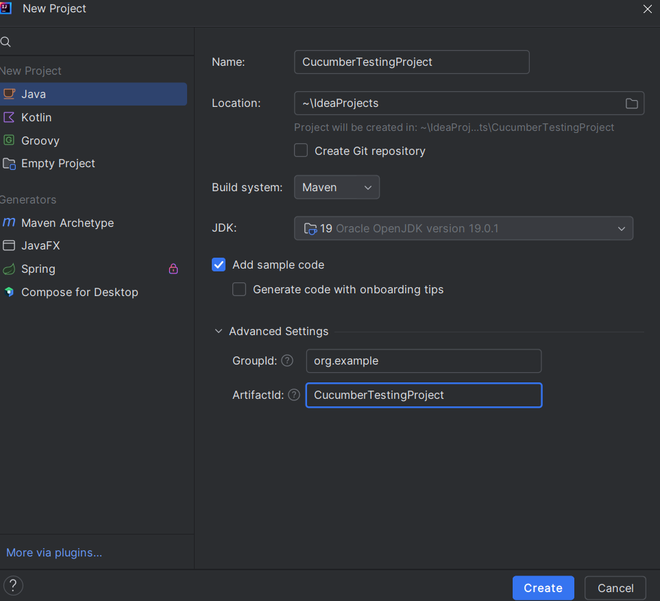
Maven Setup in Cucumber Testing Project
If in-case you use Gradle , then Open the IDE and create new Gradle project. Similar to Maven , specify the project group & name fields for your project. Also specify the source compatibility , to match the current version of JDK & project version.
Once the project is created , the project structure looks like :
- **src/main/java: Contains Application Code
- **src/test/java: Contains test code , here all cucumber tests will present.
- **src/test/resources: Contains all the features files
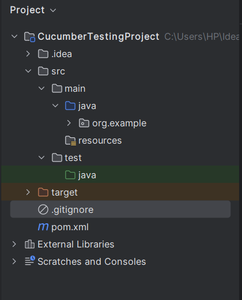
Project Structure
2. Add Dependencies to pom.xml
Cucumber requires some specific dependencies to work with a Java project and depending on whether you're using Maven or Gradle , you need to add these specific dependencies to your project file.
In case user use the Maven, then all these dependencies are need to be added into the " pom.xml " file under the " " section.
**Pom.xml
XML `
io.cucumber cucumber-java 7.0.0 test io.cucumber cucumber-junit 7.0.0 test`
If in-case the user uses the Gradle as build tool , then add the following dependencies under the " dependencies " section of " build.gradle " file.
XML `
dependencies { testImplementation 'io.cucumber:cucumber-java:7.0.0' testImplementation 'io.cucumber:cucumber-junit:7.0.0' }
`
After adding all these dependencies , please refresh project or to synchronize your project to download all these required library to your local system from the remote server.
By following the above mentioned steps , you will have a Cucumber setup with Java and be able to start writing your own customized BDD Scenarios.