CrossBrowser Testing Tools Software Testing (original) (raw)
Cross-Browser Testing Tools - Software Testing
Last Updated : 16 May, 2026
Cross-browser testing ensures that a web application functions correctly across different browsers, devices, and operating systems by identifying compatibility issues caused by browser differences.
- Ensures application works across Chrome, Firefox, Safari, Edge, etc.
- Detects rendering and layout inconsistencies.
- Helps maintain stable functionality across environments.
Cross-browser testing tools help developers and testers ensure that web applications work correctly across different browsers, devices, and operating systems. These tools support both manual and automated testing to deliver a consistent user experience.
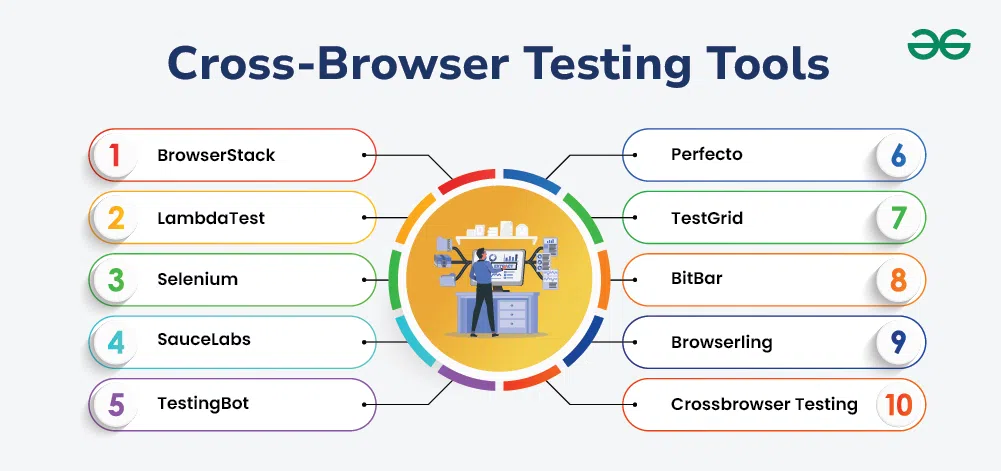
Cross-Browser Testing Tools
1. BrowserStack
BrowserStack is a cloud-based cross-browser testing platform that allows testing websites and applications on real devices and browsers without any local setup.
- Provides real-time testing on more than 3000+ browsers and real devices, ensuring wide coverage across platforms.
- Supports both desktop and mobile testing, allowing validation of responsive designs and mobile compatibility.
| **Pros | **Cons |
|---|---|
| Very easy to use with a simple and intuitive interface | Pricing is high for large teams or long-term usage |
| Offers a wide range of real devices and browsers for accurate testing | Free version has limited features |
2. LambdaTest
LambdaTest is an AI-powered cloud testing platform that enables manual and automated cross-browser testing on a scalable infrastructure.
- Supports testing on 3000+ browser and operating system combinations for maximum compatibility coverage.
- Enables real-time and automated testing on cloud-based real devices and browsers.
| **Pros | **Cons |
|---|---|
| Affordable pricing plans suitable for startups and teams | User interface can be improved for better experience |
| Fast and scalable infrastructure for test execution | Setting up local testing may be slightly complex |
3. Selenium
**Selenium is an open-source automation framework widely used for web browser testing and cross-browser validation.
- Supports multiple programming languages like Java, Python, C#, and Ruby for flexible test development.
- Works across major browsers such as Chrome, Firefox, Edge, and Safari.
| **Pros | **Cons |
|---|---|
| Completely free and open-source tool | Requires strong programming knowledge to use effectively |
| Highly flexible and widely supported by the testing community | Does not provide built-in reporting features |
4. Sauce Labs
Sauce Labs is a cloud-based testing platform that provides automated and manual testing on real devices and browsers.
- Offers access to 700+ browser and operating system combinations for extensive testing coverage.
- Supports real device testing for mobile applications to ensure real-world accuracy.
| **Pros | **Cons |
|---|---|
| Strong support for real device and browser testing | Expensive for small teams or individual users |
| Excellent integration with CI/CD tools | Some users may experience session latency |
5. TestingBot
TestingBot is a cloud-based platform that supports automated and manual cross-browser testing on a wide range of browsers and devices.
- Supports more than 2000+ browser and operating system combinations for testing flexibility.
- Works with Selenium and Appium for automated test execution.
| **Pros | **Cons |
|---|---|
| Flexible pricing suitable for different team sizes | Test session startup can be slow at times |
| Easy integration with automation tools and CI/CD pipelines | Limited mobile device options compared to competitors |
6. Perfecto
Perfecto is an enterprise-grade cloud testing platform designed for advanced cross-browser and mobile testing.
- Provides access to real devices and browsers for accurate testing results.
- Supports scriptless automation for faster test creation.
| **Pros | **Cons |
|---|---|
| Highly scalable for large enterprise projects | Expensive solution compared to other tools |
| Strong AI-powered testing capabilities | Setup process can be complex for beginners |
7. TestGrid
TestGrid is a cloud-based automation platform that supports manual, automated, and performance testing.
**Features:
- Supports Selenium and Appium-based automation for web and mobile testing.
- Allows real-time manual testing across different browsers.
| **Pros | **Cons |
|---|---|
| Fast and easy to set up | Smaller device coverage compared to competitors |
| Supports both automated and manual testing | Performance may vary with large-scale tests |
8. BitBar
BitBar is a cloud testing platform that provides real device and browser testing for web and mobile applications.
- Offers access to real device cloud for accurate testing results.
- Integrates with CI/CD tools like Jenkins and CircleCI.
| **Pros | **Cons |
|---|---|
| Wide range of real devices for testing | Limited support for older browser versions |
| Excellent CI/CD integration | High costs for large teams |
9. Browserling
Browserling is a lightweight online tool used for quick manual cross-browser testing.
- Provides live testing on real browsers without installation.
- Simple and user-friendly interface for quick testing.
| **Pros | **Cons |
|---|---|
| Very easy to use | Limited features for automation |
| Affordable pricing | No mobile device testing |
10. CrossBrowserTesting
CrossBrowserTesting is a cloud-based platform that supports both manual and automated testing across browsers and devices.
- Supports Selenium and Appium for automated testing workflows.
- Provides real device testing for accurate cross-browser validation.
| **Pros | **Cons |
|---|---|
| Large browser and device selection | Limited performance testing features |
| Good for both manual and automated testing | May experience slow session startup |
Comparison Table
| Tool | Type | Key Strength | Best For |
|---|---|---|---|
| BrowserStack | Cloud-based | Real device testing | Enterprise testing |
| LambdaTest | Cloud-based | AI + scalable testing | Teams & startups |
| Selenium | Open-source | Highly flexible automation | Developers |
| Sauce Labs | Cloud-based | Strong CI/CD integration | Large-scale testing |
| TestingBot | Cloud-based | Selenium/Appium support | Automation testing |
| Perfecto | Enterprise | AI + advanced testing | Enterprise users |
| TestGrid | Cloud-based | Manual + automation | Mid-size teams |
| BitBar | Cloud-based | Real device cloud | CI/CD pipelines |
| Browserling | Web tool | Quick manual testing | Small quick checks |
| CrossBrowserTesting | Cloud-based | Balanced manual + automation | General QA teams |
Cross-browser testing tools provide a wide range of features that help ensure web applications work consistently across different browsers, devices, and operating systems.

Features of Cross-Browser Testing Tool
These features make testing faster, more accurate, and more efficient.
- **Multi-Browser Compatibility: Supports testing on browsers like Chrome, Firefox, Safari, Edge, and others for wide coverage
- **Browser Version Testing: Allows testing on different browser versions to detect compatibility issues in older or newer releases
- **Responsive Design Testing: Checks application layout and behavior across different screen sizes and devices
- **Automated Testing: Runs test cases across multiple browsers at the same time to save time and effort
- **Visual Regression Testing: Compares UI across browsers to detect unwanted visual or layout changes
- **Performance Testing: Measures loading speed and responsiveness across different browsers
- **Debugging and Logging: Provides logs and tools to identify and fix issues easily
- **CI/CD Integration: Works with pipelines for continuous and automated testing
- **Cloud-Based Testing: Gives access to real browsers and devices without local installation
- **Comprehensive Reporting: Generates detailed reports to analyze compatibility and test results
Types of Cross-Browser Testing
Cross-browser testing includes different types that help ensure a web application works correctly across multiple browsers, devices, and environments. Each type focuses on a specific aspect of compatibility and user experience.

Types of Cross-Browser Testing
1. **Manual Testing
It involves manually checking the website on different browsers to identify functional and visual issues.
- Detects real user experience issues that automation may miss.
- Useful for small-scale or exploratory testing.
2. **Automated Testing
It uses automation tools and scripts to run tests across multiple browsers simultaneously.
- Saves time by executing repetitive test cases quickly.
- Increases test coverage across different browser combinations.
3. Responsive Testing
It ensures that web applications adapt properly to different screen sizes and devices.
- Verifies layout and design on mobile, tablet, and desktop screens.
- Ensures consistent user experience across resolutions.
4. Visual Testing
It compares UI screenshots across browsers to detect layout or design differences.
- Identifies visual mismatches like spacing, alignment, or broken UI.
- Ensures consistent appearance across all browsers.
5. Performance Testing
It evaluates how the application behaves in different browsers under various conditions.
- Measures loading speed, responsiveness, and stability.
- Helps identify browser-specific performance issues.
6. Compatibility Testing
It checks whether the application works correctly across different browser versions and platforms.
- Ensures support for older and newer browser versions.
- Confirms consistent functionality across environments.
Importance of Cross-Browser Testing
Cross-browser testing ensures that web applications work consistently across different browsers, operating systems, and devices, providing a smooth and reliable user experience.
- **Prevents display issues: Ensures web pages appear correctly across different browsers.
- **Improves user experience: Provides a consistent and smooth experience for all users.
- **Ensures proper functionality: Keeps website behavior same across browsers and devices.
- **Enhances performance: Identifies speed and responsiveness issues in different browsers.