Test Environment: A Beginner's Guide (original) (raw)
Last Updated : 28 Apr, 2026
A test environment provides a dedicated setup for executing test cases and validating application behavior. It helps ensure accurate results and improves the overall quality of the software before release.
- Provides a controlled setup with required tools, data, and configurations for executing test cases.
- Involves stakeholders like developers, testers, and sometimes clients during the testing phase.
- Helps simulate real-world conditions to ensure reliable and effective testing.
**Example: A QA team tests a web application in a setup with specific browsers, databases, and network settings to verify functionality before deployment.
Importance of Test Environment
A test environment is essential for evaluating the quality and functionality of an application under controlled conditions. It allows teams to isolate code, perform accurate testing, and simulate real-world scenarios without affecting the production system.
- **Identifies bugs effectively: Helps testers detect defects early and validate fixes before release, improving overall software quality.
- **Provides a standardized setup: Ensures consistent testing conditions, allowing reliable validation of application behavior across different scenarios.
- **Enhances security and reliability: Helps identify vulnerabilities and ensures the application is stable and secure before deployment.
- **Enables accurate feedback: Provides precise insights into application performance, features, and functionality for better decision-making.
Types of Test Environment
Different types of test environments are used based on testing objectives such as functionality, performance, security, and system stability. Each environment is configured to validate specific aspects of the application under controlled conditions.
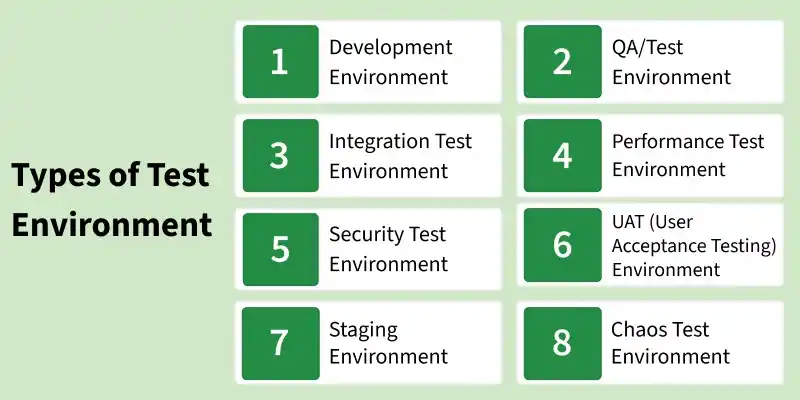
1. Development Environment
Used by developers to build, test, and debug the application during the initial stages of development.
- Supports coding, debugging, and unit testing to identify issues early in the development lifecycle.
- Allows developers to test individual components before integrating them into the system.
- Provides a base setup that prepares the application for further testing in QA environments.
2. QA/Test Environment
Used by testers to validate application functionality and ensure it meets specified requirements.
- Executes functional, regression, and system testing to verify application behavior.
- Helps ensure that features work as expected under defined test conditions.
- Acts as the primary environment for validating overall software quality before release.
3. Integration Test Environment
Used to verify how different modules interact and function together after integration.
- Tests interaction and data flow between integrated components to ensure seamless operation.
- Helps identify issues related to communication between modules and services.
- Ensures that combined components work correctly as a unified system.
4. Performance Test Environment
Designed to evaluate how the system performs under various load and stress conditions.
- Measures performance metrics such as response time, throughput, and system stability.
- Requires specific configurations like hardware capacity, data volume, and network conditions.
- Helps identify performance bottlenecks and ensures the system can handle expected load.
5. Security Test Environment
Focused on identifying vulnerabilities and ensuring the application is protected from threats.
- Tests aspects like authentication, authorization, and data protection mechanisms.
- Uses isolated environments to prevent any risk to production systems or sensitive data.
- Helps detect and fix security flaws to ensure application safety and compliance.
6. UAT (User Acceptance Testing) Environment
Used by end users or clients to validate that the application meets business requirements.
- Allows users to test real-world scenarios and confirm that features meet expectations.
- Helps ensure the application is ready for production use from a user perspective.
- Acts as the final validation stage before the application is approved for release.
7. Staging Environment
A near-production replica used for final testing before deployment to the live system.
- Simulates real production conditions to validate deployment readiness.
- Helps identify issues that may occur in the live environment.
- Reduces deployment risks by ensuring the system behaves correctly before release.
8. Chaos Test Environment
Used to test system resilience by introducing failures and unexpected disruptions.
- Identifies weak points that could cause system failures under unpredictable conditions.
- Helps improve system reliability, fault tolerance, and recovery mechanisms.
- Ensures better user experience by preventing failures in real-world scenarios.
Key Areas to Set up Test Environment
A stable test environment requires proper configuration of multiple components to ensure efficient test execution and consistent results. These key areas help testers simulate real-world conditions and validate application behavior effectively.
- **Database: Stores application data and supports backend operations, making it essential for validating data flow and functionality across the system.
- **Operating System: Includes client and server operating systems that run and manage applications, ensuring compatibility and proper execution.
- **Network Configuration: Defines network setups such as LAN, wireless, or private networks required for application communication and testing.
- **Test Data: Provides accurate, complete, and consistent data required to design and execute meaningful test cases.
- **Documentation: Includes configuration guides, installation manuals, and user documentation to support proper setup and testing processes.
Process for Setup of Test Environment
Setting up a test environment involves coordinating multiple teams and configuring essential components to ensure smooth and effective testing. It requires proper planning to replicate real-world conditions without impacting production systems.
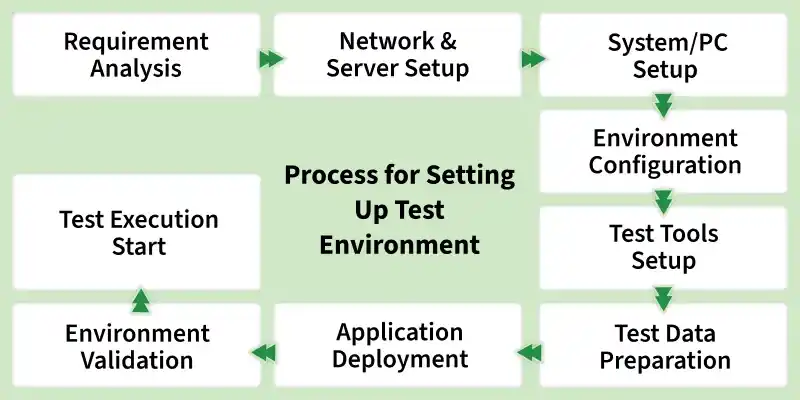
- **Test Server Setup: Configure dedicated servers to host and test applications instead of relying on local machines, ensuring scalability and realistic testing conditions.
- **Network Configuration: Set up networks such as LAN, CAN, or wireless environments to support application requirements and avoid interference with other teams.
- **System/PC Setup: Prepare systems with required operating systems, browsers, and configurations to support different testing scenarios.
- **Bug Reporting Tools: Integrate tools to log, track, and manage defects efficiently throughout the testing process.
- **Test Tools Setup: Install and configure automation and testing tools required for executing manual and automated test cases.
- **Test Data Preparation: Use production-like data for realistic testing while ensuring privacy through data masking or anonymization techniques.
Test Environment Management
Test Environment Management focuses on maintaining, monitoring, and optimizing test environments to ensure smooth and efficient testing processes. It helps keep environments up to date, reliable, and aligned with project requirements.
- **Maintain updated environments: Ensure the test environment is always up to date with the latest versions of software, tools, and configurations.
- **Efficient resource allocation: Assign environments to teams based on their testing needs to avoid conflicts and delays.
- **Continuous monitoring: Regularly track environment performance and availability to ensure smooth testing operations.
- **Remove outdated setups: Decommission unused environments, tools, and configurations to reduce clutter and maintenance overhead.
- **Issue identification and resolution: Detect environment-related issues early and resolve them quickly to prevent testing delays.
- **Continuous improvement: Regularly enhance environment setup and processes for better efficiency and reliability.
- **Enable automation: Use automation tools to reduce manual effort and improve consistency in environment management.
Challenges in Setting Up Test Environment
Setting up a test environment can be complex due to dependencies, resource constraints, and coordination between teams. Proper planning and management are required to overcome these challenges and ensure effective testing.
- **Resource planning issues: Inefficient allocation and management of resources can lead to conflicts, delays, and inaccurate testing results.
- **Dependency on external systems: Testing often relies on external hardware, software, or third-party services, which can cause delays and limited control.
- **Remote environment limitations: Geographically distributed environments may require reliance on support teams, affecting accessibility and response time.
- **Collaboration challenges: Shared environments among multiple teams can lead to conflicts, inconsistencies, and unreliable test outcomes.
- **Complex environment setup: Advanced testing scenarios require extensive configurations, increasing time, effort, and resource requirements.
Best Practices to Set up Test Environment
Following best practices helps ensure that the test environment is stable, reliable, and aligned with testing requirements. Proper setup minimizes errors and improves overall testing efficiency.
- **Define software requirements clearly: Identify all required software components and ensure compatibility with the test environment setup.
- **Validate hardware setup: List required hardware components and test installations to ensure they function correctly before use.
- **Configure necessary tools: Ensure all testing, automation, debugging, and defect tracking tools are properly installed and configured.
- **Ensure test data availability: Verify that accurate and relevant test data is available, or create it if needed while maintaining data quality.