TestNG Overview (original) (raw)
Last Updated : 20 May, 2026
TestNG (Test Next Generation) is a powerful testing framework used for automating tests in Java applications. It provides advanced features for organizing, executing, and managing test cases efficiently.
- Supports features like annotations, parallel execution, and test configuration.
- Allows parameterization to run the same test with multiple data sets.
- Widely used for building scalable and maintainable automation frameworks.
TestNG Execution Workflow
This diagram illustrates how TestNG executes test cases and generates different types of output reports.
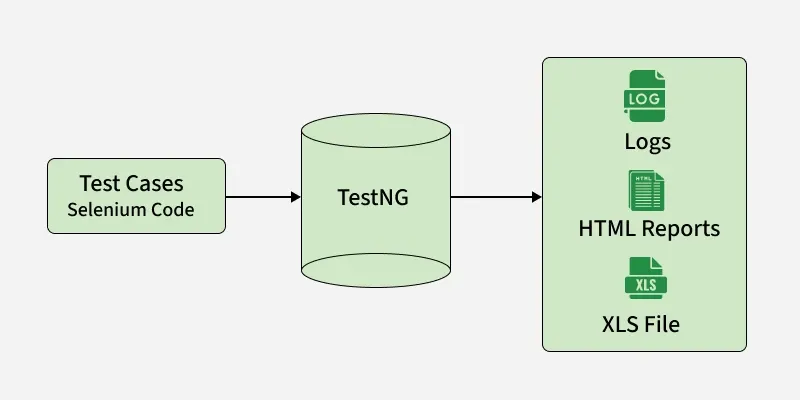
TestNG Execution Workflow
- Test cases written using Selenium are provided as input to TestNG.
- TestNG manages the execution of these test cases in an organized manner.
- During execution, TestNG processes test steps, applies configurations, and handles annotations.
- After execution, it generates multiple outputs such as logs, HTML reports, and Excel (XLS) files.
- These outputs help in analyzing test results, debugging failures, and maintaining test records.
TestNG XML Configuration
TestNG allows you to configure and execute test cases using an XML file (testng.xml). It helps define test suites, organize test classes, and control execution flow efficiently.
- Defines test suites and test cases in a structured way.
- Allows grouping and prioritization of tests.
- Controls execution order and parallel execution.
- Useful for managing complex test scenarios.
TestNG XML File (testng.xml)
The XML file defines which test classes should be executed and how they are organized in the test suite.
XML `
<!-- Test for TestClass2 -->
<test name="Test 2">
    <classes>
        <class name="GeneralXML.TestClass2" />
    </classes>
</test>
`
Creating Test Classes
First, create Java test classes that will be executed using the TestNG XML configuration.
These classes contain test methods annotated with @Test that define the test logic and will be executed by TestNG.
**TestClass1.java
Java `
package GeneralXML;
import org.testng.Assert; import org.testng.annotations.Test;
public class TestClass1 {
@Test
public void testMethod1() {
    System.out.println("Executing Test Method 1 in TestClass1");
    // Sample test condition
    Assert.assertTrue(true, "Test Method 1 passed");
}

@Test
public void testMethod2() {
    System.out.println("Executing Test Method 2 in TestClass1");
    // Sample test condition
    Assert.assertEquals(2 + 2, 4, "Test Method 2 passed");
}
}
`
**TestClass2.java
C++ `
package GeneralXML;
import org.testng.Assert; import org.testng.annotations.Test;
public class TestClass2 {
@Test
public void testMethod3() {
    System.out.println("Executing Test Method 3 in TestClass2");
    Assert.assertNotNull("Hello", "Test Method 3 passed");
}

@Test
public void testMethod4() {
    System.out.println("Executing Test Method 4 in TestClass2");
    Assert.assertEquals(3 * 3, 9, "Test Method 4 passed");
}
}
`
Running TestNG Tests
TestNG tests can be executed using different methods based on your setup.
- **From IDE: Right-click the test class or
testng.xmlfile in IDEs like Eclipse or IntelliJ -> select **Run As -> TestNG Test - **From Command Line: Using build tools like Maven or Gradle:
- Maven:
mvn test - Gradle:
gradle test
- Maven:
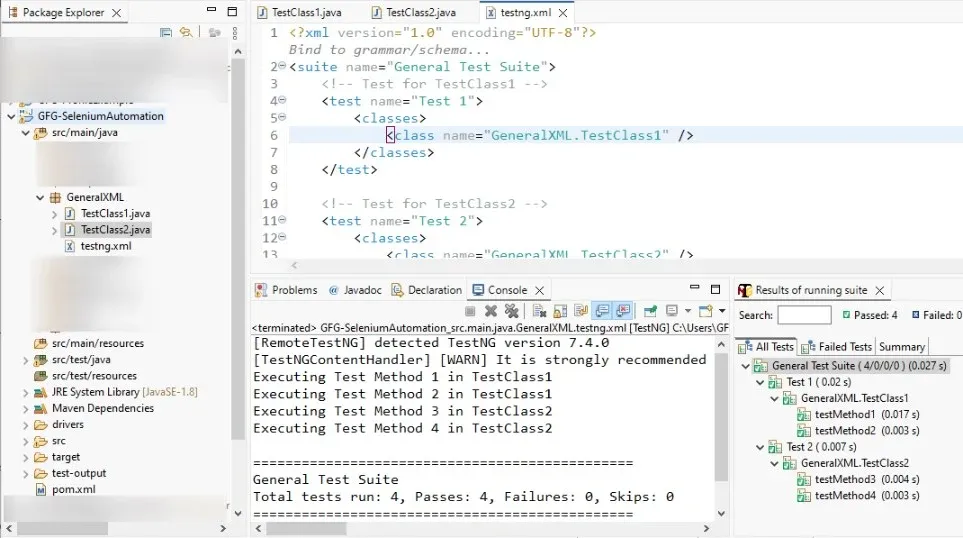
TestNG Suit Output
TestNG with Selenium
TestNG is widely used with Selenium to build scalable and maintainable automation frameworks. Selenium handles browser automation, while TestNG manages test execution, reporting, grouping, and parallel testing.
- Selenium WebDriver is used to automate browser actions and UI interactions.
- TestNG manages test execution using annotations such as
@Test,@BeforeMethod, and@AfterMethod. testng.xmlhelps organize test suites, parallel execution, and grouped test execution.- TestNG generates detailed reports that help analyze Selenium test results efficiently.
- Commonly integrated with Maven, Jenkins, and CI/CD pipelines for automated execution.
TestNG Features and Use Cases
TestNG provides powerful features that help in designing flexible, scalable, and maintainable test automation frameworks.
1. Assertions
Assertions are used to validate the expected outcome of test cases.
**Example:
Java `
@Test public void testAddition() { int result = Calculator.add(2, 3); Assert.assertEquals(result, 5, "Addition result is incorrect!"); }
`
2. Prioritizing Tests
Although TestNG supports test prioritization, it is recommended to keep test cases independent whenever possible. Excessive dependency on priorities can make test suites harder to maintain and may lead to unstable execution in large automation frameworks.
**Example:
Java `
@Test(priority = 1) public void loginTest() { System.out.println("Login Test"); }
@Test(priority = 2) public void dashboardTest() { System.out.println("Dashboard Test"); }
`
3. Grouping Tests
Tests can be grouped for selective execution (e.g., smoke, regression).
**Example:
Java `
@Test(groups = {"smoke"}) public void smokeTest() { System.out.println("Executing Smoke Test"); }
@Test(groups = {"regression"}) public void regressionTest() { System.out.println("Executing Regression Test"); }
`
4. Parameterization
TestNG supports running tests with multiple data sets using @Parameters and @DataProvider.
**Using testng.xml:
Java `
@Test @Parameters({"username", "password"}) public void loginTest(String username, String password) { System.out.println("Logging in with " + username + " and " + password); }
`
**Using @DataProvider:
Java `
@DataProvider(name = "loginData") public Object[][] dataProviderMethod() { return new Object[][] {{"user1", "pass1"}, {"user2", "pass2"}}; }
@Test(dataProvider = "loginData") public void loginTest(String username, String password) { System.out.println("Logging in with " + username + " and " + password); }
`
5. Listeners
Listeners are used to track test execution events such as pass, fail, or skip.
Java `
public class TestListener implements ITestListener { @Override public void onTestSuccess(ITestResult result) { System.out.println(result.getName() + " passed successfully."); } }
`
6. Annotations
Annotations define the lifecycle and execution flow of test cases.
- @Test -> Marks a method as a test
- @BeforeSuite / @AfterSuite -> Run before/after entire suite
- @BeforeClass / @AfterClass -> Run before/after class
- @BeforeMethod / @AfterMethod -> Run before/after each test
**Example:
Java `
public class TestExample { @BeforeClass public void setUp() { System.out.println("Setting up the test class."); }
@Test
public void test1() {
    System.out.println("Executing Test 1");
}

@Test
public void test2() {
    System.out.println("Executing Test 2");
}

@AfterClass
public void tearDown() {
    System.out.println("Cleaning up after tests.");
}
}
`
Advantages of TestNG
TestNG offers several benefits that make it a preferred framework for test automation.
- Supports parallel execution, reducing overall test execution time.
- Provides flexible configuration using the
testng.xmlfile. - Enables data-driven testing through
@DataProviderand@Parameters. - Generates detailed reports for better analysis and debugging.
- Supports grouping and prioritization of test cases.
Limitations of TestNG
Although TestNG provides powerful features for test automation, it also has certain limitations that should be considered while designing automation frameworks.
- Primarily designed for Java applications and requires Java knowledge for implementation.
- Complex configurations in
testng.xmlcan become difficult to manage in large projects. - Parallel execution may introduce synchronization and dependency issues if tests are not designed properly.
- Requires additional tools or libraries for advanced reporting and mocking support.
- Large test suites can increase maintenance effort and execution complexity over time.
Best Practices in TestNG
Following best practices helps create reliable, maintainable, and scalable test automation suites.
- Use clear and descriptive test method names along with logical grouping of test cases.
- Always validate outcomes using appropriate assertions to ensure test accuracy.
- Keep the
testng.xmlfile well-structured, organized, and updated. - Use parameterization (
@DataProvideror@Parameters) for efficient data-driven testing. - Regularly review, refactor, and maintain test cases to keep them relevant and efficient.