How to Create a Spring Boot Project with IntelliJ IDEA? (original) (raw)
Last Updated : 19 Mar, 2026
Spring Boot simplifies Java application development, and IntelliJ IDEA provides a powerful environment to build and run such applications. Creating a Spring Boot project in IntelliJ is quick and efficient using tools like Spring Initializr. It helps developers set up projects with minimal configuration.
- Easily create projects using Spring Initializr integration
- Automatic dependency management with Maven/Gradle
- Quick setup and execution within IntelliJ IDEA
Steps to Create a Spring Boot Application with IntelliJ IDEA
Follow the steps below to create and set up a Spring Boot project in IntelliJ IDEA
Step 1: Install IntelliJ IDEA
- Download IntelliJ IDEA from the official JetBrains website
- Choose: Community Edition (Free) or Ultimate Edition
- Install and launch the IDE
Step 2: Create a Spring Boot Project
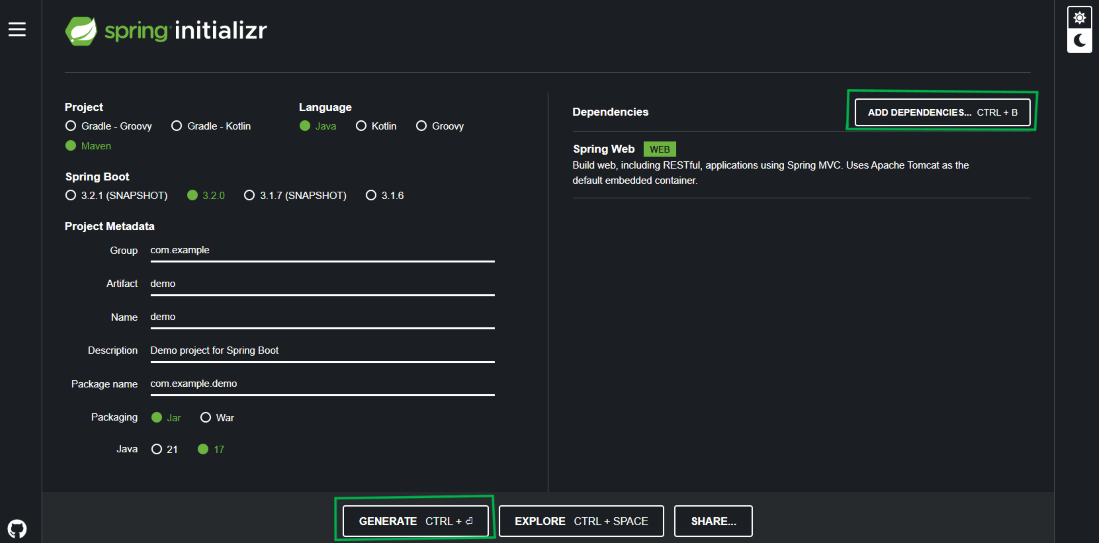
Open the browser and search Spring Initializr
- **Project: Maven Project or Gradle Project (choose based on your preference)
- **Language: Java
- **Spring Boot Version: Choose the latest stable version.
- **Project Metadata: Group (e.g., com.example), Artifact (e.g., demo), Name, and Package Name.
- **Dependencies: Add dependencies like Spring Web, Spring Data JPA, and Spring Boot DevTools (depending on your project requirements).
Click on the **GENERATE button to download the project as a ZIP file.
Extract the ZIP file to your desired location on your local machine.
Step 3: Import the Spring Boot Project into IntelliJ IDEA
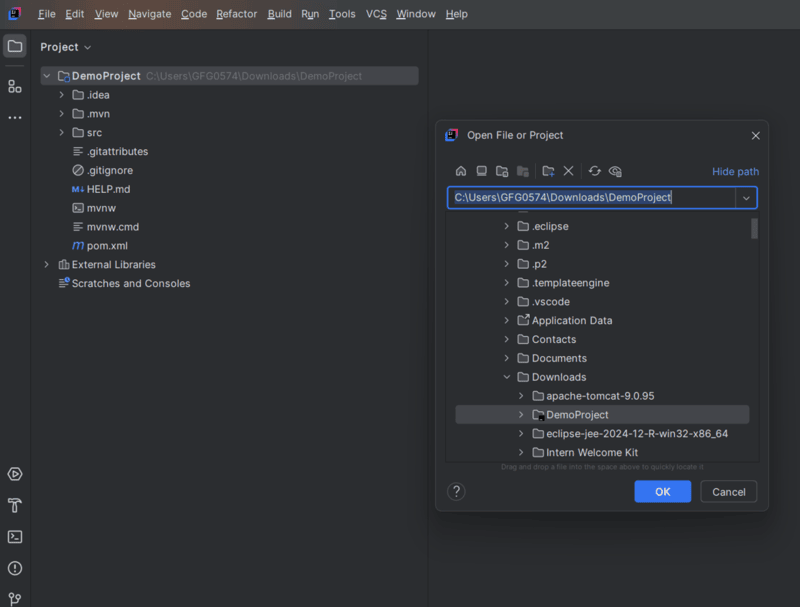
- Open IntelliJ IDEA.
- Go to File -> Open.
- Navigate to the folder where you extracted the Spring Boot project.
- Select the project folder (e.g., demo) and click OK.
- IntelliJ IDEA will automatically detect the project type (Maven or Gradle) and start importing the project.
- Wait for IntelliJ IDEA to download all the required dependencies and set up the project.
Step 4: Explore the SpringBoot Project Structure
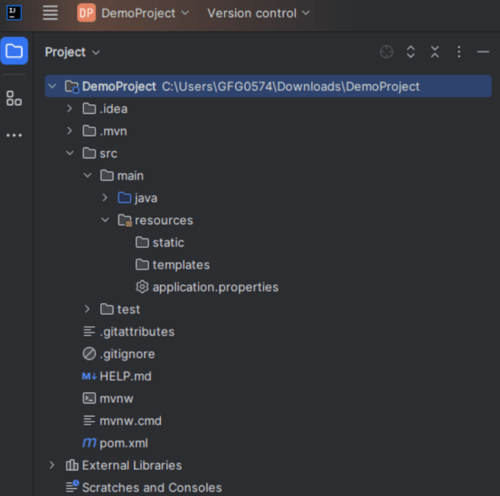
Once the project is imported, we will see the following structure in IntelliJ IDEA:
- **src/main/java: Contains the main application code.
- **src/main/resources: Contains configuration files like application.properties or application.yml.
- **src/test/java: Contains test cases for your application.
- **pom.xml (for Maven) or build.gradle (for Gradle): Manages project dependencies.
Step 5: Run Spring Boot Application
- Locate the main application class (usually named DemoApplication.java or similar).
- Right-click on the class and select Run.
- IntelliJ IDEA will start the Spring Boot application, and you will see the logs in the Run window.

**Additional Tips:
- **Dependencies: Make sure to add the necessary dependencies in Spring Initializr based on your project requirements.
- **Configuration: You can configure your application further by editing the **application.properties or **application.yml file.
- **Plugins: IntelliJ IDEA Community Edition supports Spring Boot development, but you might want to install the Spring Assistant plugin for additional features.