Spring Boot – Validation using Hibernate Validator (original) (raw)
Last Updated : 27 Apr, 2026
Validating user input is essential for building secure and reliable applications. Spring Boot simplifies validation by using Hibernate Validator, allowing developers to apply rules using simple annotations.
- Ensures data integrity and prevents invalid input
- Uses annotations like @NotNull, @Size, and @Email
- Improves application security and reliability
Common Hibernate Validator Annotations
Hibernate validators provide the following annotations that are very helpful for software development.
- ****@NotNull:** @NotNull ensures that a field is not null but allows empty values (e.g., an empty string or an empty collection).
- ****@NotEmpty:** @NotEmpty ensures that a field is not null and also not empty, meaning it must contain at least one element (for collections) or at least one character (for strings).
- ****@NotBlank:** @NotBlank applies only to strings and ensures they are not null, not empty and contain at least one non-whitespace character (i.e., spaces alone are not allowed).
- ****@Min:** Given Minimum value has to be satisfied
- ****@Max:** Given Maximum value has to be satisfied
- ****@Size:** Field size should be less than or greater than the specified field size
- ****@Email:** Email can be validated with this
- ****@Pattern:** Given the RegEx Pattern has to be satisfied.
Steps to Implement Validations
Below are the steps of Implementation to use Validation in Hibernate
**Step 1: Create the project
Use Spring Initializr (or your IDE’s wizard):
- **Project: Maven
- **Language: Java
- **Spring Boot: 3.x
- **Dependencies: Spring Web, Validation (spring-boot-starter-validation), Lombok (optional but handy)
Java 17+ is recommended for Spring Boot 3.x.
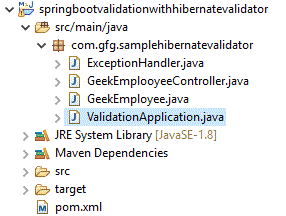
Step 2: Project structure
Once when the project open in Eclipse Ide the project Structure is looks like as below
Step 3: Create an Entity Class
Let’s create an entity class GeekEmployee with validation annotations applied to its fields.
**GeekEmployee.java
Java `
package com.gfg.samplehibernatevalidator;
import jakarta.validation.constraints.Email; import jakarta.validation.constraints.Min; import jakarta.validation.constraints.NotBlank; import jakarta.validation.constraints.NotEmpty; import java.util.List;
public class GeekEmployee {
@NotBlank(message = "Employee name cannot be blank")
private String geekEmployeeName;

@Email(message = "Email should be valid")
private String geekEmailId;

@Min(value = 10000, message = "Salary must be at least 10,000")
private double salary;

@NotEmpty(message = "Qualifications cannot be empty")
private List<String> qualifications;

// Getters and Setters
public String getGeekEmployeeName() {
    return geekEmployeeName;
}

public void setGeekEmployeeName(String geekEmployeeName) {
    this.geekEmployeeName = geekEmployeeName;
}

public String getGeekEmailId() {
    return geekEmailId;
}

public void setGeekEmailId(String geekEmailId) {
    this.geekEmailId = geekEmailId;
}

public double getSalary() {
    return salary;
}

public void setSalary(double salary) {
    this.salary = salary;
}

public List<String> getQualifications() {
    return qualifications;
}

public void setQualifications(List<String> qualifications) {
    this.qualifications = qualifications;
}
}
`
**Explanation: This class defines an employee model in Java with validation rules (like non-empty name, valid email, minimum salary, and required qualifications) using Jakarta Bean Validation annotations.
Step 4: Exception handling for Validators Errors
When validation fails, Spring Boot throws a MethodArgumentNotValidException. We can handle this exception globally using @ControllerAdvice and return a structured error response.
**GlobalExceptionHandler.java
Java `
package com.gfg.samplehibernatevalidator;
import org.springframework.http.HttpStatus; import org.springframework.http.ResponseEntity; import org.springframework.web.bind.MethodArgumentNotValidException; import org.springframework.web.bind.annotation.ControllerAdvice; import org.springframework.web.bind.annotation.ExceptionHandler;
import java.util.HashMap; import java.util.Map;
@ControllerAdvice public class ExceptionHandler {
@ExceptionHandler(MethodArgumentNotValidException.class)
public ResponseEntity<Map<String, String>> handleValidationExceptions(MethodArgumentNotValidException ex) {
    Map<String, String> errors = new HashMap<>();

    ex.getBindingResult().getFieldErrors().forEach(error ->
            errors.put(error.getField(), error.getDefaultMessage()));

    return new ResponseEntity<>(errors, HttpStatus.BAD_REQUEST);
}
}
`
**Explanation: This global exception handler catches validation errors and returns a structured response with field-wise error messages and a 400 (Bad Request) status.
Let us try to save the geek employees by accepting the inputs like "geekEmployeeName", "salary", "geekEmailId" and "qualifications". We need a rest controller file to achieve the same.
Step 5: REST Controller for Validation
Let’s create a REST controller to test the validation.
**GeekEmployeeController.java
Java `
package com.gfg.samplehibernatevalidator;
import jakarta.validation.Valid; import org.springframework.http.HttpStatus; import org.springframework.http.ResponseEntity; import org.springframework.web.bind.annotation.*;
@RestController @RequestMapping("/geek") public class GeekEmployeeController {
@PostMapping("/addEmployee")
public ResponseEntity<String> addEmployee(@Valid @RequestBody GeekEmployee employee) {
    return new ResponseEntity<>(
            "Employee details are valid and added successfully! \n" +
            "Name: " + employee.getGeekEmployeeName() + "\n" +
            "Email: " + employee.getGeekEmailId() + "\n" +
            "Salary: " + employee.getSalary() + "\n" +
            "Qualifications: " + employee.getQualifications(),
            HttpStatus.CREATED
    );
}
}
`
Explanation: This REST controller validates incoming employee data using @Valid and returns a success response with the employee details if all validations pass.
@Valid: This annotation triggers validation on the Employee object.
Response: If validation passes, the employee object is returned with a 201 CREATED status.
Step 6: Running the Application
Open main class and Run the Spring Boot application using the following command
mvn spring-boot:run
**Main Class: ValidationApplication.java
Java `
package com.gfg.samplehibernatevalidator;
import org.springframework.boot.SpringApplication; import org.springframework.boot.autoconfigure.SpringBootApplication;
@SpringBootApplication public class ValidationApplication {
public static void main(String[] args) {
    SpringApplication.run(ValidationApplication.class, args);
}
}
`
**Note: To run application using IDE goto main method in Spring Boot Application class and run the main method.
On running the application, in the console, we can see as following
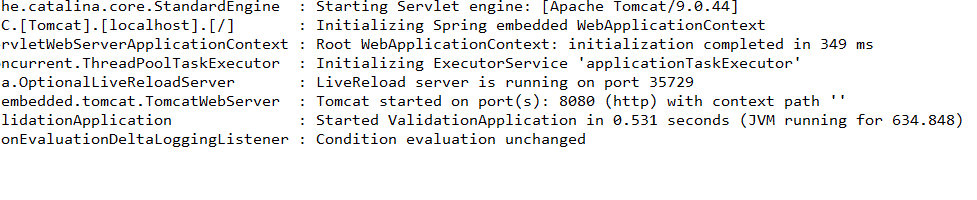
**Explanation: This log shows a Spring Boot application successfully starting, initializing the embedded Tomcat server, and running on port 8080 without errors.
Step 7: Test Application (Postman or curl).
Let's check the working part by using the Postman client as we are using post-mapping
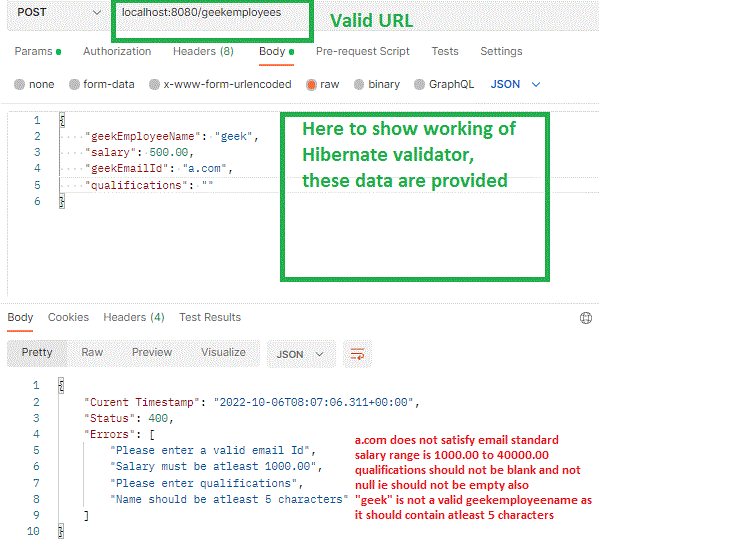
**Note: Hibernate Validator is used for server-side validation in Spring Boot applications. By adding the required dependency and using validation annotations (like @NotNull, @Email), it helps validate user input before processing the request.