Spring Prepared Statement JDBC Template (original) (raw)
Last Updated : 4 May, 2026
The JdbcTemplate class supports efficient execution of SQL queries, updates, and result mapping. When dealing with dynamic user inputs, Prepared Statements are used to prevent SQL injection and improve performance.
- PreparedStatement ensures secure execution of dynamic SQL queries.
- RowMapper is used to map database rows to Java objects.
- Prevents SQL injection by separating SQL logic and input parameters.
Syntax
Query with Prepared Statement
String sql = "SELECT * FROM frameworks WHERE name = ?";
List list = jdbcTemplate.query(
sql,
ps -> ps.setString(1, name),
new FrameworkMapper()
);
PreparedStatementSetter interface
The PreparedStatementSetter interface in Spring is used with JdbcTemplate to set values dynamically in a PreparedStatement before executing SQL queries. It helps in binding input parameters safely to prevent SQL injection and is commonly used for insert, update, and batch operations.
@FunctionalInterface
public interface PreparedStatementSetter {
void setValues(PreparedStatement ps) throws SQLException;
}
**Explanation: The PreparedStatementSetter interface provides a single method, setValues(). This method takes a PreparedStatement object and sets the value dynamically. It throws an SQLException if there is an issue while setting values.
Steps to Create the Spring JDBC Application
To understand the above concept, we will create a basic Spring JDBC application to access the data from the database. We will use the PostgreSQL database and Eclipse IDE to create this project.
**Step 1: Create a Database Table
- Create PostgreSQL/MySQL database (e.g.,
frameworkdb) - Create table:
CREATE TABLE frameworks (
id SERIAL PRIMARY KEY,
name VARCHAR(255) NOT NULL,
description TEXT
);

frameworks - table
Insert some data in the table like below:
INSERT INTO frameworks (id, name, description) VALUES (1, 'spring', 'An open source application framework to build Java enterprise applications.');
INSERT INTO frameworks (id, name, description) VALUES (2, 'struts', 'An open source web application framework extending Java servlet API to build J2EE MVC applications.');

**Step 2: Create Maven Project
- Create Spring Maven project in IDE
- Add dependencies: spring-context , spring-jdbc , database driver (MySQL/PostgreSQL)
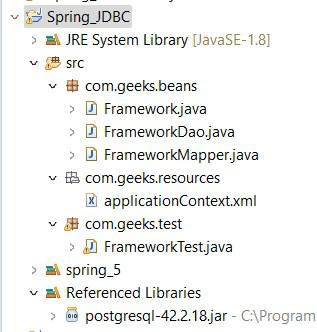
The final project structure will be like below:
Add Dependencies
XML `
org.springframework spring-context 5.3.18<!-- Spring JDBC -->
<dependency>
<groupId>org.springframework</groupId>
<artifactId>spring-jdbc</artifactId>
<version>5.3.18</version>
</dependency>
<!-- PostgreSQL Driver -->
<dependency>
<groupId>org.postgresql</groupId>
<artifactId>postgresql</artifactId>
<version>42.3.1</version>
</dependency>`
**Step 3: Create Bean Class
- Create
Framework.java - Add fields: id , name , description
- Generate getters and setters
**Bean Class (Framework.java):
Java `
package com.geeks.beans;
public class Framework {
private int id;
private String name;
private String description;

public int getId() {
    return id;
}
public void setId(int id) {
    this.id = id;
}
public String getName() {
    return name;
}
public void setName(String name) {
    this.name = name;
}
public String getDescription() {
    return description;
}
public void setDescription(String description) {
    this.description = description;
}
}
`
**Explanation: Here the Framework class represents the framework table which has three parameters id, name and description. The class provides methods to get and set the values of these attributes.
Step 4: Create DAO Class (Using PreparedStatement)
- Create FrameworkDao.java
- Inject JdbcTemplate
- Write method using PreparedStatement:
**DAO Class (FrameworkDao.java):
Java `
package com.geeks.beans;
import org.springframework.beans.factory.annotation.Autowired; import org.springframework.jdbc.core.JdbcTemplate; import org.springframework.jdbc.core.PreparedStatementSetter; import org.springframework.stereotype.Repository; import java.sql.PreparedStatement; import java.sql.SQLException; import java.util.List;
@Repository public class FrameworkDao { private JdbcTemplate jdbcTemplate;
public void setJdbcTemplate(JdbcTemplate jdbcTemplate) {
    this.jdbcTemplate = jdbcTemplate;
}
public Framework getFrameworkByName(String name) { String sql = "SELECT * FROM frameworks WHERE name = ?";
List<Framework> list = jdbcTemplate.query(
    sql,
    ps -> ps.setString(1, name),
    new FrameworkMapper()
);

return list.isEmpty() ? null : list.get(0);
}
// Additional CRUD methods can be added here}
`
**Explanation: Here, in the FrameworkDao class, the method getFrameworkByName() runs the SQL query to find the name we provide and the PreparedStatementSetter interface is used to add the name to the query.
**Step 5: Create RowMapper Class
- Create FrameworkMapper.java
- Implement RowMapper
- Map ResultSet to Framework object: id , name , description
**Mapper Class (FrameworkMapper.java):
Java `
package com.geeks.beans;
import java.sql.ResultSet; import java.sql.SQLException; import org.springframework.jdbc.core.RowMapper;
public class FrameworkMapper implements RowMapper {
@Override
public Framework mapRow(ResultSet rs, int rowNum) throws SQLException {
    Framework framework = new Framework();

     // Mapping the 'id' column to the 'id' property
    framework.setId(rs.getInt("id"));

    // Mapping the 'name' column to the 'name' property
    framework.setName(rs.getString("name"));

     // Mapping the 'description' column
    framework.setDescription(rs.getString("description"));
    return framework;
}
}
`
**Explanation: Here, the FrameworkMapper class implements the RowMapper. It is responsible for mapping each row of the result set to a Framework object. The mapRow() method is used to extract data from result set and then sets it to the Framework bean.
**Step 6: Configure Spring XML (applicationContext.xml)
- Configure DataSource
- Configure JdbcTemplate
- Configure DAO bean
**applicationContext.xml file:
XML `
<!-- DataSource configuration -->`
**Explanation: The applicationContext.xml file set the connection with the postgreSQL database and also configure the jdbcTemplate to interact with the database.
Step 7: Create Test Class
- Load Spring context
- Get DAO bean
- Call method
**FrameworkTest.java file:
Java `
package com.geeks.test;
import org.springframework.context.ApplicationContext; import org.springframework.context.support.ClassPathXmlApplicationContext;
import com.geeks.beans.Framework; import com.geeks.beans.FrameworkDao;
public class FrameworkTest {
public static void main(String[] args) {

    // Load Spring Application Context
    ApplicationContext context =
        new ClassPathXmlApplicationContext("applicationContext.xml");

    // Get DAO bean from Spring container
    FrameworkDao dao = context.getBean("frameworkDao", FrameworkDao.class);

    // Call DAO method to fetch data
    Framework fw = dao.getFrameworkByName("Spring");

    // Display output
    if (fw != null) {
        System.out.println("Framework Details:");
        System.out.println("ID: " + fw.getId());
        System.out.println("Name: " + fw.getName());
        System.out.println("Description: " + fw.getDescription());
    } else {
        System.out.println("Framework not found");
    }
}
}
`
**Explanation: Here, in the FrameworkTest class, the ClassPathXmlApplicationContext is used to load the application context and retrieves the FrameworkDao bean and then calls getFrameworkByName() with "Spring" as the parameter and then the System.our.println() display the framework details if the framework is found.
**Step 8: Run the Application
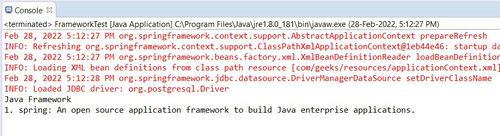
To run the Test file, right-click Run As -> Java Application. We will get the below output in the console.