Spring RestTemplate (original) (raw)
Last Updated : 23 Jul, 2025
Due to high traffic and quick access to services, REST APIs are getting more popular and have become the backbone of modern web development. It provides quick access to services and also provides fast data exchange between applications. REST is not a protocol or a standard, rather, it is a set of architectural constraints. It is also called a RESTful API or web API. When a client request is made, it just transfers a representation of the state of the resource to the requester or at the endpoint via HTTP. This information delivered to the client can be in several formats as follows:
- JSON (JavaScript Object Notation )
- XML
- HTML
- Plain text
**Key Features of RestTemplate:
The key features of RestTemplate are listed below:
- **Synchronous operations: It simplifies the programming model for many use cases.
- **Method variety: It provides 41 methods covering all the HTTP verbs.
- **Response conversion: It provides automatic mapping to domain objects.
- **Exception handling: It also provides built-in error handling capabilities.
- **Integration: Seamless with Spring ecosystem.
Why use Spring RestTemplate?
RestTemplate is a tool that makes it easier to talk to other web services from the Spring application. RestTemplate is useful in various ways which are listed below:
- Creating client instances and request objects
- Executing HTTP requests
- Interpreting responses
- Mapping responses to domain objects
- Handling exceptions
**Note: RestTemplate is deprecated as of Spring 5. It is recommended to use WebClient from Spring WebFlux, it supports non-blockin and reactive communication.
**Pre-requisites: The Client can be of any front-end framework like Angular, React, for reasons like developing a Single Page Application (SPA ), etc. or it can be a back-end internal/external Spring application itself.
Interacting with REST API
To interact with REST, the client needs to create a client instance and request object, execute the request, interpret the response, map the response to domain objects, and also handle the exceptions. It is common for the Spring framework to both create an API and consume internal or external application APIs. This advantage also helps us in the development of microservices. To avoid such boilerplate code, Spring provides a convenient way to consume REST APIs through **RestTemplate.
**Consuming REST API
The image below demonstrates the flow of requesting and getting a resource using Spring Framework, with RestTemplate for requesting and RestAPI for retrieving the resource.

RestTemplate is a synchronous REST client provided by the core Spring Framework.
**Path:
org.springframework.web.client.RestTemplate
**Constructors:
RestTemplate()
RestTemplate(ClientHttpRequestFactory requestFactory)
RestTemplate(List<HttpMessageConverter<?>> messageConverters)
It provides a total of 41 methods for interacting with REST resources. But there are only a dozen of unique methods each overloaded to form a complete set of 41 methods.
HTTP Operations Using RestTemplate
The below table demonstrates the main HTTP operations using RestTemplate
| Operation | Method | Action Performed |
|---|---|---|
| **DELETE | delete() | Performs an HTTP DELETE request on a resource at a specified URL. |
| **GET | getForEntity()getForObject() | Sends an HTTP GET request, returning a ResponseEntity containing an object mapped from the response body.Sends an HTTP GET request, returning an object mapped from a response body. |
| **POST | postForEntity() postForLocation()postForObject() | POSTs data to a URL, returning a ResponseEntity containing an object mapped from the response body.POSTs data to a URL, returning the URL of the newly created resource.POSTs data to a URL, returning an object mapped from the response body. |
| **PUT | put() | PUTs resource data to the specified URL. |
| **PATCH | patchForObject() | Sends an HTTP PATCH request, returning the resulting object mapped from the response body. |
| **HEAD | headForHeaders() | Sends an HTTP HEAD request, returning the HTTP headers for the specified resource URL. |
| **ANY | exchange() execute() | Executes a specified HTTP method against a URL, returning a ResponseEntity containing an object.Executes a specified HTTP method against a URL, returning an object mapped from the response body. |
| **OPTIONS | optionsForAllow() | Sends an HTTP OPTIONS request, returning the Allow header for the specified URL. |
Common Method Forms
Except for TRACE, RestTemplate has at least one method for each of the standard HTTP methods. execute() and exchange() provide lower-level, general-purpose methods for sending requests with any HTTP method. Most of the above methods overload in these 3 forms:
- One accepts a String URL specification with URL parameters specified in a variable argument list.
- One accepts a String URL specification with URL parameters specified in a Map<String, String>.
- One accepts a java.net.URI as the URL specification, with no support for parameterized URLs.
Initializing RestTemplate
In order to use RestTemplate, we can create an instance via as shown below:
RestTemplate rest = new RestTemplate();
Also, you can declare it as a bean and inject it as shown below as follows:
Java `
// Annotation
@Bean
// Method public RestTemplate restTemplate() { return new RestTemplate(); }
`
Project Structure
The Project structure is as follow:
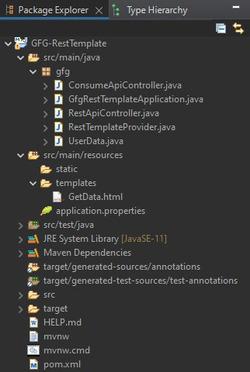
Step 1: Setting up the Project
To use **RestTemplate, include the necessary dependencies in the **pom.xml file:
**pom.xml( Maven Configurations):
XML `
4.0.0 org.springframework.boot spring-boot-starter-parent 2.6.3 sia GFG-RestTemplate 0.0.1-SNAPSHOT GFG-RestTemplate Rest-Template <java.version>11</java.version> org.springframework.boot spring-boot-starter-thymeleaf org.springframework.boot spring-boot-starter-web
    <dependency>
        <groupId>org.projectlombok</groupId>
        <artifactId>lombok</artifactId>
        <optional>true</optional>
    </dependency>
    <dependency>
        <groupId>org.springframework.boot</groupId>
        <artifactId>spring-boot-starter-test</artifactId>
        <scope>test</scope>
    </dependency>
    <dependency>
        <groupId>org.springframework.boot</groupId>
        <artifactId>spring-boot-starter</artifactId>
    </dependency>
    <dependency>
        <groupId>org.springframework.boot</groupId>
        <artifactId>spring-boot-devtools</artifactId>
        <scope>runtime</scope>
        <optional>true</optional>
    </dependency>
</dependencies>

<build>
    <plugins>
        <plugin>
            <groupId>org.springframework.boot</groupId>
            <artifactId>spring-boot-maven-plugin</artifactId>
            <configuration>
                <excludes>
                    <exclude>
                        <groupId>org.projectlombok</groupId>
                        <artifactId>lombok</artifactId>
                    </exclude>
                </excludes>
            </configuration>
        </plugin>
    </plugins>
</build>
`
Step 2: Bootstrapping the Application
Create a Spring Boot application class to bootstrap the application.
**GfgRestTemplateApplication.java (Bootstrapping of application):
Java `
package gfg;
// Importing required classes import org.springframework.boot.SpringApplication; import org.springframework.boot.autoconfigure.SpringBootApplication;
// Annotation @SpringBootApplication
// Main class public class GfgRestTemplateApplication {
 // Main driver method
public static void main(String[] args)
{
    SpringApplication.run(
        GfgRestTemplateApplication.class, args);
}
}
`
Step 3: Creating the Domain Class
This class uses the Lombok library to automatically generate Getter/Setter methods with ****@Data annotation.** Lombok's dependency is as depicted below as follows:
**Maven Dependency:
org.projectlombok
lombok
true
**UserData.java (Domain class):
Java `
package gfg;
import lombok.Data;
@Data public class UserData {
public String id;
public String userName;
public String data;
}
`
Step 4: Implementing the REST Controller
Create a REST controller to expose endpoints for GET and POST requests.
- **GET: Returns domain data in JSON form.
- **POST: Returns domain data wrapped in ResponseEntity along with headers.
**RestApiController.java (Rest Controller):
Java `
package gfg;
// Importing required classes import org.springframework.http.HttpHeaders; import org.springframework.http.HttpStatus; import org.springframework.http.ResponseEntity; import org.springframework.web.bind.annotation.CrossOrigin; import org.springframework.web.bind.annotation.GetMapping; import org.springframework.web.bind.annotation.PostMapping; import org.springframework.web.bind.annotation.RequestBody; import org.springframework.web.bind.annotation.RequestMapping; import org.springframework.web.bind.annotation.RestController;
// Annotation @RestController @RequestMapping(path = "/RestApi", produces = "application/json") @CrossOrigin(origins = "*") public class RestApiController {
@GetMapping("/getData")
public UserData get() {
    UserData userData = new UserData();
    userData.setId("1");
    userData.setUserName("darshanGPawar@geek");
    userData.setData("Data sent by Rest-API");
    return userData;
}

@PostMapping
public ResponseEntity<UserData> post(@RequestBody UserData userData) {
    HttpHeaders headers = new HttpHeaders();
    return new ResponseEntity<>(userData, headers, HttpStatus.CREATED);
}
}
`
Step 5: Consuming the REST API with RestTemplate
Create a class to implement RestTemplate for consuming the REST API.
- **GET: Consumes REST API's GET mapping response and returns domain object.
- **POST: Consumes REST API's POST mapping response and return ResponseEntity object.
**File: RestTemplateProvider.java (RestTemplate implementation):
Java `
package gfg;
// Importing required classes import org.springframework.http.ResponseEntity; import org.springframework.web.client.RestTemplate;
public class RestTemplateProvider {
private final RestTemplate rest = new RestTemplate();

public UserData getUserData() {
    try {
        return rest.getForObject("http://localhost:8080/RestApi/getData", UserData.class);
    } catch (RestClientException e) {
        System.out.println("Error fetching data: " + e.getMessage());
        return null;
    }
}

public ResponseEntity<UserData> post(UserData user) {
    try {
        return rest.postForEntity("http://localhost:8080/RestApi", user, UserData.class);
    } catch (RestClientException e) {
        System.out.println("Error posting data: " + e.getMessage());
        return new ResponseEntity<>(HttpStatus.INTERNAL_SERVER_ERROR);
    }
}
}
`
Step 6: Creating a Controller the API
Create a regular controller to interact with the REST API and display the results.
**ConsumeApiController.java (Regular Controller - Consume REST API):
Java `
package gfg;
// Importing required classes import org.springframework.http.ResponseEntity; import org.springframework.stereotype.Controller; import org.springframework.ui.Model; import org.springframework.web.bind.annotation.GetMapping; import org.springframework.web.bind.annotation.ModelAttribute; import org.springframework.web.bind.annotation.PostMapping; import org.springframework.web.bind.annotation.RequestMapping;
// Annotation @Controller @RequestMapping("/Api")
// Class public class ConsumeApiController {
// Annotation
@GetMapping public String get(Model model)
{

    // Creating an instance of RestTemplateProvider
    // class
    RestTemplateProvider restTemplate
        = new RestTemplateProvider();

    model.addAttribute("user",
                       restTemplate.getUserData());
    model.addAttribute("model", new UserData());
    return "GetData";
}

// Annotation
@PostMapping
public String post(@ModelAttribute("model")
                   UserData user, Model model)
{

    RestTemplateProvider restTemplate = new RestTemplateProvider();

    ResponseEntity<UserData> response = restTemplate.post(user);

    model.addAttribute("user", response.getBody());
    model.addAttribute("headers",
                       response.getHeaders() + " "
                           + response.getStatusCode());
    return "GetData";
}
}
`
Step 7: Displaying Results with Thymeleaf
Create a Thymeleaf template (GetData.html) to display the results.
**GetData.html:
HTML `
GFG-REST-TEMPLATEHello Geek
Replaceable text
Replaceable text
Replaceable text
Type ID :
Type USERNAME :
Type DATA :
`
**Outputs: They are as follows sequentially
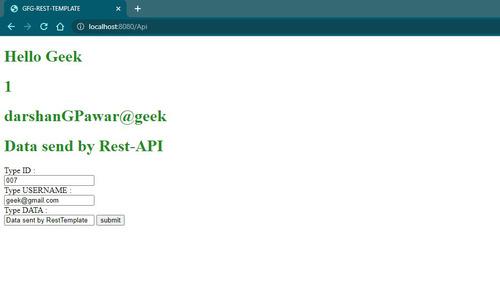

**Note:
- **RestTemplate is synchronous and deprecated in **Spring 5. for new projects, consider using **WebClient.
- When working with self-signed certificates, use HTTP for development purposes to avoid SSL errors.