Spring Security Architecture (original) (raw)
Last Updated : 8 May, 2026
Spring Security is a framework used to secure Java applications by handling authentication, authorization, and protection against common security threats. It is widely used in Spring-based applications to implement flexible security mechanisms.
- Provides authentication and authorization to control access to application resources
- Supports integration with JWT, OAuth2, LDAP, and database-based authentication
- Helps protect applications from common security vulnerabilities like CSRF and session-related attacks
Spring Security Architecture
This diagram shows how an HTTP request is processed through the Spring Security filter chain to handle authentication and authorization before returning the response.
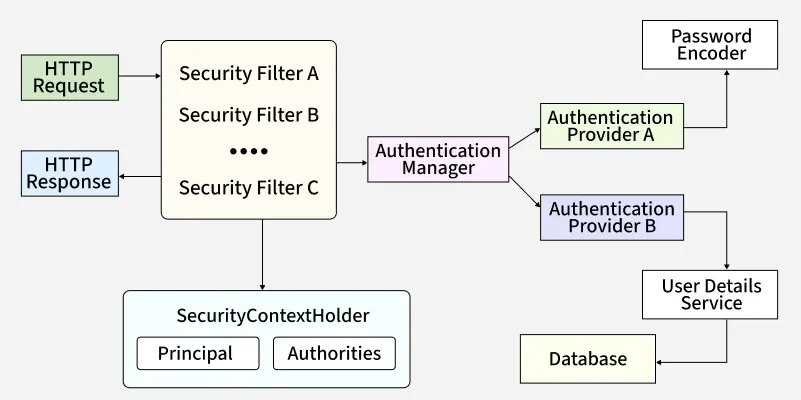
Spring-Security
Core Components of Spring Security Architecture
1. Security Filter Chain
- Acts as the entry point for all incoming HTTP requests in Spring Security
- Every request passes through a chain of filters such as UsernamePasswordAuthenticationFilter and BasicAuthenticationFilter
- Handles authentication, authorization, CSRF protection, and session management
- Ensures a modular and customizable security flow
**Example:
Java `
@Configuration public class SecurityConfig {
@Bean
public SecurityFilterChain
securityFilterChain(HttpSecurity http) throws Exception
{

    http.csrf(
            csrf
            -> csrf.disable()) // Disable CSRF for APIs
        .authorizeHttpRequests(
            auth
            -> auth.requestMatchers("/public/**")
                   .permitAll()
                   .anyRequest()
                   .authenticated())
        .httpBasic(); // Enable Basic Authentication

    return http.build();
}
}
`
2. Authentication Manager
- Core component responsible for handling user authentication
- Delegates authentication requests to one or more AuthenticationProvider instances
- Follows the Strategy design pattern, allowing multiple authentication mechanisms such as DB, LDAP, JWT, and OAuth2
**Example:
Java `
@Configuration public class AuthManagerConfig {
@Bean
public AuthenticationManager authenticationManager(
    AuthenticationConfiguration configuration)
    throws Exception
{

    return configuration.getAuthenticationManager();
}
}
`
3. Authentication Providers
- Authentication Providers are the components responsible for validating user credentials
- They process authentication requests coming from the AuthenticationManager
- Different providers support different authentication mechanisms
**Examples:
- DaoAuthenticationProvider -> Uses database authentication with UserDetailsService and PasswordEncoder
- JwtAuthenticationProvider -> Validates JWT tokens Java `
@Configuration public class ProviderConfig {
@Bean
public DaoAuthenticationProvider authenticationProvider(
    UserDetailsService userDetailsService,
    PasswordEncoder passwordEncoder)
{

    DaoAuthenticationProvider provider
        = new DaoAuthenticationProvider();
    provider.setUserDetailsService(userDetailsService);
    provider.setPasswordEncoder(passwordEncoder);

    return provider;
}
}
`
**Note: DaoAuthenticationProvider is most commonly used for database-based authentication It ensures passwords are validated securely using a PasswordEncoder
4. UserDetailsService
- Loads user-specific data (username, password, roles) from a data source like a database.
- Returns a UserDetails object.
- Used primarily by providers like DaoAuthenticationProvider.
**Example:
Java `
@Configuration public class UserConfig {
@Bean
public UserDetailsService userDetailsService(PasswordEncoder encoder) {
    return new InMemoryUserDetailsManager(
        User.withUsername("john")
            .password(encoder.encode("password"))
            .roles("USER")
            .build(),
        User.withUsername("admin")
            .password(encoder.encode("admin123"))
            .roles("ADMIN")
            .build()
    );
}
}
`
5. Password Encoder
- Ensures secure password storage and validation.
- Encodes raw passwords into secure hashes before saving/validation.
**Example:
Java `
@Configuration public class PasswordConfig {
@Bean
public PasswordEncoder passwordEncoder() {
    return new BCryptPasswordEncoder(); // Strong hashing
}
}
`
6. SecurityContextHolder
Stores the SecurityContext for the current request/thread. And holds the Authentication object, which contains:
- **Principal: Represents the logged-in user (username or user object).
- **Authorities: Roles/permissions granted to the user.
**Example:
Java `
@RestController public class UserController {
@GetMapping("/me")
public String getCurrentUser() {
    Authentication authentication = SecurityContextHolder.getContext().getAuthentication();
    return "Logged in as: " + authentication.getName() +
           " | Roles: " + authentication.getAuthorities();
}
}
`
How It Works Internally
- A client sends an HTTP request to the application.
- The request passes through the Security Filter Chain where multiple security filters are applied.
- The Authentication Manager receives the request and delegates authentication to the appropriate Authentication Provider.
- The Authentication Provider validates credentials using UserDetailsService and PasswordEncoder (if required).
- On successful authentication, user details are stored in SecurityContextHolder.
- Authorization is performed using the stored principal and authorities to check access permissions.
- If all checks pass, the request reaches the controller and an HTTP response is returned.