Clustered and NonClustered Indexing (original) (raw)
Last Updated : 5 Jan, 2026
Indexing is a performance optimization technique in SQL Server that improves the speed of data retrieval. There are two main types of indexes: Clustered and Non-Clustered.
Clustered Index
A Clustered Index defines the physical order of rows in a table. When you create a clustered index on a column, SQL Server rearranges the actual data rows to match the index order. This is why a table can have only one clustered index.
A clustered index is created only when both the following conditions are satisfied:
- The data can be stored in a sequential or sorted manner.
- The column used as the key must contain unique values.
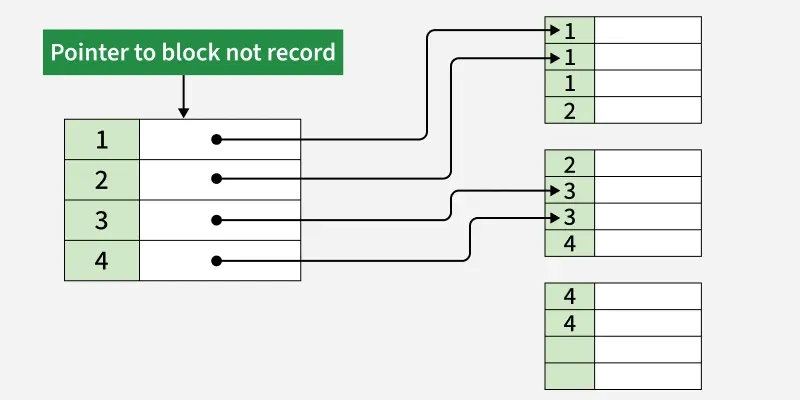
Example of Clustered Index:
Consider a table called Student where the Roll_No column is the primary key. This automatically becomes a clustered index. Here, SQL Server automatically creates a clustered index on the Roll_No column. The rows are physically stored in ascending order based on the Roll_No.
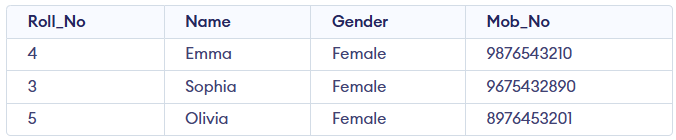
Student Table
- A table can have only one clustered index.
- A clustered index can be created on multiple columns → called a composite index.
- In this case, Roll_No is the primary key, so it automatically becomes the clustered index.
- Query results are displayed in ascending order of Roll_No.
Non-Clustered Index
A non-clustered index does not change the physical data order. It creates a separate structure with indexed columns and pointers to the actual rows. Multiple non-clustered indexes can be created, improving performance for searches and joins.
- Stores index data separately from the table.
- Multiple non-clustered indexes can exist on a table.
- Contains a copy of the indexed column(s) and a pointer to the actual data row.
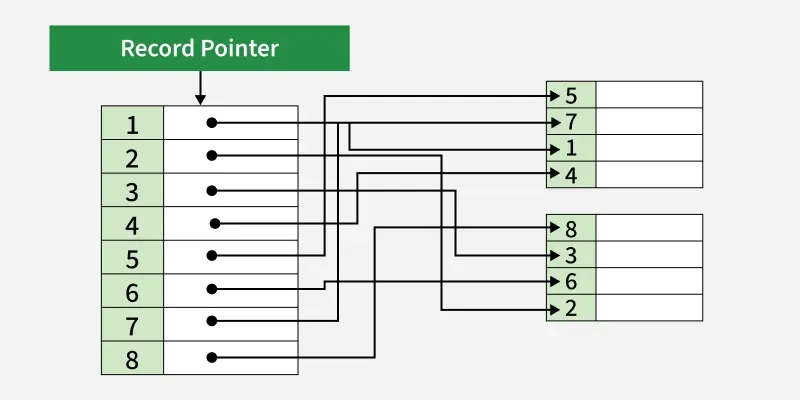
Example of Non-Clustered Index:
In the Student table, a non-clustered index can be created on the Name column. Since Roll_No is the primary key, it already has a clustered index. A non-clustered index creates a separate structure that stores the Name values and pointers to the actual rows.
Query:
CREATE NONCLUSTERED INDEX NIX_FTE_Name
ON Student (Name ASC);
**Output:
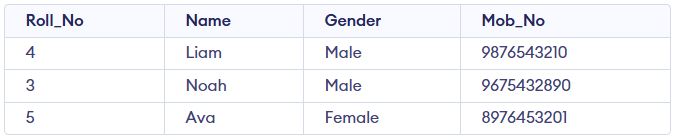
Student Table
- Creates a non-clustered index named NIX_FTE_Name on the Student table for the Name column.
- Stores the index data in ascending order without changing the actual table data.
- Improves the speed of searches and queries on the Name column.
Clustered Non-Clustered Index
This table organizes the primary differences between clustered and non-clustered indexes, making it easier to understand when to use each index type based on performance requirements and database structure.
| **Clustered Index | **Non-Clustered Index |
|---|---|
| Faster for range-based queries and sorting. | Slower for range-based queries but faster for specific lookups. |
| Requires less memory for operations. | Requires more memory due to additional index structure. |
| The clustered index stores data in the table itself. | The non-clustered index stores data separately from the table. |
| A table can have only one clustered index. | A table can have multiple non-clustered indexes. |
| The clustered index can store data on the disk. | The non-clustered index stores the index structure (B-tree) on disk with pointers to the data pages. |
| Stores pointers to the data blocks, not the data itself. | Stores both the indexed value and a pointer to the actual row in a separate data page. |
| Leaf nodes contain the actual data itself. | Leaf nodes contain indexed columns and pointers to data. |
| Defines the physical order of the rows in the table. | Defines the logical order of data in the index, not the table. |
| The data is physically reordered to match the index. | The logical order does not match the physical order of rows. |
| Primary keys are by default clustered indexes. | Composite keys used with unique constraints are non-clustered. |
| Typically larger, especially for large primary clustered indexes. | Smaller than clustered indexes, especially when composite. |
| Ideal for range queries and sorting. | Suitable for optimizing lookups and queries on non-primary columns. |
| A clustered index directly impacts the table's physical storage order. | A non-clustered index does not affect the physical storage order of the table. |