Relationships in SQL OnetoOne, OnetoMany, ManytoMany (original) (raw)
Relationships in SQL - One-to-One, One-to-Many, Many-to-Many
Last Updated : 8 Sep, 2025
Relationships in SQL define how tables in a relational database are connected and interact through foreign keys, ensuring data integrity and enabling efficient data retrieval by allowing data to be linked across multiple tables.
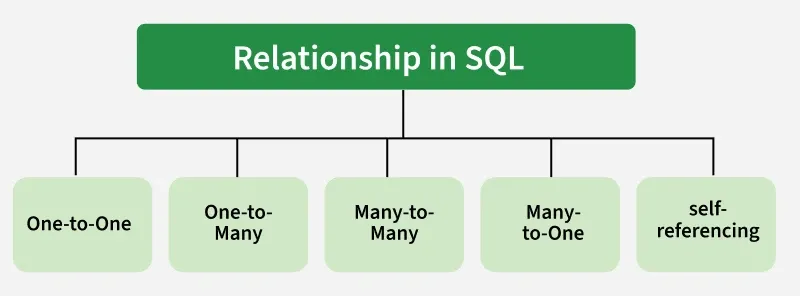
**Type of Relationships in SQL
There are different types of relationships: one-to-one, one-to-many, many-to-many, and self-referencing.
1. One-to-One Relationship
Each record in Table A is associated with one and only one record in Table B, and vice versa.
- **Setup: Include a foreign key in one of the tables that references the primary key of the other table.
- **For example: Tables users and user_profiles, where each user has a single corresponding profile.
CREATE TABLE users (
user_id INT PRIMARY KEY,
username VARCHAR(50));
CREATE TABLE user_profiles (
profile_id INT PRIMARY KEY,
user_id INT UNIQUE,
profile_data VARCHAR(255),
FOREIGN KEY (user_id) REFERENCES users(user_id));
**Output:
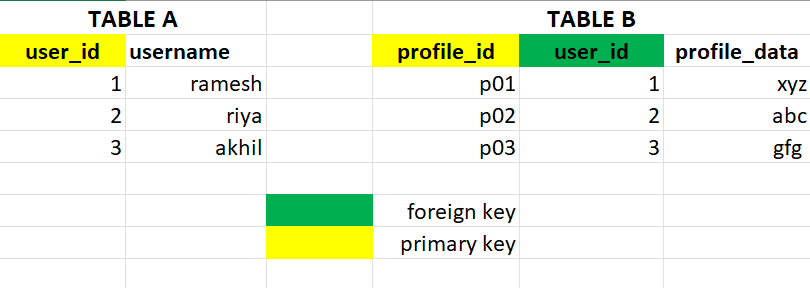
one-to-one relatonship
2. One-to-Many Relationship
Each record in Table A can be associated with multiple records in Table B, but each record in Table B is associated with only one record in Table A.
- **Setup: Include a foreign key in the "many" side table (Table B) that references the primary key of the "one" side table (Table A).
- **For example: Tables departments and employees, where each department can have multiple employees, but each employee belongs to one department.
CREATE TABLE departments (
department_id INT PRIMARY KEY,
department_name VARCHAR(50));
CREATE TABLE employees (
employee_id INT PRIMARY KEY,
employee_name VARCHAR(50),
department_id INT,
FOREIGN KEY (department_id) REFERENCES departments(department_id));
**Output:
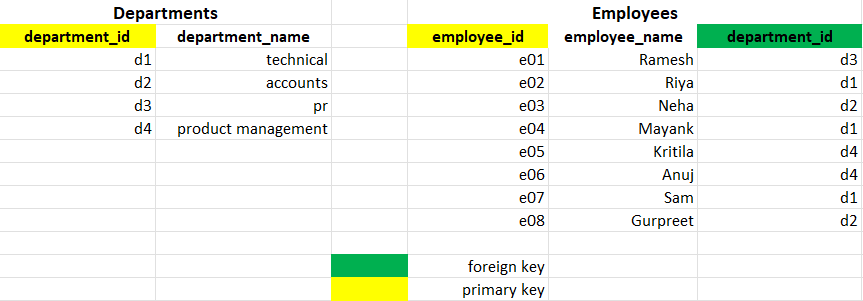
One-to-many relationship
3. Many-to-Many Relationship
Each record in Table A can be associated with multiple records in Table B, and vice versa.
- **Setup: Create an intermediate table (also known as a junction or linking table) that contains foreign keys referencing both related tables.
- **For example: Tables students and courses, where each student can enroll in multiple courses, and each course can have multiple students.
CREATE TABLE students (
student_id INT PRIMARY KEY,
student_name VARCHAR(50));
CREATE TABLE courses (
course_id INT PRIMARY KEY,
course_name VARCHAR(50));
CREATE TABLE student_courses (
student_id INT,
course_id INT,
PRIMARY KEY (student_id, course_id),
FOREIGN KEY (student_id) REFERENCES students(student_id),
FOREIGN KEY (course_id) REFERENCES courses(course_id));
**Output:
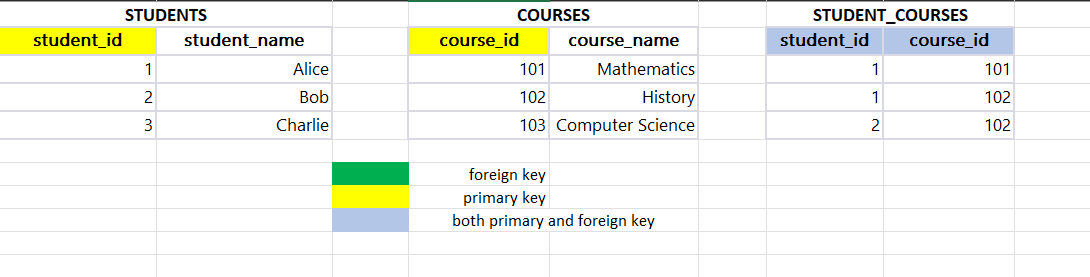
Many-to-many relationship
4. Many-to-One Relationship
Multiple records in table B can be associated with one record in table A.
- Setup: Crate a Foreign key in "Many Table" that references to Primary Key in "One Table".
- **Example: Table Teachers and Courses, many courses can be taught by single teacher.
CREATE TABLE Teachers (
teacher_id INT PRIMARY KEY,
first_name VARCHAR(255),
last_name VARCHAR(255)
);
CREATE TABLE Courses (
course_id INT PRIMARY KEY,
course_name VARCHAR(255),
teacher_id INT,
FOREIGN KEY (teacher_id) REFERENCES Teachers(teacher_id)
);
**Output:
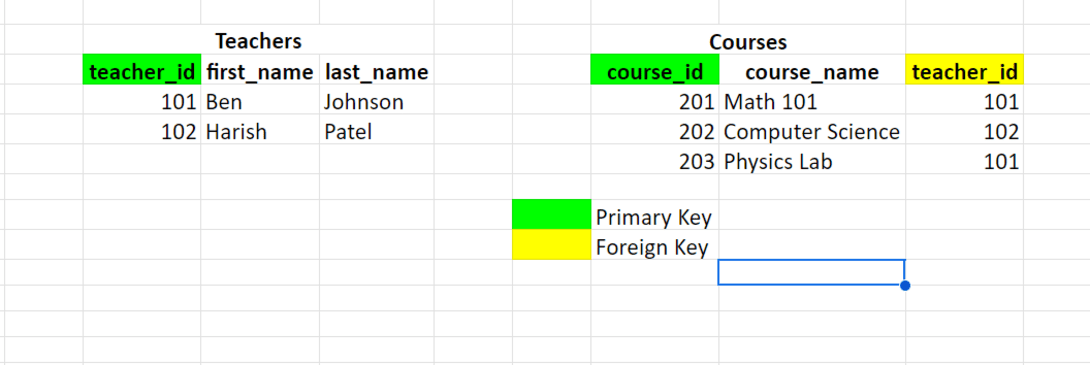
Many-to-One Relationship
5. Self-Referencing Relationship
A table has a foreign key that references its primary key.
- **Setup: Include a foreign key column in the same table that references its primary key.
- **For example : A table employees with a column manager_id referencing the same table's employee_id.
CREATE TABLE employees (
employee_id INT PRIMARY KEY,
employee_name VARCHAR(50),
manager_id INT,
FOREIGN KEY (manager_id) REFERENCES employees(employee_id));
**Output:
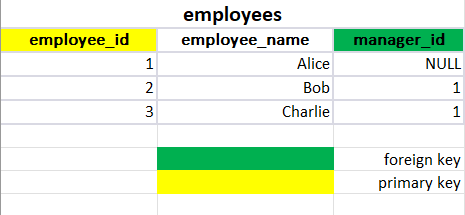
Self-Referencing Relationship