SQL Correlated Subqueries (original) (raw)
Last Updated : 11 Apr, 2026
A correlated subquery is a subquery that depends on values from the outer query. Unlike a regular (non-correlated) subquery, it is evaluated once for every row in the outer query. This makes correlated subqueries dynamic and highly useful for solving complex database problems like row-by-row comparisons, filtering, and conditional updates.
- Executes once for each row of the outer query.
- Subquery uses values from the outer query.
- Ideal for ranking, row-specific calculations, and conditional logic.
**Syntax:
SELECT column1, column2, ... FROM table1 t1 WHERE column1 operator (SELECT column FROM table2 WHERE expr1 = t1.expr2);
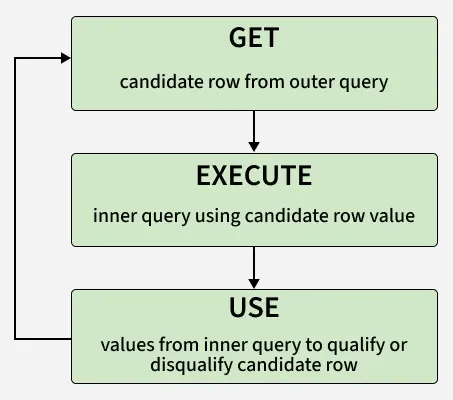
Workflow
Correlated subqueries are best understood through practical use cases. Below are some common scenarios where they are used to filter, update, or compare data row by row.
Consider the following two tables for the examples below:
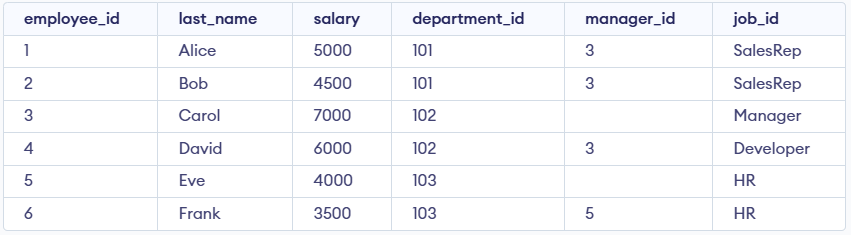
employees Table
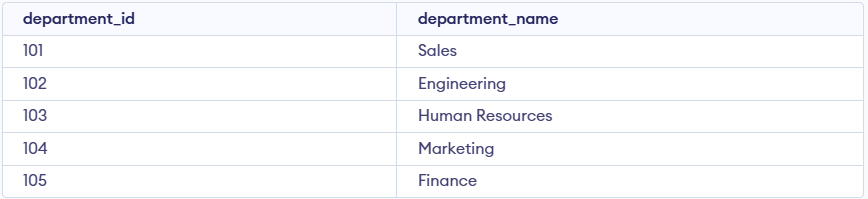
departments Table
1. Fetching Data Based on Row-Specific Conditions
Correlated subqueries are often used when you need to filter data based on a condition that involves comparing values from the outer query.
Query:
SELECT last_name, salary, department_id FROM employees AS outer WHERE salary > ( SELECT AVG(salary) FROM employees WHERE department_id = outer.department_id );
**Output:

Output
- Selects employees whose salary is above the average salary of their department.
- Uses a subquery to calculate the department’s average salary for comparison.
Correlated subqueries can also be used with UPDATE statements to modify data based on related information from another table.
**Query:
UPDATE employees SET salary = ROUND( (SELECT AVG(salary) FROM employees WHERE department_id = employees.department_id), 2 ) WHERE department_id = 101;
**Output:
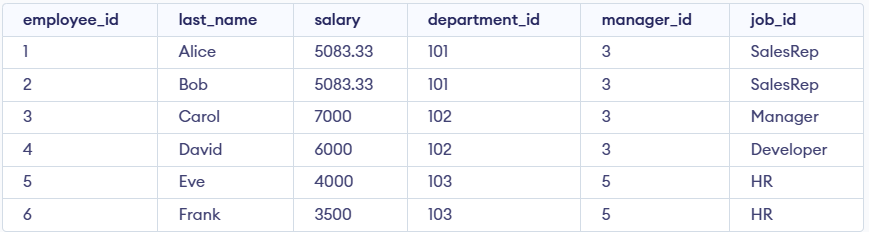
Output
- Updates the salary of employees in department 101 to the average salary of their department.
- Uses a subquery to calculate the average salary for each department and rounds it to two decimal places.
We can use a correlated subquery within a DELETE statement to remove rows from one table based on conditions in another table.
**Query:
DELETE FROM employees WHERE employee_id IN ( SELECT employee_id FROM employees WHERE department_id = 101 );
**Output:

Output
- Deletes employees who belong to department 101.
- Uses a subquery to select the employee_ids of employees in department 101.
The EXISTS operator is often used in correlated subqueries to test if a subquery returns any rows. It returns TRUE if the subquery has at least one row.
**Query:
SELECT e.employee_id, e.last_name, e.job_id, e.department_id FROM employees e WHERE EXISTS ( SELECT 1 FROM employees sub WHERE sub.manager_id = e.employee_id );
**Output:

Output
- Selects employees who are managers of at least one other employee.
- Uses a subquery to check if any employee has manager_id matching the outer employee’s employee_id.
The NOT EXISTS operator is used to check if a subquery does not return any rows. This is useful for finding records that do not match specific criteria.
**Query:
SELECT d.department_id, d.department_name FROM departments d WHERE NOT EXISTS ( SELECT 1 FROM employees e WHERE e.department_id = d.department_id );
**Output:

Output
- Selects departments that have no employees.
- Uses a subquery to check for the absence of matching employees in each department.
Here are the differences between nested and correlated subqueries:
| Nested (Non-Correlated) Subquery | Correlated Subquery |
|---|---|
| Executes once before the outer query. | Executes for each row of the outer query. |
| Independent of the outer query. | Dependent on values from the outer query. |
| Usually more efficient for large datasets. | Can be slower as it runs multiple times. |
| Example: WHERE col IN (SELECT col FROM table2) | Example: WHERE col > (SELECT AVG(col) FROM table 2 WHERE table2.id = outer.id) |
Performance Considerations
WHERE col > (SELECT AVG(col) FROM table2 WHERE table2.id = outer.id)
- Can be slow on large datasets due to repeated execution.
- Use JOINs when possible for better performance.
- Ensure proper indexes on columns used in filtering.