SQL CREATE DATABASE (original) (raw)
Last Updated : 11 Jun, 2026
To create a new database in MySQL, we use CREATE DATABASE command followed by the database name. Database names cannot contain spaces; if needed, an underscore (_) can be used instead.
**Syntax:
CREATE DATABASE database_name;
It helps organize data by providing a separate container to store related tables and other objects. Let’s create a database named GeeksForGeeks:
**Query:
CREATE DATABASE GeeksForGeeks;
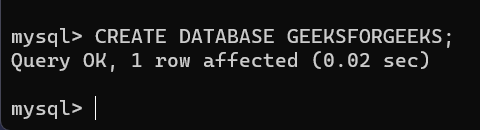
**Output
output
- This query creates an empty database named GeeksForGeeks.
- A success message will confirm that the database was created.
**Note: If you try to create a database with a name that already exists, you’ll see an error. To avoid this, either choose a new name or use IF NOT EXISTS clause to only create database if it doesn't already exist.
**Query:
CREATE DATABASE IF NOT EXISTS GeeksForGeeks;
1. Verifying Database Creation
To confirm that a new database has been created, use:
**Query:
SHOW DATABASES;
**Output

output
After selecting the database using the USE command, all operations will be performed within it.
2. Switching to a Database (USE Command)
Once your database is created, we can switch to the database to begin adding tables, inserting data and running queries. To switch to your new database, use the USE command.
**Syntax:
USE database_name;
**Query:
USE GeeksForGeeks;
- After running this, any SQL operations like creating tables or inserting data will be done within GeeksForGeeks database.
- This allows you to work within the scope of the newly created database.
3. Deleting a Database
If you ever want to delete a database, use:
**Query:
DROP DATABASE GeeksForGeeks;
This permanently deletes the database.
**Note: Once dropped, all data inside the database will be lost permanently.