SQL Except Operator (original) (raw)
Last Updated : 14 Apr, 2026
The SQL EXCEPT operator returns rows from the first query that do not appear in the second. It works like subtracting one result set from another and is useful for identifying unmatched or missing records between tables.
- Returns only rows unique to the first SELECT.
- Removes duplicates automatically.
- Helps compare datasets and find non-overlapping records.
**Example: First, we will create a demo SQL database and table, on which we will use the Except Clause command.

**Query:
SELECT name FROM Students
EXCEPT
SELECT name FROM Students WHERE city = 'Berlin';
**Output:

**Syntax:
SELECT column1, column2, ...
FROM table1
EXCEPT
SELECT column1, column2, ...
FROM table2;
Examples of SQL EXCEPT
Let’s consider two tables, Students and Teaching Assistant. We will perform all the examples based on these two tables.
**Student Table:
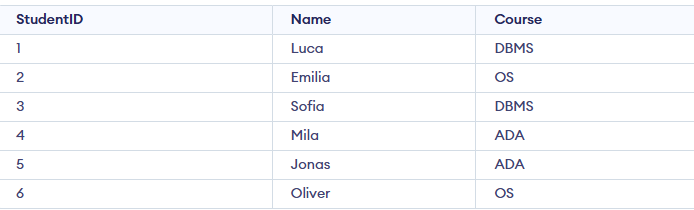
Students Table

Teaching_Assistant Table
Example 1: Filter Students
We want to find all the students who are not teaching assistants.
**Query:
SELECT Name
FROM Students
EXCEPT
SELECT Name
FROM Teaching_Assistant;
**Output:

Example 2: Retaining Duplicates with EXCEPT ALL
By default, EXCEPT removes duplicates from the result set. To retain duplicates, you can use EXCEPT ALL instead.
**Query:
SELECT Name
FROM Students
EXCEPT ALL
SELECT Name
FROM Teaching_Assistant;
**Output:

**Note: EXCEPT ALL is supported in databases like PostgreSQL and Oracle, but is not supported in SQLite and MySQL.
SQL EXCEPT vs. SQL NOT IN
Here are the detailed comparison between SQL EXCEPT and NOT IN.
| **EXCEPT | **NOT IN |
|---|---|
| Removes duplicates from the result | Retains duplicates in the result |
| Generally more efficient for large datasets as it processes only the required rows | May be slower for large datasets, especially when checking multiple conditions |
| When you need to find rows that exist in one result set but not the other | When you need to check a specific column’s values against a list |
| Not supported by MySQL | Supported by most SQL databases |
**Note: The two SELECT queries must return the same number of columns and the data types must be compatible.