SQL EXISTS (original) (raw)
Last Updated : 16 Jun, 2026
SQL provides the EXISTS operator to check whether a subquery returns at least one row. It is useful for filtering data based on the presence of related records.
- It checks if a subquery returns one or more rows.
- It returns TRUE if data exists, otherwise FALSE.
- It is commonly used with subqueries.
**Example: First, we create a demo SQL database and tables, on which we use the EXISTS command.

Customers Table

Orders Table
**Query:
SELECT Name
FROM Customers c
WHERE EXISTS (
SELECT 1
FROM Orders o
WHERE o.CustomerID = c.CustomerID
);
**Output:
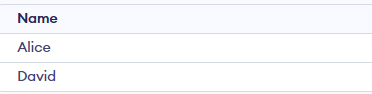
Output
**Syntax:
SELECT column_name(s)
FROM table_name
WHERE EXISTS (
SELECT column_name(s)
FROM subquery_table
WHERE condition
);
- **EXISTS: The boolean operator that checks if a subquery returns rows.
- **Subquery: A nested SELECT query that returns data for evaluation.
- **Condition: The condition applied to the subquery.
Examples of SQL EXISTS
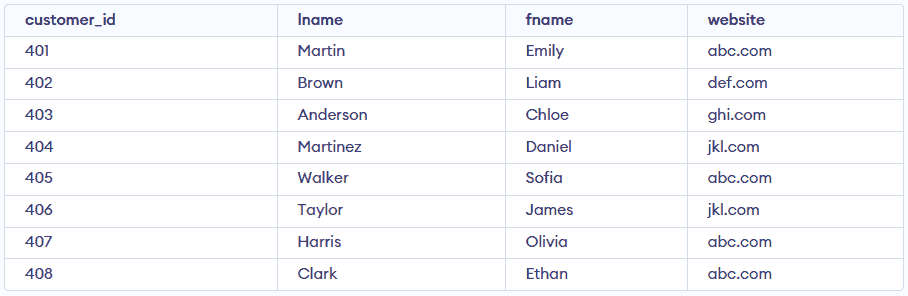
Consider the following two relation "Customers" and "Orders".
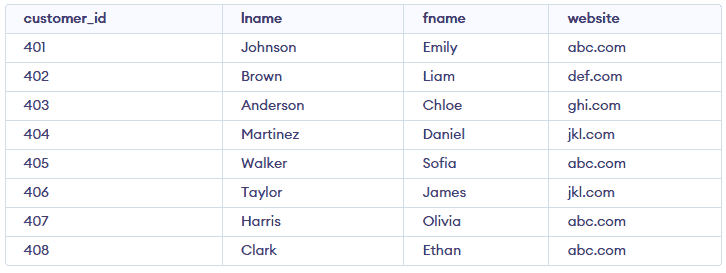
Customers Table
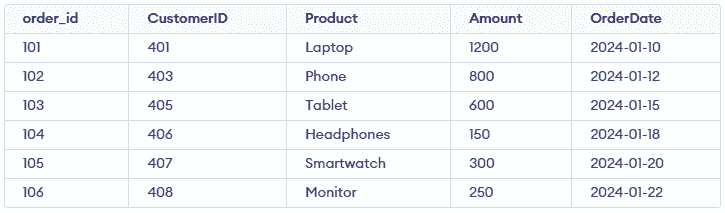
Orders Table
Example 1 : Using EXISTS with SELECT
To fetch the customers whose website is shared by at least one other customer in the same Customers table.
**Query:
SELECT c1.*
FROM Customers c1
WHERE EXISTS (
SELECT 1
FROM Customers c2
WHERE c2.website = c1.website
AND c2.customer_id <> c1.customer_id
);
**Output:
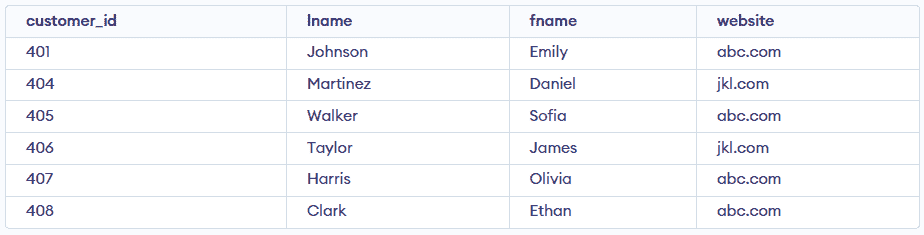
Output after using EXIST with SELECT
Example 2 : Using NOT with EXISTS
Fetch last and first name of the customers who have not placed any order.
SELECT c.lname, c.fname
FROM Customers c
WHERE NOT EXISTS (
SELECT 1
FROM Orders o
WHERE o.CustomerID = c.customer_id
);
**Output:

Output after using EXIST with NOT
Example 3 : Using EXISTS Condition with DELETE Statement
Delete record of all the customer from Order Table whose website is 'abc.com'.
DELETE FROM Orders
WHERE EXISTS (
SELECT 1
FROM Customers c
WHERE c.customer_id = Orders.CustomerID
AND c.website = 'abc.com'
);
SELECT * FROM Orders;
**Output:

Output after Using EXISTS Condition with DELETE Statement
Example 4 : Using EXISTS Condition with UPDATE Statement
Update the lname as 'Martin' of customer in Customer Table whose customer_id is 401.
UPDATE Customers
SET lname = 'Martin'
WHERE EXISTS (
SELECT 1
FROM Customers c2
WHERE c2.customer_id = 401
AND c2.customer_id = Customers.customer_id
);
SELECT * FROM Customers;
**Output:
Output after using EXIST with UPDATE
To better understand row filtering techniques, see our detailed comparison of EXISTS vs IN in SQL