SQL GROUP BY (original) (raw)
Last Updated : 14 Apr, 2026
The SQL GROUP BY clause is used to arrange identical data into groups based on one or more columns. It is commonly used with aggregate functions like COUNT(), SUM(), AVG(), MAX() and MIN() to perform calculations on each group of data.
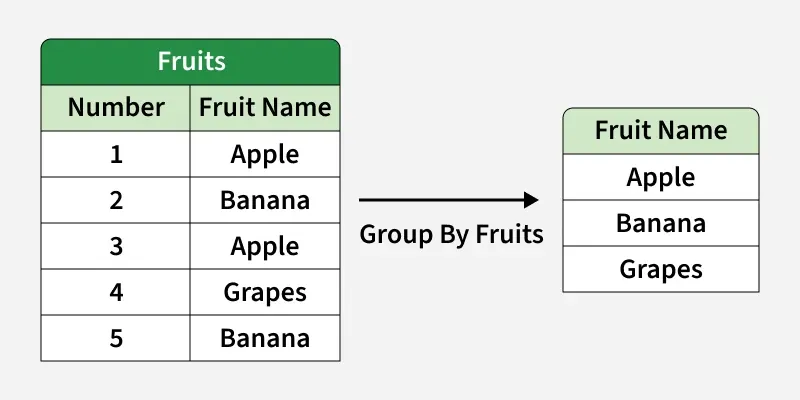
**Example: First, we will create a demo SQL database and table, on which we will use the GROUP BY command.
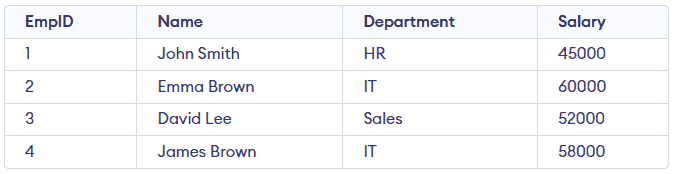
Employees Table
**Query:
SELECT Department, SUM(Salary) AS TotalSalary
FROM Employees
GROUP BY Department;
**Output:

- Groups all employee records based on their department.
- Calculates and returns total salary for each department.
**Syntax:
SELECT column1, aggregate_function(column2)
FROM table_name
WHERE condition
GROUP BY column1, column2;
- **aggregate_function: function used for aggregation, e.g., SUM(), AVG(), COUNT().
- **table_name: name of the table from which data is selected.
- **condition: Optional condition to filter rows before grouping (used with WHERE).
- **column1, column2: Columns on which the grouping is applied.
Working with GROUP BY
Let's assume that we have a Student table. We will insert some sample data into this table and then perform operations using GROUP BY to understand how it groups rows based on a column and aggregates data.
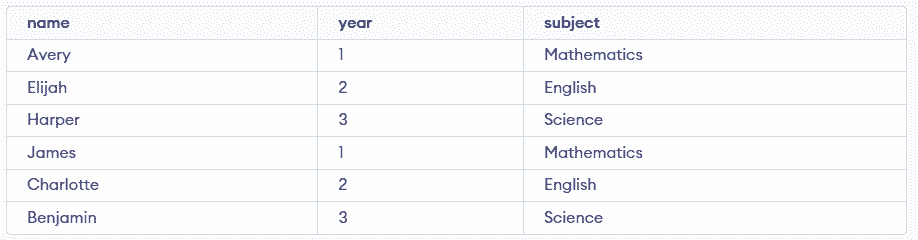
Student Table
Example 1: Group By Single Column
When we group by a single column, rows with the same value in that column are combined. For example, grouping by subject shows how many students are enrolled in each subject.
**Query:
SELECT subject, COUNT(*) AS Student_Count
FROM Student
GROUP BY subject;
**Output:

- Groups all student records by their subject.
- Counts total number of students in each subject.
Example 2: Group By Multiple Columns
Using GROUP BY with multiple columns groups rows that share the same values in those columns. For example, grouping by subject and year will combine rows with the same subject–year pair and we can count how many students fall into each group.
**Query:
SELECT subject, year, COUNT(*)
FROM Student
GROUP BY subject, year;
**Output:

- Students with the same subject and year are grouped together.
- Since each subject and year pair occurs twice, the count is 2 for every group.
HAVING Clause in GROUP BY Clause
HAVING clause is used to filter results after grouping, especially when working with aggregate functions like SUM(), COUNT() or AVG(). Unlike WHERE, it applies conditions on grouped data.
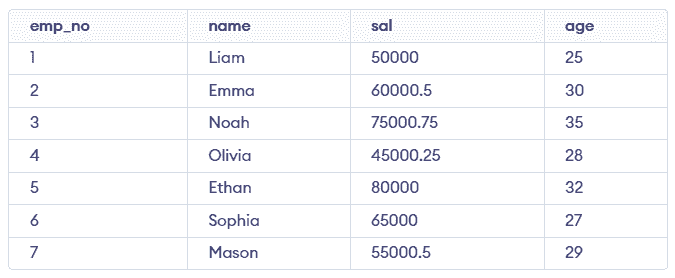
Employees Table
Example 1: Filter by Total Salary
In this query, we group employees by age and display only those whose total salary is greater than 50,000.
SELECT age, SUM(sal) FROM Employees
GROUP BY age
HAVING SUM(sal)>50000;
**Output:
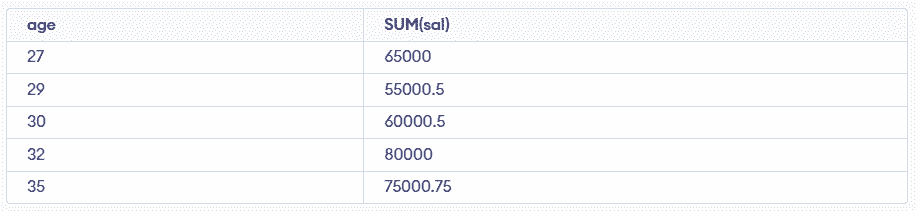
- Groups employees by age and sums their salaries.
- Returns only ages where total salary exceeds 50000.
Example 2: Filter by Average Salary
In this query, we group employees by age and display only those age groups where average salary is above 60,000.
SELECT age, AVG(sal) AS Average_Salary
FROM Employees
GROUP BY age
HAVING AVG(sal) > 60000;
**Output:

- Groups employees by age and calculates average salary.
- Filters only age groups with average salary above 60000.