SQL HAVING Clause (original) (raw)
Last Updated : 9 Feb, 2026
The SQL HAVING clause filters the results of grouped data after using the GROUP BY clause. It is used with aggregate functions such as SUM(), COUNT(), or AVG() to display only those groups that meet specific conditions.
**Example: First, we will create a demo SQL database and table, on which we will use the HAVING Clause command.
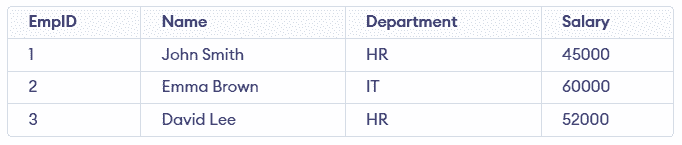
**Query:
SELECT Department, COUNT(EmpID) AS Employee_Count FROM Employees GROUP BY Department HAVING COUNT(EmpID) > 1;
**Output:

**Syntax:
SELECT column_name, AGGREGATE_FUNCTION(column_name) FROM table_name GROUP BY column_name HAVING condition;
**Note: When HAVING is used without GROUP BY, the entire table is treated as a single group. This works only with aggregate functions.
Examples of HAVING Clause
First, we create the Employee table and insert sample data to demonstrate the HAVING clause.
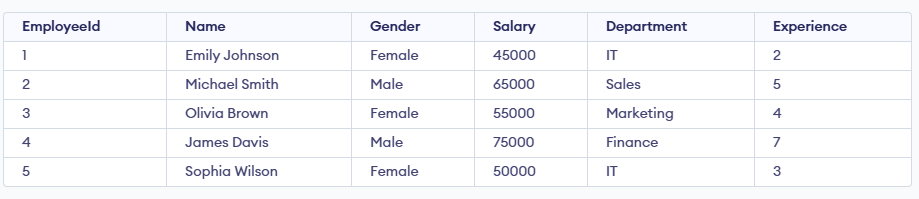
Employee Table
Example 1: Filter Total Salary
In this example, we calculate the total salary of all employees and display it only if it meets the specified condition.
**Query:
SELECT SUM(Salary) AS Total_Salary FROM Employee GROUP BY (SELECT 1) HAVING SUM(Salary) >= 250000;
**Output:

- SUM(Salary) adds up salaries of all employees.
- GROUP BY (SELECT 1) treats the entire table as one single group.
- HAVING SUM(Salary) >= 250000 filters the result and shows it only when the condition is met.
**Note: GROUP BY (SELECT 1) is database-specific and may not work in all SQL databases. So alternatively, you can omit GROUP BY and use HAVING directly with aggregate functions.
Example 2: Filter Average Salary
In this example, we calculate the average salary of all employees and display it only if the average exceeds 55,000.
**Query:
SELECT Department, AVG(Salary) AS AverageSalary FROM Employee GROUP BY Department HAVING AVG(Salary) > 55000;
**Output:

- GROUP BY Department calculates average salary per department.
- AVG(Salary) finds the department-wise average.
- HAVING AVG(Salary) > 55000 shows only departments whose average salary exceeds 55,000.
Example 3: Filter Maximum Salary
In this example, we find the highest salary among employees and display it only if it exceeds 70,000.
**Query:
SELECT MAX(Salary) AS Max_Salary FROM Employee HAVING MAX(Salary) > 70000;
**Output

Example 4: Filter Minimum Experience
In this example, we find the least experienced employee and display it only if their experience is less than 3 years.
**Query:
SELECT MIN(Experience) AS Min_Experience FROM Employee HAVING MIN(Experience) < 3;
**Output

Example 5: Multiple Conditions
In this example, we calculate both the total and average salary of employees and display the results only if the total salary is at least 250,000 and the average salary exceeds 55,000.
**Query:
SELECT SUM(Salary) AS Total_Salary, AVG(Salary) AS Average_Salary FROM Employee HAVING SUM(Salary) >= 250000 AND AVG(Salary) > 55000;
**Output:
