SQL IN Operator (original) (raw)
Last Updated : 16 Apr, 2026
The IN operator in SQL is used to filter query results by checking whether a column’s value matches any value in a specified list. It acts like a shorthand for writing multiple OR conditions, making queries cleaner and easier to read.
**Syntax:
SELECT column_name
FROM table_name
WHERE column_name IN (value1, value2, .....);
Example of SQL IN Operator
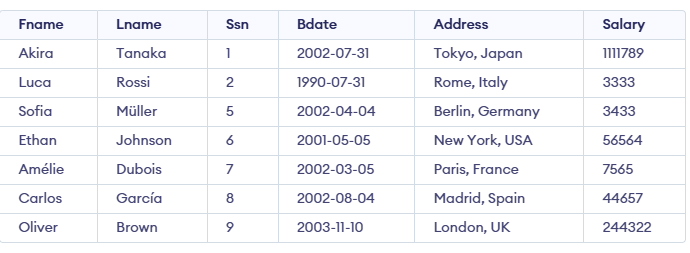
Let's understand IN Operator in SQL with examples. Here we will look at different examples. First, we create a demo SQL database and table, on which we will use the IN Operator command.
Example 1: Basic Use of the IN Operator
SQL Query to get Fname and Lname of employees who have address in Tokyo, Japan, France and Paris.
**Query:
SELECT Fname, Lname
FROM Employee
WHERE Address IN ('Tokyo, Japan', 'Paris, France');
**Output:

- We fetched the Fname and Lname of employees whose Address is either Tokyo, Japan or Paris, France
- The IN operator was used in the WHERE clause to specify these multiple address values.
Example 2: SQL IN and NOT IN Operators
We can use the SQL IN with the NOT operator to exclude specified data from our result.
**Query:
SELECT Fname
FROM Employee
WHERE Address NOT IN ('Tokyo, Japan', 'London, UK');
**Output:
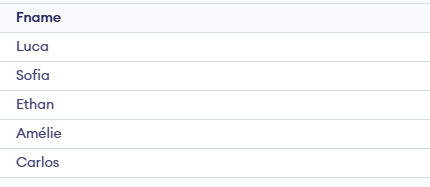
- We created a query to fetch the Fname (first name) of all employees.
- The condition is that the supplier’s address should be neither 'Tokyo, Japan', 'London', nor 'UK'.
- To exclude these addresses, we used the NOT operator along with the IN clause.
- This ensures only employees with other addresses are displayed in the result.
Example 3: IN Operator with Subquery
We have used IN operator with explicit values for conditions. However, we can use the IN operator to select values for the condition from another query. For demonstrating this, we will use another table from the database, manager. The contents of the table are given below.

Now, we write a query to fetch details of all employees who are managers. This can be done by using nested SELECT queries with the IN operator.
**Query:
SELECT * FROM employee
WHERE Ssn IN (SELECT Ssn FROM manager);
**Output:

- We first selected the Ssn of all managers from the Manager table.
- This inner query (or nested query) returns a list of manager SSNs.
- We then used the IN operator in the main query to compare employee SSNs with those from the nested query.
- As a result, the main query fetches the details of all employees whose Ssn matches any Ssn returned by the manager query.
- This approach helps link data between two related tables using a subquery.
**Note: The IN operator returns TRUE if a value matches any item in the given list or subquery result.