SQL LEFT JOIN (original) (raw)
Last Updated : 16 Jun, 2026
In SQL, the LEFT JOIN (also called LEFT OUTER JOIN) retrieves all records from the left table and only the matching records from the right table. If no match is found, NULL values are returned for the right table columns.
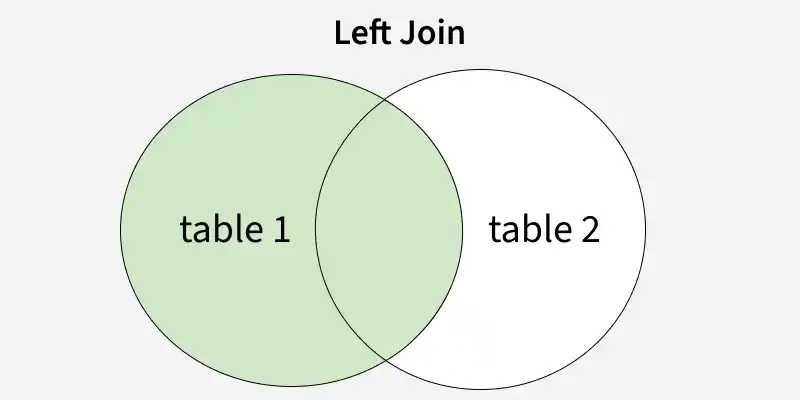
SQL LEFT JOIN
**Syntax:
SELECT column_name(s)
FROM tableA
LEFT JOIN tableB ON tableA.column_name = tableB.column_name;
- **SELECT column_name(s): Specifies the columns to retrieve from the tables.
- **FROM table: Defines the left table from which all rows will be returned.
- **LEFT JOIN table: Joins the right table with the left table.
- **ON tableA.column_name = tableB.column_name: Specifies the matching condition between both tables
Examples of SQL LEFT JOIN
First, we will create a demo SQL database and tables. Consider two tables: Emp (employees) and department (departments). The Emp table contains employee details, while the department table holds department details.
**Employee Table:
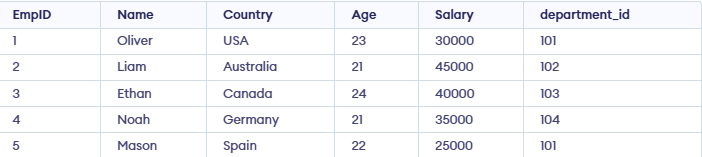
**Department Table:

Example 1: Performing a LEFT JOIN
To perform left-join on Employee and Department Tableswe will use the following SQL query:
**Query:
SELECT Emp.EmpID, Emp.Name, department.
department_name, department.department_head,
department.location
FROM Emp
LEFT JOIN department ON Emp.department_id = department.department_id;
**Output:

- All employees (left table) are included.
- Since each employee is assigned a department, we see matching details from the right table.
- If an employee had no department assigned, the department columns would show NULL
**Example 2: SQL LEFT JOIN with WHERE Clause
In this example, the WHERE clause filters the results to display only employees whose department location is 'London'. Departments without employees will not appear in the output.
**Query:
SELECT e.EmpID, e.Name, d.department_name, d.department_head, d.location
FROM Emp e
LEFT JOIN department d ON e.department_id = d.department_id
WHERE d.location = 'London';
**Output:

**Example 3: SQL LEFT JOIN as Aliases
In this example, aliases e and d are used for the tables to make the query shorter, simpler and easier to read.
**Query:
SELECT e.EmpID, e.Name, d.department_name,
d.department_head, d.location
FROM Emp e
LEFT JOIN department d ON
e.department_id = d.department_id;
**Output:
