NULL values in SQL (original) (raw)
Last Updated : 5 Jan, 2026
Some records in an SQL table may not have values for every field, and such fields are termed NULL values. These occur when data is unavailable during entry or when an attribute does not apply to a specific record. To handle such scenarios, SQL provides a special placeholder value called NULL to represent unknown, unavailable, or inapplicable data.
**Importance of NULL Value
It is essential to understand that a NULL value differs from a zero or an empty string. A NULL value represents missing or undefined data. Since it is often not possible to determine which interpretation applies, SQL treats all NULL values as distinct and does not distinguish between them. Typically, it can have one of three interpretations:
- **Value Unknown: The value exists but is not known.
- **Value Not Available: The value exists but is intentionally withheld.
- **Attribute Not Applicable: The value is undefined for a specific record.
Principles of NULL values
- Setting a NULL value is appropriate when the actual value is unknown, or when a value is not meaningful.
- A NULL value is not equivalent to a value of ZERO if the data type is a number and is not equivalent to spaces if the data type is a character.
- A NULL value can be inserted into columns of any data type.
- A NULL value will evaluate NULL in any expression.
- Suppose if any column has a NULL value, then UNIQUE, FOREIGN key, and CHECK constraints will ignore by SQL.
Logical Behavior
SQL uses **three-valued logic (3VL): TRUE, FALSE, and UNKNOWN. Logical expressions involving NULL return UNKNOWN.
- **AND: Returns
FALSEif one operand isFALSE; otherwise, returnsUNKNOWN. - **OR: Returns
TRUEif one operand isTRUE; otherwise, returnsUNKNOWN. - **NOT: Negates the operand;
UNKNOWNremainsUNKNOWN.
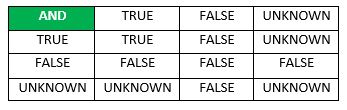
Logical Behavior of AND
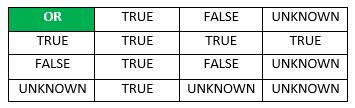
Logical Behavior of OR
**How To Test for NULL Values?
SQL allows queries that check whether an attribute value is NULL. Rather than using = or to compare an attribute value to NULL, SQL uses IS and IS NOT. This is because SQL considers each NULL value as being distinct from every other NULL value, so equality comparison is not appropriate.
Example: Employee Table
CREATE TABLE Employee ( Fname VARCHAR(50), Lname VARCHAR(50), SSN VARCHAR(11), Phoneno VARCHAR(15), Salary FLOAT );
INSERT INTO Employee (Fname, Lname, SSN, Phoneno, Salary) VALUES ('Shubham', 'Thakur', '123-45-6789', '9876543210', 50000.00), ('Aman', 'Chopra', '234-56-7890', NULL, 45000.00), ('Aditya', 'Arpan', NULL, '8765432109', 55000.00), ('Naveen', 'Patnaik', '345-67-8901', NULL, NULL), ('Nishant', 'Jain', '456-78-9012', '7654321098', 60000.00);
Select * FROM Employee;
**Output
| Fname | Lname | SSN | Phone no | Salary |
|---|---|---|---|---|
| John | Smith | 123-45-6789 | 9876543210 | 50000 |
| Michael | Johnson | 234-56-7890 | 45000 | |
| David | Brown | 8765432109 | 55000 | |
| Robert | Wilson | 345-67-8901 | ||
| James | Anderson | 456-78-9012 | 7654321098 | 60000 |
The IS NULL Operator
In this query, it retrieves the Fname and Lname of employees whose SSN is NULL. Since SSN represents a unique identifier, rows with NULL in this column indicate missing data. This query helps identify records that lack this essential information.
**Query:
SELECT Fname, Lname FROM Employee WHERE SSN IS NULL;
**Output
| Fname | Lname |
|---|---|
| David | Brown |
The IS NOT NULL Operator
In this query, it counts the number of employees who have a valid SSN by excluding rows where SSN is NULL. The result provides the total number of employees with an SSN present in the table. The COUNT(*) function ensures that all non-NULL rows are included in the count.
**Query
SELECT COUNT(*) AS Count FROM Employee WHERE SSN IS NOT NULL;
**Output

IS NOT NULL Operator
Updating NULL Values in a Table
We can update the NULL values present in a table using the UPDATE statement in SQL. To do so, we can use the IS NULL operator in the WHERE clause to select the rows with NULL values and then we can set the new value using the SET keyword. Let's suppose that we want to update SSN in the row where it is NULL.
**Query:
UPDATE Employee SET SSN = '789-01-2345' WHERE Fname = 'Aditya' AND Lname = 'Arpan';
select* from Employee;
**Output
| Fname | Lname | SSN | Phoneno | Salary |
|---|---|---|---|---|
| John | Smith | 123-45-6789 | 9876543210 | 50000 |
| Michael | Johnson | 234-56-7890 | 45000 | |
| David | Brown | 789-01-2345 | 8765432109 | 55000 |
| Robert | Wilson | 345-67-8901 | ||
| James | Anderson | 456-78-9012 | 7654321098 | 60000 |
Explanation:
The UPDATE query modifies the row where the SSN is NULL for the employee named Aditya Arpan, replacing it with a valid value
Conclusion
NULL values in SQL are essential for representing missing or inapplicable data. Understanding their behavior, impact on constraints, and three-valued logic is crucial for writing accurate queries. By using operators like IS NULL and IS NOT NULL, we can effectively filter and update NULL values to maintain data integrity. Mastery of these concepts ensures reliable data handling in SQL applications. Mastering these concepts ensures reliable data handling in SQL applications and enhances query precision.