SQL TRUNCATE TABLE (original) (raw)
Last Updated : 13 Jun, 2026
The TRUNCATE TABLE statement is used to remove all records from a table while preserving its structure. It is especially useful when working with large tables.
- Executes faster than DELETE because it does not log individual row deletions.
- In most databases, the operation cannot be rolled back once executed.
**Example: First, we will create a demo SQL database and table, on which we will use the TRUNCATE TABLE command.

Student Table
**Query:
TRUNCATE TABLE Students;
**Output:

**Syntax:
TRUNCATE TABLE table_name;
Example of SQL TRUNCATE TABLE
Here we will look at different examples of the SQL TRUNCATE TABLE command. Consider the EMPLOYEE table below for the following example:
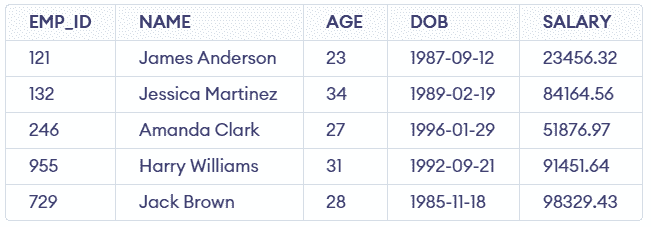
EMPLOYEE Table
**Query:
TRUNCATE TABLE EMPLOYEE;
SELECT * FROM EMPLOYEE
**Output:

- After truncating the table, all records are removed while the table structure remains intact.
- Executing SELECT * FROM EMPLOYEE will return an empty result set since all data has been erased.
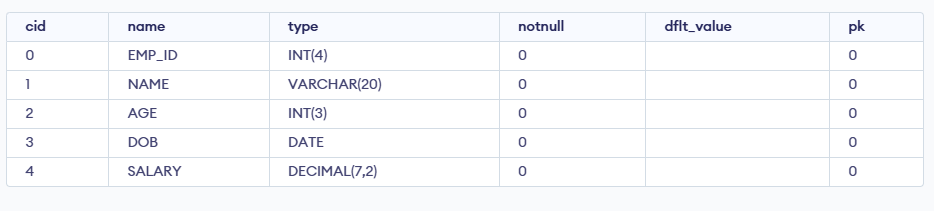
But let's now check whether the structure of the table is deleted or it has been preserved so we again use the DESC command to see the structure of the table and we will see that the structure remains as it is.
To better understand when to use TRUNCATE, see our detailed explanation of the differences between TRUNCATE, DELETE and DROP commands.