SQL Wildcard Characters (original) (raw)
Last Updated : 11 Jun, 2026
SQL wildcard characters are special symbols used to represent one or more unknown characters in a string. They help in searching and filtering text data based on patterns instead of exact matches. Wildcards are mainly used with the LIKE and NOT LIKE operators to perform flexible searches.
**Syntax:
SELECT column1,column2 FROM table_name
WHERE column LIKE wildcard_operator;
- **column1,column2: fields in the table
- **table_name: name of the table
- **column: name of the field used for filtering data
**Types of SQL Wildcard Characters
There are several wildcard characters in SQL, each serving a different purpose in pattern matching. Let’s break down the most common wildcard characters and their usage:
- ****%:** Represents zero or more characters.
- **_: Represents exactly one character.
- **[ ]: Represents a range of characters, used to match any single character within the range.
- **[ ] with ^ or !: Matches any character that is NOT in the specified range.
Example of SQL Wildcard Characters
We will use a Customers table to show how wildcard characters work in SQL searches.
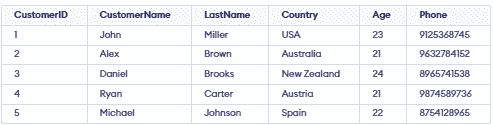
1. Using the % Wildcard
The % wildcard is used to substitute for zero or more characters. It’s very flexible and is commonly used for matching partial strings.
**Example 1: Records Starting with a Specific Letter
To fetch records where CustomerName starts with 'A'.
**Query:
SELECT *
FROM Customers
WHERE CustomerName LIKE 'A%';
**Output:

**Example 2: Records Ending with a Specific Letter
To fetch records from the Customers table with NAME ending with the letter 'I'.
**Query:
SELECT *
FROM Customers
WHERE CustomerName LIKE '%l';
**Output

**Example 3: Records Containing a Specific Letter at Any Position
To fetch records from the Customers table where CustomerName contains the letter 'A' at any position.
**Query
SELECT * FROM Customers WHERE CustomerName LIKE '%A%';
**Output:

**Example 4: Records Containing a Specific Substring at Any Position
To fetch records from the Customers table where the Country contains the substring 'ra' at any position.
**Query:
SELECT DISTINCT * FROM Customers WHERE Country LIKE '%ra%';
**Output:

2. Using the _ Wildcard
The _ wildcard is used to substitute for exactly one character. This is useful when we know part of the string but need to match one specific unknown character.
**Example 1: Records with a Specific Prefix and Exactly Three Characters
This query fetches records where CustomerName starts with "Dan" and is followed by exactly three characters.
**Query:
SELECT * FROM Customers WHERE CustomerName LIKE 'Dan___';
**Output:

Example 2: Records with a Specific Length
This query fetches customers whose Country name has exactly 7 characters.
**Query:
SELECT * FROM Customers WHERE Country LIKE '_______';
**Output:

3. Using the [ ] Wildcard
The [ ] wildcard is used to match a single character from a specified set or range of characters. It is useful for searching values that contain characters from a defined group.
**Example 1: Matching One Character from a Set
This query fetches customers whose LastName starts with A, B or C.
**Query
SELECT * FROM Customers WHERE LastName REGEXP '^[A-C]';
**Output:

**Example 2: Matching Characters Outside a Range
To fetch records from the Customers table with LastName not containing letters 'y' or 'z'.
**Query
SELECT * FROM Customers WHERE LastName NOT LIKE '%[y-z]%';
**Output:

4. Combining Both % and _ Wildcard
We can combine % and _ to create more accurate search patterns.% matches many characters and _ matches one, helping filter data more precisely.
**Example: Matching Specific Digits in a Phone Number
This query fetches records where the phone number starts with 8, has any two characters next and 5 as the fourth character.
**Query
SELECT * FROM Customers WHERE PHONE LIKE '8__5%';
**Output:
