Window Functions in SQL (original) (raw)
Last Updated : 11 Jun, 2026
SQL window functions allow performing calculations across a set of rows that are related to the current row, without collapsing the result into a single value. They are commonly used for tasks like aggregates, rankings and running totals. The OVER clause defines the “window” of rows for the calculation. It can:
- **PARTITION BY: It divides the data into groups using PARTITION BY.
- **ORDER BY: It specifies the order of rows within each group using ORDER BY.
With this, functions such as SUM(), AVG(), ROW_NUMBER(), RANK() and DENSE_RANK() can be applied in a controlled way.
**Syntax:
SELECT column_name1,
window_function(column_name2)
OVER ([PARTITION BY column_name3] [ORDER BY column_name4]) AS new_column
FROM table_name;
- **window_function: Aggregate or ranking function (
SUM(),AVG(),ROW_NUMBER(), etc.) - **column_name1: Column(s) to display
- **column_name2: Column used by the window function
- **column_name3: Column for grouping (
PARTITION BY) - **column_name4: Column for ordering (
ORDER BY) - **new_column: Alias for the window function result
- **table_name: Table to select data from
Types of Window Functions in SQL
SQL window functions are mainly of two types: aggregate window functions and ranking window functions.
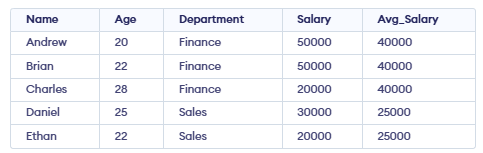
**Example: First, we create a demo table Employee, and now we will apply window functions on it.
1. Aggregate Window Functions
Aggregate window functions calculate aggregates over a window of rows while retaining individual rows. Common aggregate functions include:
- **SUM(): Sums values within a window.
- **AVG(): Calculates the average value within a window.
- **COUNT(): Counts the rows within a window.
- **MAX(): Returns the maximum value in the window.
- **MIN(): Returns the minimum value in the window.
**Example: Using AVG(), we will calculate the average salary within each department.
SELECT Name, Age, Department, Salary,
AVG(Salary) OVER( PARTITION BY Department) AS Avg_Salary
FROM Employee
**Output:
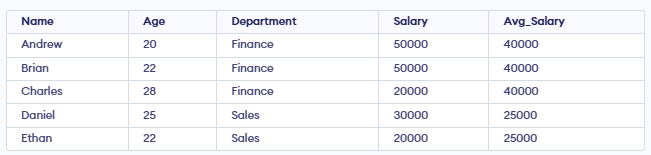
- **For Finance: (50,000 + 50,000 + 20,000) ÷ 3 = 40,000.
- **For Sales: (30,000 + 20,000) ÷ 2 = 25,000.
- This average value is displayed for each employee belonging to the same department.
2.Ranking Window Functions
These functions provide rankings of rows within a partition based on specific criteria. Common ranking functions include:
- **RANK(): Assigns ranks to rows, skipping ranks for duplicates.
- **DENSE_RANK(): Assigns ranks to rows without skipping rank numbers for duplicates.
- **ROW_NUMBER(): Assigns a unique number to each row in the result set.
- **PERCENT_RANK(): Shows the relative rank of a row as a percentage between 0 and 1.
RANK() Function
RANK() functions are used to assign ranks to rows within a group based on a specific order. Ranking functions are commonly used to organize and analyze data. Some common ranking functions include:
**Example: Using RANK(), we will rank employees by salary, allowing gaps in ranks when salaries are equal.
SELECT Name, Department, Salary,
RANK() OVER(PARTITION BY Department ORDER BY Salary DESC) AS emp_rank
FROM employee;
**Output:
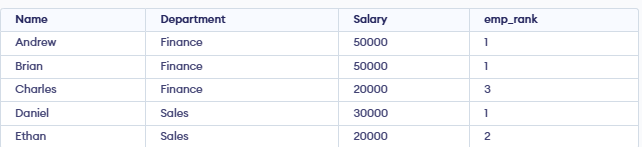
- RANK() function assigns a ranking within each department based on salary (highest salary = rank 1).
- **Finance: Andrew and Brian both earn 50,000, so both get rank 1. The next salary is 20,000, so it gets rank 3 (rank 2 is skipped).
- **Sales: Daniel earns 30,000, so he gets rank 1. Ethan earns 20,000, so he gets rank 2.
DENSE RANK() Function
DENSE_RANK() gives the same rank to rows with equal values. It then continues with the next number without skipping, keeping the ranking sequence continuous.
**Example: Using DENSE_RANK(), we will rank employees by salary without skipping ranks.
SELECT Name, Department, Salary,
DENSE_RANK() OVER(PARTITION BY Department ORDER BY Salary DESC) AS emp_dense_rank
FROM employee;
**Output:
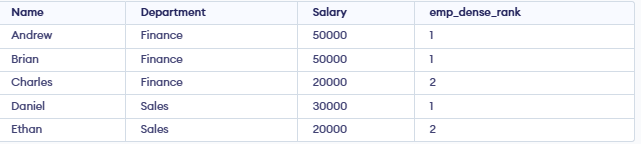
- DENSE_RANK() works like RANK(), but it ensures the ranking sequence has no gaps.
- **Finance: Andrew and Brian both earn 50,000, so they get rank 1. The next salary (20,000) is assigned rank 2 (no gap).
- **Sales: Daniel earns the highest salary (30,000) and gets rank 1.Ethan earns 20,000 and gets rank 2.
ROW NUMBER() Function
ROW_NUMBER() gives a unique number to each row in the result set. It increments by 1 for every row, even if values are the same, so no two rows have the same number.
**Example: Using ROW_NUMBER(), we will assign a unique number to each row based on salary order.
SELECT Name, Department, Salary,
ROW_NUMBER() OVER(PARTITION BY Department ORDER BY Salary DESC) AS emp_row_no
FROM employee;
**Output:
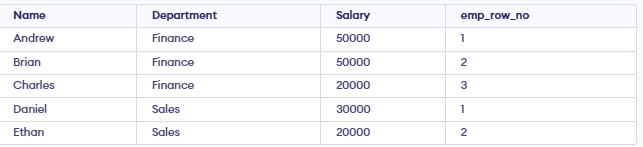
- In Finance, Andrew is row 1, Brian is row 2, Charles is row 3.
- In Sales, Daniel is row 1, Ethan is row 2.
PERCENT RANK() Function
PERCENT_RANK() shows where a row stands compared to others in the same group. The formula is:
PERCENT_RANK() = (RANK - 1)/(Total Rows in Partition - 1)
**Example: Using PERCENT_RANK(), we will find the relative salary position of each employee within a department.
SELECT Name, Department, Salary,
PERCENT_RANK() OVER(PARTITION BY Department ORDER BY Salary DESC) AS emp_percent_rank
FROM employee;
**Output:
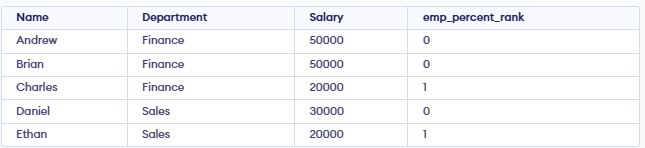
- **In Finance: Andrew and Brian are tied for highest = 0.00, Charles (lowest) = 1.00.
- **In Sales: Daniel (highest) = 0.00, Ethan (lowest) = 1.00.
- Each value shows the employee’s relative position within the departmen**t.
Fixing Window Function Issues
This helps to identify and fix problems like incorrect partitioning, wrong order or slow performance when using window functions.
- **Partition carefully: Without Partition by, the whole table is treated as one group.
- **Check Order by : It controls the calculation order in the window.
- **Optimize performance: Window functions can be slow on large datasets; use indexes if needed.