Working With JSON in SQL (original) (raw)
Last Updated : 13 Apr, 2026
JSON (JavaScript Object Notation) is a lightweight and widely used data format for storing and exchanging data. It is easy to read, write and understand, making it ideal for web and mobile applications. SQL Server supports JSON handling through built-in functions.
- Stored in NVARCHAR columns in SQL Server
- Provides compatibility with OLTP, temporal tables and columnstore indexes
- Treated as structured text (plain text format with JSON structure)
- Supported on the client side as a JavaScript object without a separate data type
- Available in SQL Server starting from version 2016
Storing JSON in SQL Server
JSON data in SQL Server is stored as plain text using NVARCHAR columns, allowing easy parsing with built-in functions
**Query:
CREATE TABLE Authors (
ID INT IDENTITY NOT NULL PRIMARY KEY,
AuthorName NVARCHAR(MAX),
Age INT,
Skillsets NVARCHAR(MAX),
NumberOfPosts INT
);
INSERT INTO Authors (AuthorName, Age, Skillsets, NumberOfPosts) VALUES
('Geek',25,'Java,Python,.Net',5),
('Geek2',22,'Android,Python,.Net',15),
('Geek3',23,'IOS,GO,R',10),
('Geek4',24,'Java,Python,GO',5);
**Output:
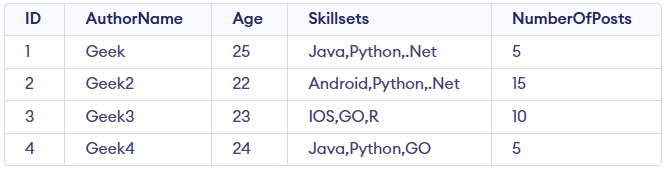
Authors Table
- Supports large JSON data using NVARCHAR(MAX) up to 2GB.
- Helps move and bridge data from NoSQL (like MongoDB) to SQL Server.
Examples of JSON in SQL
Let us see the important functionalities available in SQL Server which can be used with JSON data.
**Example JSON Data:
{
"Information":
{"SchoolDetails":
[
{"Name": "VidhyaMandhir"},
{"Name": "Chettinad"},
{"Name":"PSSenior"}]
}
}
Example 1: ISJSON (JSON string)
This function is used to check whether the given input JSON string is in JSON format or not. If it is in JSON format, it returns 1 as output or else 0. i.e. it returns either 1 or 0 in INT format.
**Query:
SELECT ISJSON(@JSONData) AS VALIDJSON
**Output:

Example 2: JSON_VALUE (JSON string, path)
The output will be a scalar value from the given JSON string. Parsing of JSON string is done and there are some specific formats are there for providing the path. For example
- '$' - reference entire JSON object
- '$.Example1' - reference Example1in JSON object
- '$[4]' - reference 4th element in JSON array
- '$.Example1.Example2[2].Example3' - reference nested property in JSON object
**Query:
SELECT JSON_VALUE(@JSONData,'$.Information.SchoolDetails[0].Name') as SchoolName
**Output:

Example 3: JSON_QUERY(JSON string, path)
Used to extract an array of data or objects from the JSON string.
**Query:
SELECT JSON_QUERY(@JSONData,'$.Information.SchoolDetails')
AS LISTOFSCHOOLS
**Output:

LIST OF SCHOOLS BY MEANS OF JSON_QUERY
Example 4: JSON_MODIFY
JSON_MODIFY is a Transact-SQL function used to update, insert or delete values inside a JSON string without changing the entire document structure. It allows you to dynamically modify specific properties within complex JSON data.
**Query:
SET @JSONData= JSON_MODIFY(@JSONData, '$.Information.SchoolDetails[2].Name', 'Adhyapana');
SELECT modifiedJson = @JSONData;
**Output:

Example 5: FOR JSON
This function is used for Exporting SQL Server data as JSON format. This is a useful function to export SQL data into JSON format. There are two options available with FOR JSON
- **AUTO: As it is nested JSON sub-array is created based on the table hierarchy.
- **PATH: By using this we can define the structure of JSON in a customized way.
**Query:
SELECT * FROM Authors FOR JSON AUTO;
**Output:

**Query:
SELECT * FROM Authors FOR JSON AUTO, ROOT ('AuthorInfo')
**Output:

Example 6: OPENJSON
This function is used for importing JSON as String data. We can import JSON as a text file by using OPENROWSET function and in that the BULK option should be enabled. It returns a single string field with BulkColumn as its column name.
**Query:
DECLARE @JSON VARCHAR(MAX)
--Syntax to get json data using OPENROWSET
SELECT @JSON = BulkColumn FROM OPENROWSET
(BULK '<pathname\jsonfilename with .json extension>', SINGLE_CLOB) AS j
--To check json valid or not, we are using this ISJSON
SELECT ISJSON(@JSON)
--If ISJSON is true, then display the json data
If (ISJSON(@JSON)=1)
SELECT @JSON AS 'JSON Text'
**Output:

Note: Even large data also can be placed. As a sample, we showed only a single row.
SINGLE_BLOB, SINGLE_NCLOB and SINGLE_CLOB control how external files are read (binary, Unicode text or plain text), especially for non-English JSON data. OPENJSON then parses the JSON text and converts it into a relational table format by iterating through JSON elements.
Let us have a JSON placed in an external file and its contents are:

**Query:
SELECT @JSON = BulkColumn
FROM OPENROWSET
(BULK '', SINGLE_CLOB)
AS j
--If the retrieved JSON is a valid one
If (ISJSON(@JSON)=1)
Select * FROM OPENJSON (@JSON)
**Output:
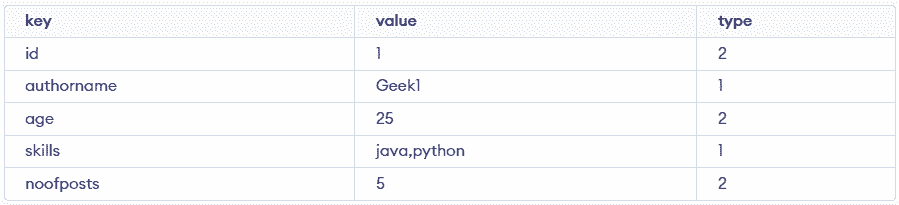
Output
- We can see that for "Strings" key like "authorname" and "skills" got type as 1 and "int" key like "id" and "age" got type as 2.
- Similarly, for boolean, the type is 3. For arrays, it is 4 and for object, it is 5.
- OPENJSON parses only the root level of the JSON.
**Query: In case if the JSON is nested, we need to use Path variables
SELECT *
FROM OPENJSON(@JSON, '$.skills');
**Output:

- Targets a specific nested JSON path.
- Extracts only the required array/object.
We can also transform the skillsets from JSON data into separate columns, allowing a more structured and relational representation of the data
SELECT * FROM OPENJSON (@JSON, '$.skills')
WITH ( skill1 VARCHAR(25), skill2 VARCHAR(25), skill3 VARCHAR(25) )
**Output:

- Maps JSON values to separate table columns.
- Creates structured relational output from JSON data.
**Saving the rowset into Table: Here the number of columns should match the count that is present inside with:
**Query:
SELECT ,,.... INTO FROM OPENJSON (@JSON, '$.skills')
WITH (skill1 VARCHAR(25),
skill2 VARCHAR(25),
skill3 VARCHAR(25)
)
**Output:

- Creates a new table from the JSON result set.
- Column names and count must match the JSON structure.
Example 7: Changing JSON values
JSON_MODIFY allows updating specific properties inside a JSON string and returns the modified JSON without altering the overall structure.
**Query:
DECLARE @json NVARCHAR(MAX);
SET @json = '{"Information": {"SchoolDetails": [{"Name": "VidhyaMandhir"}, {"Name": "Chettinad"}, {"Name":"PSSenior"}]}}';
SET @json = JSON_MODIFY(@json, '$.Information.SchoolDetails[2].Name', 'Adhyapana');
SELECT modifiedJson = @json;
**Output:

- Updates the Name value at the specified JSON path.
- Returns the updated JSON string as output.
Working with JSON in Azure SQL Database
Azure SQL Database natively supports JSON, allowing users to store, query and modify JSON data directly using built-in functions. This eliminates the need for text-based workarounds and makes JSON handling faster and more efficient.
Native JSON Support in Azure SQL
Azure SQL Database provides native JSON support, letting you store and manage JSON data directly in table columns. This enables faster and more efficient querying and updates using built-in JSON functions.
- Use JSON_VALUE(), JSON_QUERY() and JSON_MODIFY() to extract and update JSON data.
- Store complete JSON documents in columns without manual parsing.
- Run performant queries on individual JSON elements directly in SQL.
JSON Functions in Azure SQL
Azure SQL provides several functions to work with JSON data, making it simple to query, extract and modify JSON stored in columns.
Consider this table for the examples below:
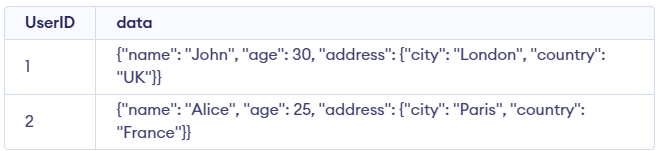
Users Table
**1. JSON_VALUE(): Extracts a scalar value from a JSON string.
**Query:
SELECT JSON_VALUE(data, '$.name') AS name
FROM Users;
**Output:

Output after using JSON_VALUE()
- Extracts the name value from the JSON stored in the data column.
- Returns the name for each row in the Users table.
**2. JSON_QUERY(): Extracts a JSON object or array from a JSON string.
**Query:
SELECT JSON_QUERY(data, '$.address') AS address
FROM Users;
**Output:

Output after using JSON_QUERY()
- Extracts the address object from the JSON stored in the data column.
- Displays the result for all rows in the Users table.
**3. JSON_MODIFY(): Modifies the value of a property in a JSON string.
**Query:
UPDATE Users
SET data = JSON_MODIFY(data, '$.address.city', 'New York')
WHERE UserID = 1;
**Output:
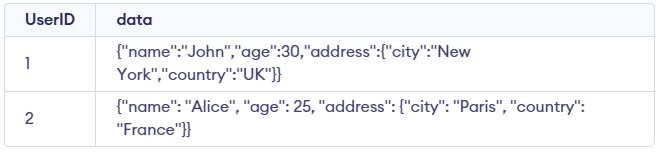
Output after using JSON_MODIFY()
- Updates the city value inside JSON.
- Runs only for UserID = 1.
**4. OPENJSON(): Parses a JSON string and returns a result set.
**Query:
SELECT *
FROM OPENJSON('{"name": "John", "age": 30}')
WITH (name VARCHAR(100), age INT);
**Output:

Output after using OPENJOIN()
- Parses the JSON string and converts it into tabular rows and columns.
- Maps JSON fields like name and age to the specified column data types.
These functions allow you to interact with JSON data in SQL just like any other data type, making it easier to work with JSON-based applications in Azure SQL Database.
Native JSON in Azure SQL lets you easily store, query and update JSON data with built-in, high-performance functions. Below are the features of Native JSON support in Azure SQL:
- **Simplified Handling: Store and manage JSON directly without extra parsing.
- **Powerful Queries: Easily extract and update JSON data.
- **Better Performance: Faster than string-based processing.
- **Seamless Integration: Works smoothly with relational and semi-structured data.