Block, Object, and File Storage in System Design (original) (raw)
Last Updated : 17 Apr, 2026
Storage is an important component of system design because it determines how data is stored, accessed, and managed. Different storage types are used depending on application requirements and data structure.
- Block Storage stores data in fixed-size blocks and is commonly used in databases and virtual machines.
- File Storage organizes data in files and directories, making it suitable for shared file systems and document storage.
- Object Storage stores data as objects with metadata and unique identifiers, ideal for large-scale unstructured data.
1. Block storage
Block storage is a method of storing data in fixed-size blocks, where each block has a unique address and works independently. Unlike file storage, it does not follow a hierarchical structure, making it more flexible and efficient. It is commonly used in high-performance systems like databases and virtual machines.
- Stores data in fixed-size blocks with unique addresses
- No predefined structure, unlike file-based storage
- Ideal for high performance and scalable systems like databases and VMs
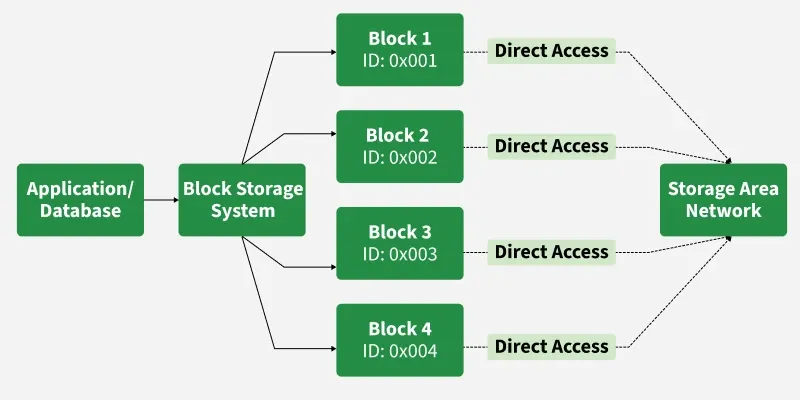
Block Storage Architecture
Block storage doesn’t inherently “understand” the data it stores - it only stores raw bytes. The file system on top of block storage interprets it into files. So block storage itself isn’t aware of formats or data types.
Example
Consider a cloud-based database service where you need to store a large amount of structured data. The data is broken into smaller pieces (blocks) and distributed across a storage area network. When you access the database,
- The system retrieves the required blocks and reassembles them into meaningful data for your application.
- Amazon Elastic Block Store (EBS) is a real-world example of block storage.
Working
Imagine a warehouse where items aren't organized by category or aisle, but simply placed in numbered bins. Each bin (block) can hold anything, and you access items directly by their bin number. This direct-access model eliminates the overhead of navigating folder hierarchies, resulting in exceptional speed.
Features
Block storage stores data in fixed-sized blocks, making it suitable for high-performance and low-latency applications.
- **High Performance: Block storage is perfect for high-performance applications since it is designed for quick read/write operations.
- **Flexibility: Since it does not impose a particular structure, it allows data to be stored in any format.
- **Scalability: Blocks can be added or removed easily to scale the storage up or down.
- **Independence: Each block operates independently, enabling precise control and management of data.
- **Use in Distributed Systems: Block storage can be distributed across multiple servers for redundancy and improved performance.
2. Object Storage
With object storage, data is kept as discrete units known as "objects." A unique identity, metadata (information about the data), and the actual data are all contained in each item. Object storage is hence very flexible, scalable, and appropriate for storing vast amounts of unstructured data, such as backups, videos, and pictures.
- Object storage doesn't use fixed-sized blocks or a hierarchical file system like file or block storage does.
- Instead, it organizes data into a flat structure, which is easier to scale and manage in distributed environments.
Note: Object storage is ideal for write-once, read-many (WORM) workloads, not for frequently modified data.
Understanding the Object Model
Think of object storage as a vast library where every book has a unique ISBN, a detailed catalog card, and can be retrieved directly without knowing which shelf it's on. The flat structure eliminates hierarchical limitations, allowing the system to scale horizontally across unlimited storage nodes.
Example
Object storage is widely used for storing large amounts of unstructured data in cloud-based applications.
- **Media Streaming: Netflix and YouTube store billions of video files as objects, serving them to millions of concurrent viewers.
- **Backup and Archival: Companies use object storage for long-term data retention, leveraging its durability and low cost per gigabyte.
- **Big Data Analytics: Data lakes built on object storage allow analysts to store raw data in any format and process it at scale.
- **Static Website Hosting: Web assets like images, CSS, and JavaScript files are served directly from object storage.
Features
Object storage systems are designed to handle massive volumes of unstructured data efficiently.
- **Scalability: Object storage is perfect for cloud applications because it can manage massive volumes of data.
- **Metadata Richness: Metadata is stored in every object to help with data management, indexing, and searching.
- **Global Accessibility: Objects can be accessed via HTTP/HTTPS, making it suitable for web-based applications.
- **Cost-Effective for Unstructured Data: Large amounts of unstructured data, such as logs, media files, and backups, are ideal for this storage.
- **Resilient and Durable: To provide stability and fault tolerance, object storage systems frequently duplicate data across different locations.
3. File Storage
Similar to how we arrange files on a computer, file storage is a conventional technique of storing data in a hierarchical system of files and folders. Every file has a name and directory path, which helps access and navigation. Applications that need regular updates and organized data management are best suited for it.
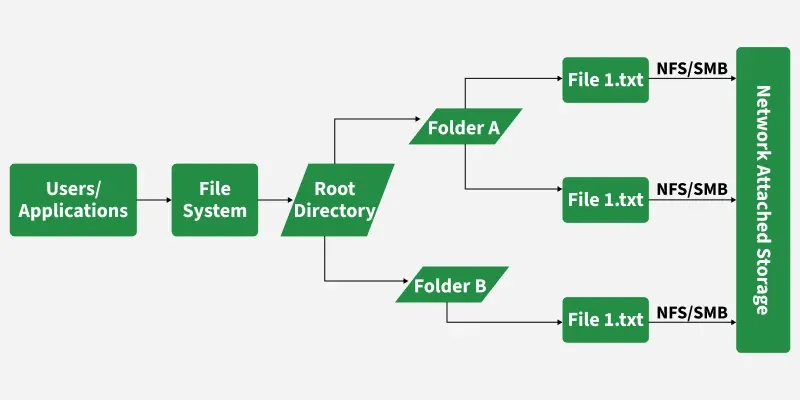
File Storage in System Design
The Hierarchical Model
File storage organizes data in a tree structure with directories (folders) containing files and subdirectories. Each file has a path (like /projects/2024/report.pdf) that defines its location, making navigation logical and straightforward.
Example
Amazon EFS, Google Filestore, or Azure Files for cloud file storage analogs
- **Corporate File Shares: Departments share documents, spreadsheets, and presentations through networked drives with folder hierarchies mirroring organisational structure.
- **Content Management: Web servers host files in organised directories, serving websites through familiar path-based URLs.
- **Development Environments: Developers work with codebases organised in folder structures, relying on file storage for source control integration.
- **Home Directories: User workspaces on servers maintain personal files in individual, permission-protected directories.
Features
File storage systems organize and manage data in a traditional file-and-folder structure, making them easy to understand and use.
- **Hierarchical Organization: Data is stored in a clear folder-and-file structure, making it easy to locate and manage.
- **Simplicity: File storage systems are easy to set up and use for small-scale applications.
- **Compatibility: Works well with legacy applications and systems that require traditional file access methods.
- **Shared Access: Supports multi-user environments with file permissions and version control.
- **Data Integrity: Ensures consistency and integrity through locking mechanisms during file updates but distributed file systems (like NFS) can experience locking issues and performance bottlenecks under concurrency.
Block Storage Vs Object Storage Vs File Storage
This section explains the key differences between block, object, and file storage systems in terms of structure, performance, and use cases.
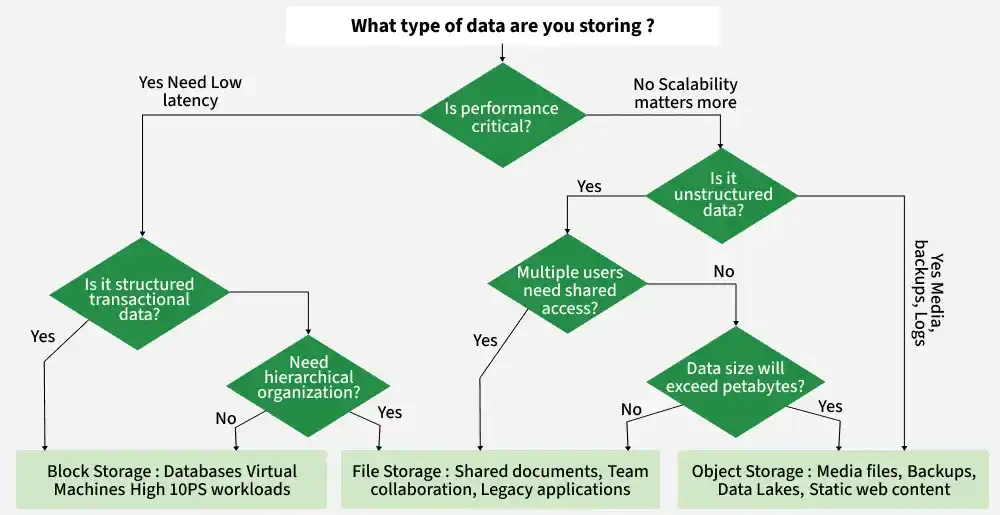
Differences between them are as follows:
| Block Storage | Object Storage | File Storage |
|---|---|---|
| Divides data into fixed-size blocks, each with a unique identifier. | Stores data as objects with metadata and a unique ID in a flat structure. | Organizes data in a hierarchical structure of files and folders. |
| Ideal for databases, virtual machines, and transactional workloads requiring high performance. | Best for storing large amounts of unstructured data, like multimedia files or backups. | Suitable for structured file storage and shared file access, such as documents and spreadsheets. |
| High performance and low latency, especially for read/write operations. | Optimised for scalability and durability, not real-time performance. | Moderate performance; dependent on file system and storage device. |
| Scales well but may require manual configuration for capacity expansion. | Highly scalable; can handle massive amounts of data across distributed systems. | Limited scalability compared to object storage; suitable for smaller systems. |
| Minimal metadata, often handled by the application layer. | Extensive metadata stored with each object, enabling advanced search and analytics. | Basic metadata, such as file name, type, and permissions. |
| Requires manual backup or snapshot configurations for data durability. | Highly durable with built-in redundancy across multiple locations. | Data durability depends on the underlying file system and backup strategies. |
| AWS EBS, Google Persistent Disks, SAN (Storage Area Network). | AWS S3, Azure Blob Storage, Google Cloud Storage. | Network Attached Storage (NAS), Shared Drives, Local File Systems. |