Command Design Pattern (original) (raw)
Last Updated : 7 May, 2026
The Command Design Pattern is a behavioral design pattern that encapsulates a request as an object, thereby decoupling the sender of the request from the receiver and allowing flexible execution of operations.
- Turns a request into an object so it can be passed, stored, queued, or undone easily.
- Encapsulates the request as an object and decouples the invoker (sender) from the receiver (handler).
**Example: A Remote Controller where a user sends commands like turning on lights, TV, speakers, or AC. The remote does not directly control the devices; instead, it passes command objects to them. Each device then executes the command independently, keeping the sender and receiver loosely coupled.
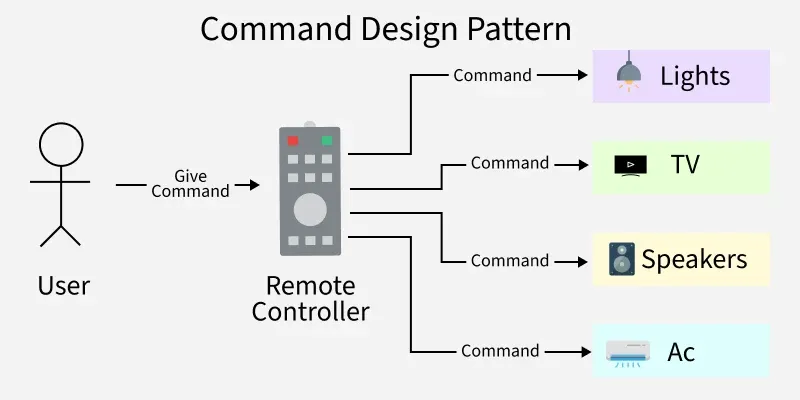
Command Design Pattern
In the diagram
- A User interacts with a Remote Controller and sends a command instead of directly controlling devices.
- The remote acts as an invoker, forwarding command objects to different devices like Lights, TV, Speakers, and AC.
- Each device acts as a receiver and executes its own command independently, keeping the system loosely coupled.
Real Life Software Applications
Some real-life software examples where the Command Pattern is commonly used are:
- **GUI Buttons and Menu: Each button or menu item (Copy, Paste, Save, Undo) is a command object. The framework doesn’t know the exact action — it just executes the command.
- **Job Queues: AWS SQS, RabbitMQ, Each job/task is wrapped in a command object. Queues hold commands and execute them later or distribute them across systems.
- **Database Transactions: Example are Hibernate, JPA, SQL transaction managers. Each query (INSERT, UPDATE, DELETE) is wrapped as a command. Transactions execute them sequentially, and rollback is possible if one fails.
Components
The Command Design Pattern consists of the following key components that work together to decouple the sender and receiver of a request
- **Command Interface: Declares the common method (e.g.,
execute()) for all commands. - **Concrete Commands: Implement the interface and encapsulate specific actions (e.g., turn on TV).
- **Invoker: Initiates the command execution without knowing the details (e.g., remote control).
- **Receiver: Performs the actual operation defined by the command (e.g., TV, stereo).
Working
Using Remote Control Example
- The remote control acts as the Invoker
- Each button is a Command object
- The device (TV, AC, Light) is the Receiver
- When a button is pressed, the command’s execute() method is called, which triggers the action on the receiver
Uses
This pattern is used when a request needs to be encapsulated as an object for flexible execution.
- Implementing remote controls and button-based actions
- Supporting undo and redo operations (editors, drawing tools)
- Logging and storing command history
Implementation Example
Problem Statement
Imagine you are tasked with designing a remote control system for various electronic devices in a smart home. The devices include a TV, a stereo, and potentially other appliances. The goal is to create a flexible remote control that can handle different types of commands for each device, such as turning devices on/off, adjusting settings, or changing channels.
Challenges while implementing this system
- Devices can have different functionalities, so designing a remote control that can easily handle different device types with varying functionalities without becoming highly complex.
- Implementing a remote control that supports various commands without tightly coupling ensuring the remote control can execute commands for different devices without needing extensive modifications for each new command.
- Designing a system that allows users to customize the behavior of the remote control dynamically.
Using the Command Pattern to Overcome These Challenges
The Command Pattern can be employed to address these challenges. It introduces a level of abstraction between the sender of a command (remote control) and the receiver of the command (electronic devices).
- The Command Pattern decouples the sender (Invoker) from the receiver (Devices).
- The remote control doesn't need to know the specific details of how each device operates; it only triggers commands.
- New devices or commands can be added without modifying existing code.
- The remote control can work with any device that implements the common command interface.
.png)
Let’s break down into the component wise code:
**1. Command Interface
The Command interface declares a method, often named execute(). This method is meant to encapsulate a specific operation. The interface sets a contract for concrete command classes, defining the execute() method that encapsulates the operation to be performed.
C++ `
// Command interface public interface Command { void execute(); }
Java
// Command interface public interface Command { void execute(); }
Python
from abc import ABC, abstractmethod
class Command(ABC): @abstractmethod def execute(self): pass
JavaScript
// Command interface class Command { execute() { throw new Error('Method not implemented.'); } }
`
**2. Concrete Command Classes
Concrete command classes implement the Command interface. Each class encapsulates a specific operation related to devices. Each concrete command class provides a specific implementation of the execute() method, defining how a particular device operation (turning on, turning off, adjusting volume, changing channel) is executed.
C++ `
#include using namespace std;
// Command Interface class Command { public: virtual void execute() = 0; virtual ~Command() {} };
// Concrete Command for turning a device ON class TurnOnCommand : public Command { private: Device* device; public: TurnOnCommand(Device* device) : device(device) {} void execute() override { device->turnOn(); } };
// Concrete Command for turning a device OFF class TurnOffCommand : public Command { private: Device* device; public: TurnOffCommand(Device* device) : device(device) {} void execute() override { device->turnOff(); } };
// Concrete Command for adjusting Stereo volume class AdjustVolumeCommand : public Command { private: Stereo* stereo; public: AdjustVolumeCommand(Stereo* stereo) : stereo(stereo) {} void execute() override { stereo->adjustVolume(); } };
// Concrete Command for changing TV channel class ChangeChannelCommand : public Command { private: TV* tv; public: ChangeChannelCommand(TV* tv) : tv(tv) {} void execute() override { tv->changeChannel(); } };
Java
// Concrete Command for turning a device ON class TurnOnCommand implements Command { private Device device;
public TurnOnCommand(Device device) {
    this.device = device;
}

@Override
public void execute() {
    device.turnOn();
}
}
// Concrete Command for turning a device OFF class TurnOffCommand implements Command { private Device device;
public TurnOffCommand(Device device) {
    this.device = device;
}

@Override
public void execute() {
    device.turnOff();
}
}
// Concrete Command for adjusting Stereo volume class AdjustVolumeCommand implements Command { private Stereo stereo;
public AdjustVolumeCommand(Stereo stereo) {
    this.stereo = stereo;
}

@Override
public void execute() {
    stereo.adjustVolume();
}
}
// Concrete Command for changing TV channel class ChangeChannelCommand implements Command { private TV tv;
public ChangeChannelCommand(TV tv) {
    this.tv = tv;
}

@Override
public void execute() {
    tv.changeChannel();
}
}
Python
Concrete Command for turning a device ON
class TurnOnCommand: def init(self, device): self.device = device
def execute(self):
    self.device.turn_on()
Concrete Command for turning a device OFF
class TurnOffCommand: def init(self, device): self.device = device
def execute(self):
    self.device.turn_off()
Concrete Command for adjusting Stereo volume
class AdjustVolumeCommand: def init(self, stereo): self.stereo = stereo
def execute(self):
    self.stereo.adjust_volume()
Concrete Command for changing TV channel
class ChangeChannelCommand: def init(self, tv): self.tv = tv
def execute(self):
    self.tv.change_channel()
JavaScript
// Concrete Command for turning a device ON class TurnOnCommand { constructor(device) { this.device = device; } execute() { this.device.turnOn(); } }
// Concrete Command for turning a device OFF class TurnOffCommand { constructor(device) { this.device = device; } execute() { this.device.turnOff(); } }
// Concrete Command for adjusting Stereo volume class AdjustVolumeCommand { constructor(stereo) { this.stereo = stereo; } execute() { this.stereo.adjustVolume(); } }
// Concrete Command for changing TV channel class ChangeChannelCommand { constructor(tv) { this.tv = tv; } execute() { this.tv.changeChannel(); } }
`
**3. Receiver Classes (Devices)
The Device interface declares methods related to device functionality, such as turnOn() and turnOff().This interface sets a contract for device classes, defining common operations that concrete devices should support.
C++ `
#include
// Receiver Interface class Device { public: virtual void turnOn() = 0; virtual void turnOff() = 0; };
// Concrete Receiver: TV class TV : public Device { public: void turnOn() override { std::cout << "TV is now on" << std::endl; }
void turnOff() override {
    std::cout << "TV is now off" << std::endl;
}

void changeChannel() {
    std::cout << "Channel changed" << std::endl;
}
};
// Concrete Receiver: Stereo class Stereo : public Device { public: void turnOn() override { std::cout << "Stereo is now on" << std::endl; }
void turnOff() override {
    std::cout << "Stereo is now off" << std::endl;
}

void adjustVolume() {
    std::cout << "Volume adjusted" << std::endl;
}
};
Java
// Receiver Interface interface Device { void turnOn(); void turnOff(); }
// Concrete Receiver: TV class TV implements Device { @Override public void turnOn() { System.out.println("TV is now on"); }
@Override
public void turnOff() {
    System.out.println("TV is now off");
}

public void changeChannel() {
    System.out.println("Channel changed");
}
}
// Concrete Receiver: Stereo class Stereo implements Device { @Override public void turnOn() { System.out.println("Stereo is now on"); }
@Override
public void turnOff() {
    System.out.println("Stereo is now off");
}

public void adjustVolume() {
    System.out.println("Volume adjusted");
}
}
Python
Receiver Interface
from abc import ABC, abstractmethod
class Device(ABC): @abstractmethod def turnOn(self): pass
@abstractmethod
def turnOff(self):
    pass
Concrete Receiver: TV
class TV(Device): def turnOn(self): print("TV is now on")
def turnOff(self):
    print("TV is now off")

def changeChannel(self):
    print("Channel changed")
Concrete Receiver: Stereo
class Stereo(Device): def turnOn(self): print("Stereo is now on")
def turnOff(self):
    print("Stereo is now off")

def adjustVolume(self):
    print("Volume adjusted")
JavaScript
// Receiver Interface class Device { turnOn() { throw new Error('Method not implemented.'); }
turnOff() {
    throw new Error('Method not implemented.');
}
}
// Concrete Receiver: TV class TV extends Device { turnOn() { console.log('TV is now on'); }
turnOff() {
    console.log('TV is now off');
}

changeChannel() {
    console.log('Channel changed');
}
}
// Concrete Receiver: Stereo class Stereo extends Device { turnOn() { console.log('Stereo is now on'); }
turnOff() {
    console.log('Stereo is now off');
}

adjustVolume() {
    console.log('Volume adjusted');
}
}
`
4. **Invoker Class (Remote Control):
The invoker class holds a reference to a Command object and triggers its execution through the execute() method. The invoker doesn't know the specific details of the command or the devices. It simply calls the execute() method on the current command, allowing for flexible and dynamic control over different devices.
C++ `
#include #include
class Command { public: virtual void execute() = 0; };
class RemoteControl { private: std::unique_ptr command;
public: void setCommand(std::unique_ptr command) { this->command = std::move(command); }
void pressButton() {
    if (command!= nullptr) {
        command->execute();
    } else {
        std::cout << "No command assigned" << std::endl;
    }
}
};
Java
class RemoteControl { private Command command;
public void setCommand(Command command) {
    this.command = command;
}

public void pressButton() {
    if (command != null) {
        command.execute();
    } else {
        System.out.println("No command assigned");
    }
}
}
Python
from abc import ABC, abstractmethod
class Command(ABC): @abstractmethod def execute(self): pass
class RemoteControl: def init(self): self.command = None
def set_command(self, command):
    self.command = command

def press_button(self):
    if self.command is not None:
        self.command.execute()
    else:
        print("No command assigned")
JavaScript
class Command { execute() {} }
class RemoteControl { constructor() { this.command = null; }
setCommand(command) {
    this.command = command;
}

pressButton() {
    if (this.command!== null) {
        this.command.execute();
    } else {
        console.log('No command assigned');
    }
}
}
`
Complete code for the above example
Below is the complete code for the above example:
Java `
// Command Interface interface Command { void execute(); }
// Concrete Command for turning a device ON class TurnOnCommand implements Command { private Device device;
public TurnOnCommand(Device device) {
    this.device = device;
}

@Override
public void execute() {
    device.turnOn();
}
}
// Concrete Command for turning a device OFF class TurnOffCommand implements Command { private Device device;
public TurnOffCommand(Device device) {
    this.device = device;
}

@Override
public void execute() {
    device.turnOff();
}
}
// Concrete Command for adjusting Stereo volume class AdjustVolumeCommand implements Command { private Stereo stereo;
public AdjustVolumeCommand(Stereo stereo) {
    this.stereo = stereo;
}

@Override
public void execute() {
    stereo.adjustVolume();
}
}
// Concrete Command for changing TV channel class ChangeChannelCommand implements Command { private TV tv;
public ChangeChannelCommand(TV tv) {
    this.tv = tv;
}

@Override
public void execute() {
    tv.changeChannel();
}
}
// Receiver Interface interface Device { void turnOn(); void turnOff(); }
// Concrete Receiver: TV class TV implements Device { @Override public void turnOn() { System.out.println("TV is now on"); }
@Override
public void turnOff() {
    System.out.println("TV is now off");
}

public void changeChannel() {
    System.out.println("Channel changed");
}
}
// Concrete Receiver: Stereo class Stereo implements Device { @Override public void turnOn() { System.out.println("Stereo is now on"); }
@Override
public void turnOff() {
    System.out.println("Stereo is now off");
}

public void adjustVolume() {
    System.out.println("Volume adjusted");
}
}
// Invoker class RemoteControl { private Command command;
public void setCommand(Command command) {
    this.command = command;
}

public void pressButton() {
    if (command != null) {
        command.execute();
    } else {
        System.out.println("No command assigned");
    }
}
}
// Main Class public class Main { public static void main(String[] args) {
    // Create receivers
    TV tv = new TV();
    Stereo stereo = new Stereo();

    // Create commands
    Command turnOnTV = new TurnOnCommand(tv);
    Command turnOffTV = new TurnOffCommand(tv);
    Command adjustVolume = new AdjustVolumeCommand(stereo);
    Command changeChannel = new ChangeChannelCommand(tv);

    // Create invoker
    RemoteControl remote = new RemoteControl();

    // Execute commands
    remote.setCommand(turnOnTV);
    remote.pressButton();

    remote.setCommand(adjustVolume);
    remote.pressButton();

    remote.setCommand(changeChannel);
    remote.pressButton();

    remote.setCommand(turnOffTV);
    remote.pressButton();
}
}
Python
from abc import ABC, abstractmethod
Command Interface
class Command(ABC): @abstractmethod def execute(self): pass
Concrete Command for turning a device ON
class TurnOnCommand(Command): def init(self, device): self.device = device
def execute(self):
    self.device.turn_on()
Concrete Command for turning a device OFF
class TurnOffCommand(Command): def init(self, device): self.device = device
def execute(self):
    self.device.turn_off()
Concrete Command for adjusting Stereo volume
class AdjustVolumeCommand(Command): def init(self, stereo): self.stereo = stereo
def execute(self):
    self.stereo.adjust_volume()
Concrete Command for changing TV channel
class ChangeChannelCommand(Command): def init(self, tv): self.tv = tv
def execute(self):
    self.tv.change_channel()
Receiver Interface
class Device(ABC): @abstractmethod def turn_on(self): pass
@abstractmethod
def turn_off(self):
    pass
Concrete Receiver: TV
class TV(Device): def turn_on(self): print("TV is now on")
def turn_off(self):
    print("TV is now off")

def change_channel(self):
    print("Channel changed")
Concrete Receiver: Stereo
class Stereo(Device): def turn_on(self): print("Stereo is now on")
def turn_off(self):
    print("Stereo is now off")

def adjust_volume(self):
    print("Volume adjusted")
Invoker
class RemoteControl: def init(self): self.command = None
def set_command(self, command):
    self.command = command

def press_button(self):
    if self.command is not None:
        self.command.execute()
    else:
        print("No command assigned")
Main
if name == "main": # Create receivers tv = TV() stereo = Stereo()
# Create commands
turn_on_tv = TurnOnCommand(tv)
turn_off_tv = TurnOffCommand(tv)
adjust_volume = AdjustVolumeCommand(stereo)
change_channel = ChangeChannelCommand(tv)

# Create invoker
remote = RemoteControl()

# Execute commands
remote.set_command(turn_on_tv)
remote.press_button()

remote.set_command(adjust_volume)
remote.press_button()

remote.set_command(change_channel)
remote.press_button()

remote.set_command(turn_off_tv)
remote.press_button()
JavaScript
/** Command Interface */ class Command { execute() {} }
// Concrete Command for turning a device ON class TurnOnCommand extends Command { constructor(device) { super(); this.device = device; }
execute() {
    this.device.turnOn();
}
}
// Concrete Command for turning a device OFF class TurnOffCommand extends Command { constructor(device) { super(); this.device = device; }
execute() {
    this.device.turnOff();
}
}
// Concrete Command for adjusting Stereo volume class AdjustVolumeCommand extends Command { constructor(stereo) { super(); this.stereo = stereo; }
execute() {
    this.stereo.adjustVolume();
}
}
// Concrete Command for changing TV channel class ChangeChannelCommand extends Command { constructor(tv) { super(); this.tv = tv; }
execute() {
    this.tv.changeChannel();
}
}
// Receiver Interface class Device { turnOn() {} turnOff() {} }
// Concrete Receiver: TV class TV extends Device { turnOn() { console.log("TV is now on"); }
turnOff() {
    console.log("TV is now off");
}

changeChannel() {
    console.log("Channel changed");
}
}
// Concrete Receiver: Stereo class Stereo extends Device { turnOn() { console.log("Stereo is now on"); }
turnOff() {
    console.log("Stereo is now off");
}

adjustVolume() {
    console.log("Volume adjusted");
}
}
// Invoker class RemoteControl { command = null;
setCommand(command) {
    this.command = command;
}

pressButton() {
    if (this.command!== null) {
        this.command.execute();
    } else {
        console.log("No command assigned");
    }
}
}
// Main Class (function() { // Create receivers const tv = new TV(); const stereo = new Stereo();
// Create commands
const turnOnTV = new TurnOnCommand(tv);
const turnOffTV = new TurnOffCommand(tv);
const adjustVolume = new AdjustVolumeCommand(stereo);
const changeChannel = new ChangeChannelCommand(tv);

// Create invoker
const remote = new RemoteControl();

// Execute commands
remote.setCommand(turnOnTV);
remote.pressButton();

remote.setCommand(adjustVolume);
remote.pressButton();

remote.setCommand(changeChannel);
remote.pressButton();

remote.setCommand(turnOffTV);
remote.pressButton();
})();
`
Output
TV is now on Volume adjusted Channel changed TV is now off
Advantages
This pattern offers several benefits that improve flexibility and maintainability of the system.
- Decouples the sender from the receiver
- Easy to add new commands without modifying existing code
- Supports undo and redo operations
- Allows commands to be logged or queued
Disadvantages
Despite its benefits, the pattern also introduces some drawbacks.
- Increases the number of classes in the system
- Adds complexity for small or simple applications
- Can make the code harder to understand initially