Design Dropbox A System Design Interview Question (original) (raw)
Last Updated : 1 Apr, 2026
Most of us use file hosting services in our daily life to store, access, and share files like documents, images, and videos from anywhere. Platforms like Dropbox make this process simple by allowing users to upload files to the cloud and access them across multiple devices seamlessly.
In system design interviews, designing a system like Dropbox is a very common and important question. It helps interviewers evaluate your understanding of scalability, storage systems, synchronization, and distributed architecture.
1. System Requirements
This section defines what features the system should provide and how well it should perform under different conditions.
Functional Requirements
These describe the core features and operations that users can perform in the system.
- The user should be able to upload photos/files.
- The user should be able to create/delete directories on the drive.
- The user should be able to download files
- The user should be able to share the uploaded files.
- The drive should synchronize the data between user all devices.
Non Functional Requirements
These define the performance, reliability, and quality attributes of the system.
- **Availability: Availability means what percentage of the time the system is available to take a user’s request. We generally mention availability as 5 Nine’s, 4 Nine’s, etc. 5 Nine’s means 99.999% availability, 4 Nine means 99.99% availability, and so on.
- **Durability: Durability means the data uploaded by the user should be permanently stored in the database even in case of database failure. Our System should ensure the files uploaded by the user should be permanently stored on the drive without any data loss.
- **Reliability: Reliability means how many times the system gives the expected output for the same input.
- **Scalability: With the growing number of users our system should be capable enough to handle the increasing traffic.
- **ACID properties: Atomicity, Consistency, Integrity and Durability. All the file operations should follow these properties.
2. Capacity Estimation
Storage Estimations
This section estimates how much storage the system will require based on user activity and data usage.
**Assumptions:
The total number of users = 500 million.
Total number of daily active users = 100 million
The average number of files stored by each user = 200
The average size of each file = 100 KB
Total number of active connections per minute = 1 million
**Calculations:
- **Total number of files: 500 million × 200 = 100 billion files.
- **Total storage required: 100 billion × 100 KB = 10 PB (Petabytes)
3. High-Level Design(HLD)
This section describes the overall architecture of the system, including key components and how they interact to handle file storage, synchronization, and user requests efficiently.
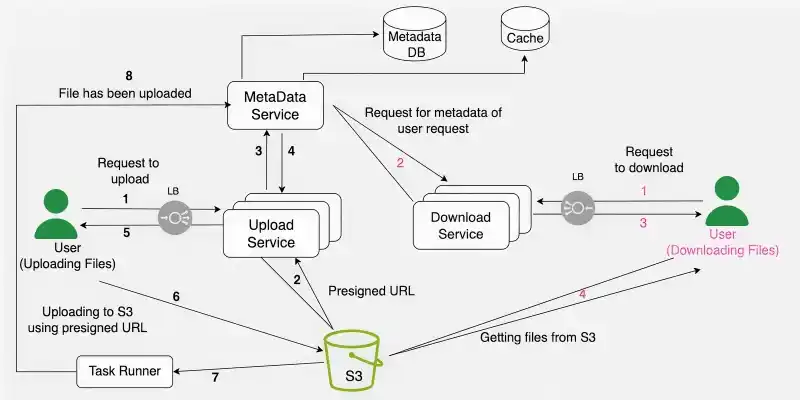
HLD
1. User Uploading
Users interact with the client application or web interface to initiate file uploads. The client application communicates with the Upload Service on the server side. Large files may be broken into smaller chunks for efficient transfer.
2. Upload Service
Receives file upload requests from clients. Generates Presigned URLs for S3 to allow clients to upload directly. Coordinates the upload process, ensuring data integrity and completeness. After successful upload, it updates the Metadata Database with file details. Coordinates the upload process, breaking down large files into manageable chunks if necessary.
3. Getting Presigned URL
The client application requests a Presigned URL from the Upload Service. The server generates the Presigned URL by interacting with the S3 service, creating a unique token for the specific upload operation. These URLs grant temporary, secure access to upload a specific file to a designated S3 bucket. Allows clients to bypass the server for direct communication with the storage layer.
4. S3 Bucket
S3 serves as the scalable and durable storage backend. Presigned URLs allow clients to upload directly to S3, minimizing server involvement in the actual file transfer. The bucket structure may organize files based on user accounts and metadata.
5. Metadata Database
Stores metadata associated with each file, including details like name, size, owner, access permissions, and timestamps. Enables quick retrieval of file details without accessing S3. Ensures that file metadata is consistent with the actual content in S3.
6. Uploading to S3 using Presigned URL and Metadata
The client uses the Presigned URL to upload the file directly to the designated S3 bucket. Metadata associated with the file, such as file name and owner, is included in the upload process. This ensures that the file's metadata is synchronized with its corresponding data in S3.
7. Role of Task Runner
After the file is successfully uploaded to S3, a task runner process is triggered. The task runner communicates with the Metadata Database to update or perform additional tasks related to the uploaded file. This may include updating file status, triggering indexing for search functionality, or sending notifications.
8. Downloading Services
Clients initiate file download requests through the client application. The Download Service queries the Metadata Database for file details. The server's Download Service retrieves metadata from the Metadata Database. Metadata includes information such as file name, size, owner, and access permissions.
4. Low-Level Design(LLD)
A lot of people assume designing a Dropbox is that all they just need to do is to use some cloud services, upload the file, and download the file whenever they want but that's not how it works. The core problem is "Where and how to save the files? ". Suppose you want to share a file that can be of any size (small or big) and you upload it into the cloud.
Everything is fine till here but later if you have to make an update in your file then it's not a good idea to edit the file and upload the whole file again and again into the cloud. The reason is:
**1. High Bandwidth and Storage Usage: Maintaining file history requires storing multiple versions of the same file. Even small changes force the system to re-upload the entire file, leading to unnecessary bandwidth consumption and increased cloud storage usage.
**2. Increased Latency: Uploading the entire file for minor updates increases the time required for each operation. This results in higher latency and slower user experience.
**3. Poor Concurrency Utilization: Since files are uploaded as a whole, it is difficult to leverage parallelism. The system cannot efficiently use multi-threading or multi-processing to upload or download file parts concurrently.
**Solution this problem:
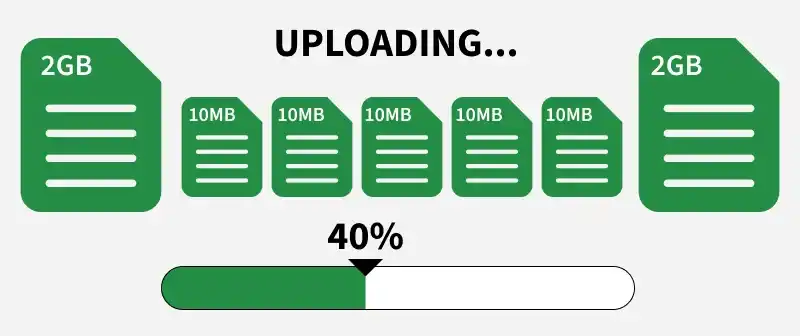
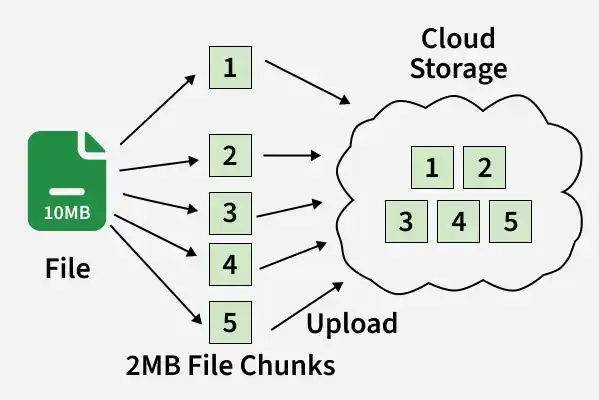
We can break the files into multiple chunks to overcome the problem we discussed above. There is no need to upload/download the whole single file after making any changes in the file.
- You just need to save the chunk which is updated (this will take less memory and time). It will be easier to keep the different versions of the files in various chunks.
- We have considered one file which is divided into various chunks. If there are multiple files then we need to know which chunks belong to which file.
- To keep this information we will create one more file named a metadata file. This file contains the indexes of the chunks (chunk names and order information).
- You need to mention the hash of the chunks (or some reference) in this metadata file and you need to sync this file into the cloud. We can download the metadata file from the cloud whenever we want and we can recreate the file using various chunks.
Various components for the complete low level design solution of the Dropbox.
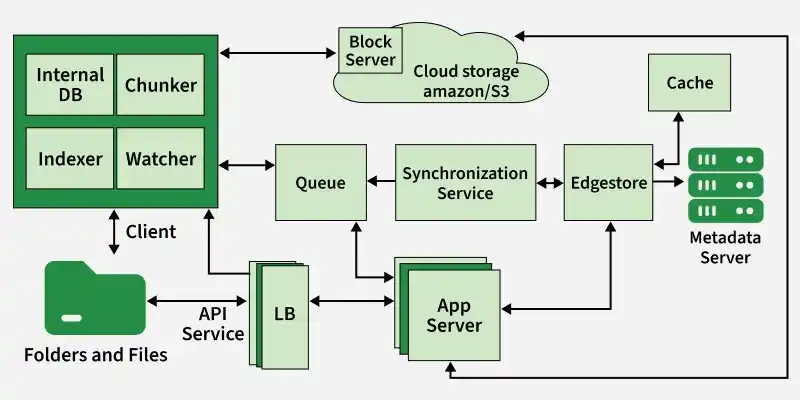
Assume we have a client installed on our computer (an app installed on your computer) and this client has 4 basic components. These basic components are Watcher, Chunker, Indexer, and Internal DB. We have considered only one client but there can be multiple clients belonging to the same user with the same basic components.
- The client is responsible for uploading/downloading the files, identifying the file changes in the sync folder, and handling conflicts due to offline or concurrent updates.
- The client is actively monitoring the folders for all the updates or changes happening in the files.
- To handle file metadata updates (e.g. file name, size, modification date, etc.) this client interacts with the Messaging services and Synchronization Service.
- It also interacts with remote cloud storage (Amazon S3 or any other cloud services) to store the actual files and to provide folder synchronization.
1. Client Components
These components run on the user’s device and handle file monitoring, processing, and synchronization with the cloud.
- **Watcher: Monitors the sync folder for any changes like create, update, or delete. It notifies other components whenever a change is detected.
- **Chunker: Breaks files into smaller pieces called chunks and uploads them with unique IDs (hashes). It only updates modified chunks, reducing bandwidth, sync time, and storage usage.
- **Indexer: Updates the internal database when changes are detected. It stores chunk details (like URLs and hashes) and keeps track of file versions and modifications.
- **Message Queue Communication: The indexer communicates with the synchronization service using a message queue after successfully uploading chunks.
- **Internal Database: Stores metadata about files, chunks, versions, and their locations in the system.
2. Metadata Database
The metadata database maintains the indexes of the various chunks. The information contains files/chunks names, and their different versions along with the information of users and workspace.
- You can use RDBMS or NoSQL but make sure that you meet the data consistency property because multiple clients will be working on the same file.
- With RDBMS there is no problem with the consistency but with NoSQL, you will get eventual consistency.
Lets understand how we can efficientlt do relational database scaling
**Relational Database Scaling:
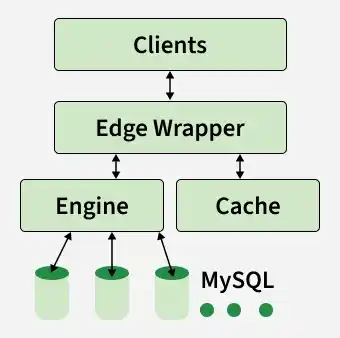
Relational databases like MySQL may face scalability challenges as the data and traffic grow.
- Scaling can be achieved using techniques such as vertical scaling (increasing hardware capabilities) or horizontal scaling (adding more machines).
- However, horizontal scaling for relational databases often involves complexities, especially in scenarios with high read and write operations.
**Database Sharding:
Database sharding is a horizontal partitioning technique where a large database is divided into smaller, more manageable parts called shards.
- Each shard is essentially a separate database instance that can be distributed across different servers or even different geographic locations.
- Sharding helps distribute the load, improve query performance, and enhance scalability.
**Challenges with Database Sharding:
Managing multiple shards can become complex, especially when updates or new information needs to be added. Coordinating transactions across shards can be challenging. Maintenance, backup, and recovery operations become more intricate.
Edge Wrapper:
An edge wrapper is an abstraction layer that sits between the application and the sharded databases.
- It acts as an intermediary, providing a unified interface for the application to interact with the database system.
- The edge wrapper encapsulates the complexities of managing multiple shards and provides a simplified interface to the application.
**Object-Relational Mapping (ORM):
ORM is a programming technique that allows data to be seamlessly converted between the relational database format and the application's object-oriented format.
- It maps database tables to application objects, providing a convenient way to interact with the database using programming language constructs.
- ORM helps abstract away the intricacies of SQL queries and database schema, making it easier for developers to work with databases.
**Edge Wrapper and ORM:
The edge wrapper integrates ORM functionality to provide a convenient interface for the application to interact with sharded databases.
- It handles tasks like routing queries to the appropriate shard, managing transactions across shards, and abstracting the underlying complexities of database sharding.
- ORM, within the edge wrapper, enables the application to interact with the database using high-level programming constructs, reducing the need for developers to write complex SQL queries.
- This combination of edge wrapper and ORM simplifies database management, making it easier to scale the application horizontally with sharded databases while maintaining a cohesive and developer-friendly interface.
3. Message Queuing Service
The messaging service queue will be responsible for the asynchronous communication between the clients and the synchronization service.
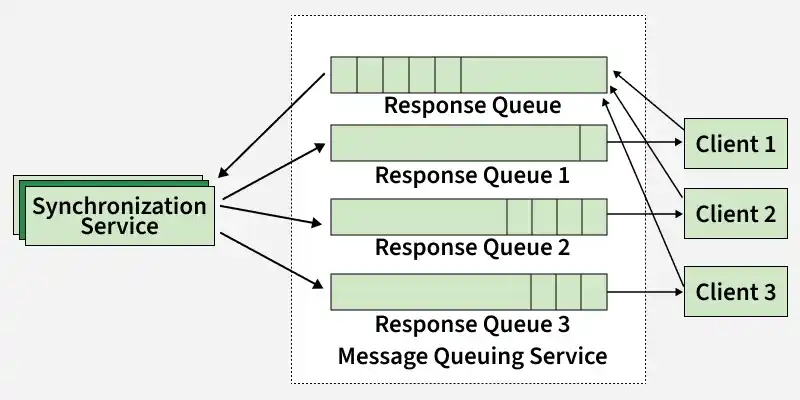
Below are the main requirements of the Message Queuing Service.
- Ability to handle a high volume of read and write requests
- Store large numbers of messages with high availability and reliability
- Ensure high performance and scalability
- Provide load balancing and elasticity for multiple Synchronization Service instances
There will be two types of messaging queues in the service.
**1. Request Queue (Global Queue)
A single shared queue used by all clients to send updates. Whenever a client makes changes (file upload, update, delete), it pushes a message to this queue. The Synchronization Service consumes these messages and updates the Metadata Database accordingly.
**2. Response Queue (Per-Client Queue)
Each client has its own dedicated response queue. After processing updates, the Synchronization Service broadcasts changes to all relevant clients through their respective queues.
- Ensures every client receives updates independently
- Messages are not lost even if a client is temporarily offline
- Once a client consumes a message, it is removed from its queue
- Separate queues are required so multiple clients can receive the same update reliably
4. Synchronization Service
The Synchronization Service ensures that all clients stay consistent with the latest file updates across the system.
- It acts as a bridge between clients, messaging queues, and the Metadata Database.
- It consumes update requests from the Request Queue and applies changes to the Metadata Database.
- After processing, it broadcasts updates to other clients through their respective Response Queues.
- Other clients receive these updates and fetch the latest file chunks from cloud storage to rebuild updated files.
- It also keeps the client’s local state in sync with the Metadata Database.
- If a client is offline, it can fetch missed updates (poll or sync) once it reconnects.
5. Cloud Storage
Cloud storage is used to store the actual file data (chunks) uploaded by users in a scalable and durable manner.
- Services like Amazon S3 can be used as the storage backend.
- Files are split into smaller chunks and stored as objects in cloud storage.
- Clients interact directly with the storage layer (via APIs or presigned URLs) for upload and download operations.
- This reduces load on backend servers and improves system scalability.
- Cloud storage ensures high availability, durability, and fault tolerance for user data.
5. Database Design for Dropbox System Design
To understand Database design one should understand
- Each user must have at-least one device.
- Each device will have at-least one object (file or folder). Once user registers, we create a root folder for him/her making sure he/she has at-least one object.
- Each object may have chunks. Only files can have chunk, folders can’t have chunks.
- Each object may be shared with one or multiple users. This mapping is maintained in AccessControlList.
We need the following tables to store our data:
1. Users
Users `
{ user_id(PK) name email password last_login_at created_at updated_at }
`
2. Devices
Devices `
{ device_id(PK) user_id(FK) created_at updated_at }
`
3. Objects
Objects `
{ object_id(PK) device_id(PK,FK) object_type parent_object_id name created_at updated_at }
`
4. Chunks
Chunks `
{ chunks_id(PK) object_id(PK,FK) url created_at updated_at }
`
5. AccessControlList
AccessControlList `
{ user_id(PK,FK1) object_id(PK,FK2) created_at update_at }
`
6. API Design for Dropbox System Design
APIs define how clients interact with the system to perform operations like upload, download, synchronization, and file management in a scalable way.
1. Download Chunk
This API would be used to download the chunk of a file.
Request `
GET /api/v1/chunks/:chunk_id X-API-Key: api_key Authorization: auth_token
Response
200 OK Content-Disposition: attachment; filename="" Content-Length: 4096000
`
The response will contain Content-Disposition header as attachment which will instruct the client to download the chunk. Note that Content-Length is set as 4096000 as each chunk is of 4 MB.
2. Upload Chunk
This API would be used to upload the chunk of a file.
Request `
POST /api/v1/chunks/:chunk_id X-API-Key: api_key Authorization: auth_token Content-Type: application/octet-stream /path/to/chunk
Response
200 OK
`
3. Get Objects
This API would be used by clients to query Meta Service for new files/folders when they come online. Client will pass the maximum object id present locally and the unique device id.
Request `
GET /api/v1/objects?local_object_id=&device_id= X-API-Key: api_key Authorization: auth_token
Response
200 OK { new_objects: [ { object_id: object_type: name: chunk_ids: [ chunk1, chunk2, chunk3 ] } ] }
`
Meta Service will check the database and return an array of objects containing name of object, object id, object type and an array of chunk_ids. Client calls the Download Chunk API with these chunk_ids to download the chunks and reconstruct the file.
7. Scalability for Dropbox System Design
To handle growing users and data efficiently, Dropbox uses multiple techniques to scale its system.
- **Horizontal Scaling:To handle increasing load, we can add more servers behind the load balancer. Each service can scale independently, allowing the system to handle more requests without affecting other services. This approach is called horizontal scaling.
- **Database Sharding: The metadata database is sharded based on
object_id. A hash function maps eachobject_idto a specific database server where its metadata is stored. When querying for an object, the service uses the same hash function to locate the correct shard. This distributes the database load across multiple servers, improving performance and scalability. - **Cache Sharding: The cache is also distributed across multiple servers, similar to database sharding. For example, Redis supports partitioning data across instances. Using consistent hashing ensures that the load is evenly distributed, and the system can handle node failures without major impact.